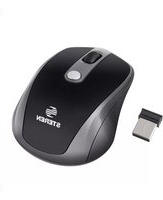
COM-5714BL - Mouse Steren - Free user manual and instructions
Find the device manual for free COM-5714BL Steren in PDF.


Pick your language and provide your email: we'll send you a specifically translated version.
| Type | Wired Optical Mouse |
| Model | COM-5714BL |
| Brand | Steren |
| Color | Blue |
| Connection | USB 2.0 Wired |
| Cable Length | 1.5 m (5 ft) |
| Sensor Type | Optical |
| Resolution | 1000 DPI |
| Number of Buttons | 3 (Left, Right, Scroll Wheel) |
| Scroll Wheel | Yes, with click |
| Weight | 100 g |
| Dimensions (L x W x H) | 120 x 65 x 38 mm |
| Compatible Operating Systems | Windows, macOS, Linux |
| Power Supply | Powered via USB (no batteries required) |
| Maintenance | Clean with a soft, dry cloth; avoid liquids |
| Safety Precautions | Do not expose to moisture; avoid pulling cable forcefully |
| Spare Parts Availability | Not available; device is non-repairable |
| General Information | Plug and play; no driver installation required |
Frequently Asked Questions - COM-5714BL Steren
Does this mouse require any driver installation?
No, the COM-5714BL is plug-and-play. It uses standard USB HID drivers that are already included in most operating systems like Windows, macOS, and Linux.
Is the mouse wired or wireless?
It is a wired mouse with a USB cable. No batteries needed.
What is the DPI of the mouse?
The mouse has a fixed 1000 DPI optical sensor, suitable for everyday tasks.
Can I use this mouse with a Mac?
Yes, the mouse is compatible with macOS (and most other operating systems) through the USB port.
How do I clean the mouse?
Use a soft, dry cloth to wipe the surface. Avoid using water or cleaning chemicals. For the sensor, gently blow away dust.
What is the cable length?
The USB cable is 1.5 meters (5 feet) long, providing flexibility for desktop setups.
Does the mouse have extra buttons?
It has 3 basic buttons: left, right, and a clickable scroll wheel. No additional side buttons.
Is the mouse suitable for gaming?
This mouse is designed for general office and home use. It is not optimized for gaming due to its fixed DPI and basic buttons.
What should I do if the cursor is not moving?
First, check that the USB connection is secure. Try plugging it into a different USB port. If the issue persists, restart your computer.
Where can I find the user manual?
The manual can be downloaded for free from the notice-facile.com website or the official Steren support page.
User questions about COM-5714BL Steren
0 question about this device. Answer the ones you know or ask your own.
Ask a new question about this device
No questions yet. Be the first to ask one.
Download the instructions for your Mouse in PDF format for free! Find your manual COM-5714BL - Steren and take your electronic device back in hand. On this page are published all the documents necessary for the use of your device. COM-5714BL by Steren.
USER MANUAL COM-5714BL Steren


Manual assistant
Powered by Anthropic
Waiting for your message
Product information
Brand : Steren
Model : COM-5714BL
Category : Mouse