ET-ELT30 - Projector accessory PANASONIC - Free user manual and instructions
Find the device manual for free ET-ELT30 PANASONIC in PDF.


Pick your language and provide your email: we'll send you a specifically translated version.
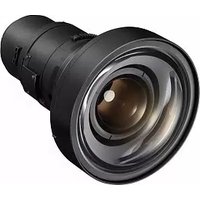
| Product Type | Projector Lens (Accessory) |
| Brand | Panasonic |
| Model | ET-ELT30 |
| Compatibility | Panasonic projectors with PT-DZ series and compatible bayonet mount |
| Lens Type | Zoom lens |
| Focal Length | Approx. 12.8–16.4 mm |
| F-number | f/1.7–f/2.4 |
| Zoom Ratio | 1.3x |
| Optical Coating | Multi-layer anti-reflective coated glass |
| Diameter | Approx. 145 mm |
| Length | Approx. 200 mm |
| Weight | Approx. 1.1 kg |
| Mount Type | Bayonet mount for quick installation |
| Colour | Black |
| Material | Aluminium body with high-grade plastic components |
| Maintenance | Clean with soft dry cloth; use blower for dust removal |
| Safety Warning | Never look directly into the projector light source through the lens |
| Spare Parts & Repairability | Not user-serviceable – refer to authorised Panasonic service centres |
| General Information | Designed for professional projection applications, delivering sharp and bright images |
Frequently Asked Questions - ET-ELT30 PANASONIC
How do I install the ET-ELT30 lens on my Panasonic projector?
To install the ET-ELT30 lens, first ensure the projector is turned off and the light source is cool. Align the lens with the bayonet mount on the projector, then rotate it clockwise until it locks into place. Push gently to confirm a secure fit. Never force the lens – if it does not lock easily, realign and try again.
Which projectors are compatible with the Panasonic ET-ELT30?
The ET-ELT30 is designed for Panasonic PT-DZ series projectors and other models using the same bayonet lens mount. Check your projector's user manual or the compatible lens list on Panasonic's official website to confirm compatibility before installation.
Can the ET-ELT30 be used to adjust projection distance?
Yes, the ET-ELT30 is a zoom lens, which allows you to adjust the projected image size and focus without moving the projector. The zoom ring changes the focal length, while the focus ring sharpens the image. For best results, adjust zoom first, then focus.
How should I clean the ET-ELT30 lens?
Use a soft, dry, lint-free cloth to gently wipe the lens surface in a circular motion. For stubborn dust, use a camera blower first to remove particles, then clean with a lens cleaning solution if necessary. Avoid using abrasive materials or excessive pressure to prevent scratches.
Is the ET-ELT30 a zoom lens or a fixed lens?
The ET-ELT30 is a zoom lens with a 1.3x zoom ratio. This provides flexibility in positioning the projector relative to the screen, allowing you to fill a wider range of screen sizes without moving the unit.
Can I use this lens on a non-Panasonic projector?
The lens uses a proprietary bayonet mount designed specifically for Panasonic projectors. It is not recommended for use with other brands due to differences in flange distance and mount design. Using it on non-Panasonic equipment may cause image quality issues or damage.
What is the main function of the ET-ELT30 lens?
The primary function is to focus and project the image from the projector onto a screen. It uses high-quality multi-layer coated optics to ensure brightness, sharpness, and accurate color reproduction, making it ideal for professional presentations and events.
Does the ET-ELT30 come with a manufacturer's warranty?
Yes, the ET-ELT30 is covered by Panasonic's standard warranty, typically for one year from the date of purchase. The warranty covers manufacturing defects but not damage caused by misuse or unauthorized modifications. Always keep your original receipt as proof of purchase.
How do I adjust the focus and zoom on the ET-ELT30?
The lens is equipped with two rings: the zoom ring (usually the rear ring) and the focus ring (usually the front ring). Rotate the zoom ring to adjust image size, then rotate the focus ring until the image is sharp. Some installations may require fine adjustments by slightly moving the projector and re-tuning.
What safety precautions should I take when using the ET-ELT30?
Always avoid direct eye exposure to the light beam emitted from the projector while the lens is in place. Do not disassemble the lens, as it contains no user-serviceable parts. Ensure the lens is properly mounted to prevent it from falling, and keep the lens away from heat sources and liquids.
User questions about ET-ELT30 PANASONIC
0 question about this device. Answer the ones you know or ask your own.
Ask a new question about this device
No questions yet. Be the first to ask one.
Download the instructions for your Projector accessory in PDF format for free! Find your manual ET-ELT30 - PANASONIC and take your electronic device back in hand. On this page are published all the documents necessary for the use of your device. ET-ELT30 by PANASONIC.
USER MANUAL ET-ELT30 PANASONIC


Manual assistant
Powered by Anthropic
Waiting for your message
Product information
Brand : PANASONIC
Model : ET-ELT30
Category : Projector accessory