PANASONIC ET-D3LEW50 - Projector accessory

ET-D3LEW50 - Projector accessory PANASONIC - Free user manual and instructions

Find the device manual for free ET-D3LEW50 PANASONIC in PDF.

📄 18 pages English EN Download 💬 AI Question 10 questions ⚙️ Specs
Notice PANASONIC ET-D3LEW50 - page 3
Pick your language and provide your email: we'll send you a specifically translated version.
Product Type Projection Lens (Fixed Focus)
Model Number ET-D3LEW50
F Value 2.5
Focal Length 14.8 mm
Dimensions (Width x Height) 160 mm x 160 mm
Supplied Accessories Lens cover (1 each)
Compatible Projectors PT-RQ32K, PT-RZ31K, PT-RS30K, PT-RZ21K, PT-RS20K, PT-RQ13K, PT-RZ12K, PT-RS11K, PT-DZ21K2, PT-DS20K2, PT-DW17K2, PT-DZ16K2, PT-DZ13K, PT-DS12K, PT-DW11K, PT-DZ10K
Peripheral Focus Adjustment Yes (for ET-D3LEW60 and ET-D3LEW50)
Lens Calibration Required Yes, after attachment
Lens Shift Range Standard projection position only; lens shift not recommended
Safety Warnings Do not look into light; turn off power before replacement; keep desiccant away from children
Cleaning Instructions Use clean, soft, dry cloth; avoid fluffy cloths with oil, water, or dust
Storage Store safely away from vibration or impacts; attach lens cover when not in use
Desiccant Warning Do not open bag; do not ingest; if contact occurs, rinse with water and seek medical attention
Documentation Operating instructions available for download

Frequently Asked Questions - ET-D3LEW50 PANASONIC

How do I attach the ET-D3LEW50 lens to the projector?
First, ensure the projector power is off and unplugged. Remove the lens hole cover by pressing the lens release button and turning counterclockwise. Align the orange marker on the lens with the marker on the projector (O to the left of 'LOCK'), then insert and turn clockwise until it clicks. Secure with the lens drop prevention screw. Finally, perform lens calibration.
Do I need to calibrate the lens after attaching it?
Yes, lens calibration is required after attaching the ET-D3LEW50. The procedure depends on the projector model and firmware version. For PT-RQ32K/RZ31K/RS30K (firmware 3.00+) and PT-RZ21K/RS20K (firmware 2.00+), navigate to [PROJECTOR SETUP] > [LENS] > [LENS CALIBRATION] and select [SHIFT/FOCUS/ZOOM]. For other compatible projectors, select [LENS CALIBRATION] and choose [NORMAL]. Follow on-screen prompts.
Which projectors are compatible with the ET-D3LEW50?
The ET-D3LEW50 is compatible with: PT-RQ32K, PT-RZ31K, PT-RS30K, PT-RZ21K, PT-RS20K, PT-RQ13K, PT-RZ12K, PT-RS11K, PT-DZ21K2, PT-DS20K2, PT-DW17K2, PT-DZ16K2, PT-DZ13K, PT-DS12K, PT-DW11K, and PT-DZ10K. Some projector models may require a minimum firmware version.
Can I use lens shift with the ET-D3LEW50?
For the ET-D3LEW50, it is recommended to use the standard projection position and not perform lens shift adjustment. The lens shift range is limited; moving the lens outside the adjustment ranges may alter focus.
How do I adjust the peripheral focus on the ET-D3LEW50?
First, align the focus of the center of the projected image using the projector. Loosen the lock knob by turning it counterclockwise. Turn the peripheral focus adjustment ring to align the focus of the peripheral areas. Tighten the lock knob clockwise. Screen sizes on the lens are approximate guides.
What safety precautions should I follow when using this lens?
Never look at or place skin into the light beam while the projector is on. Turn off power and unplug before lens replacement. Do not stand in front of the lens during use. Keep the desiccant bag away from children; do not ingest. Ensure the lens cover is removed before projection.
How should I clean the ET-D3LEW50 lens?
Use a clean, soft, dry cloth to wipe away dust and dirt. Do not use fluffy cloths containing oil, water, or dust. Avoid applying excessive pressure as the lens is easily damaged.
What should I do if the desiccant bag is damaged or ingested?
If the desiccant gets into your eyes or mouth, immediately rinse with plenty of water and seek medical attention. Keep desiccant out of the reach of children. Do not open the bag.
How do I remove the ET-D3LEW50 lens from the projector?
First, ensure power is off and unplugged. Remove the lens drop prevention screw with a Phillips screwdriver. While pressing the lens release button, turn the lens counterclockwise until the orange marker aligns with the marker on the projector. Pull the lens out. Store it safely and attach the lens hole cover if the projector will be transported.
Where can I download the user manual for the ET-D3LEW50?
The user manual is available for free download on notice-facile.com or the Panasonic website. The manual includes operating instructions, specifications, and safety information.

User questions about ET-D3LEW50 PANASONIC

0 question about this device. Answer the ones you know or ask your own.

Ask a new question about this device

The email remains private: it is only used to notify you if someone responds to your question.

No questions yet. Be the first to ask one.

Download the instructions for your Projector accessory in PDF format for free! Find your manual ET-D3LEW50 - PANASONIC and take your electronic device back in hand. On this page are published all the documents necessary for the use of your device. ET-D3LEW50 by PANASONIC.

USER MANUAL ET-D3LEW50 PANASONIC

Operating Instructions

Projection Lens

Commercial Use

Model No.

ET-D3LEW60

ET-D3LES20

ET-D3LET80

ET-D3LEW50
PANASONIC ET-D3LEW50 - Commercial Use - 1

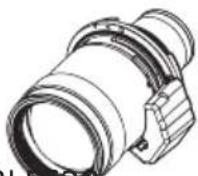
natural_image Technical line drawing of a cylindrical mechanical component (no text or symbols)

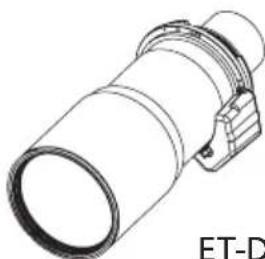
ET-D3LEW60 ET-D3LES20

PANASONIC ET-D3LEW50 - Commercial Use - 2

PANASONIC ET-D3LEW50 - Commercial Use - 3

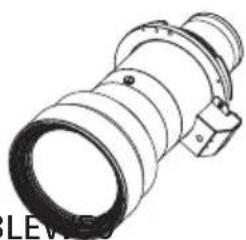
natural_image Technical line drawing of a cylindrical mechanical component with a flanged end (no text or symbols)

ET-D3LET80 ET-D3LEV

PANASONIC ET-D3LEW50 - Commercial Use - 4

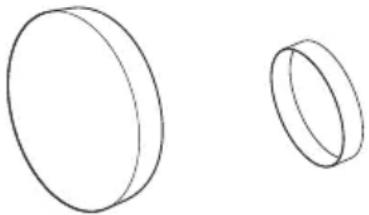
natural_image Technical line drawing of a mechanical component with no visible text or symbols

ENGLISH

Read before use

This document is intended for the various projection lenses that can be attached to and used in conjunction with Panasonic projectors.

For Model No. and model names, refer to the product list ( Page 4).

Thank you for purchasing this Panasonic product.

■o ensure correct use of this lens, please read the operating instructions supplied with the lens and the projector carefully.

■before using this product, be sure to read "Read this first!" (→Page 3).

■lease save this manual for future use.

PANASONIC ET-D3LEW50 - Read before use - 1

Contents

Read this first! ....3

Before Use....4

Attaching the Lens / Detaching the Lens....5

Before replacing the projection lens 5

Attaching the Lens....5

Peripheral focus adjustment function 7

Lens calibration 8

Removing the Lens 11

Projection relationships....12

Lens shift ranges....14

Specifications ....16

Dimensions....16

Projected image size and Projection distance......Appendix / Annexe / 付録 1

The "Appendix" can be found after the Japanese language section (日本語).

WARNING:

Do not look at or place your skin into the light emitted from the lens while the projector is being used.

Doing so can cause burns or loss of sight.

  • Strong light is emitted from the projector's lens. Do not look at or place your hands directly into this light.
    ● Turn off the power when moving away from the projection lens or projector.

Do not project an image with the lens cover attached.

- Doing so can cause fire.

CAUTION:

Before replacing the projection lens, be sure to turn off the power and disconnect the power plug from the wall outlet.

● Unexpected projection of light may cause injury to eyes.
● Replacing the projection lens without removing the power plug may result in electric shock.

Do not stand in front of the lens while the projector is being used.

Doing so can cause damage and burns to clothing.

- Strong light is emitted from the projector's lens.

Do not place objects in front of the lens while the projector is being used.

Doing so can cause fire, damage to the object, or malfunction of the lens and projector.

- Strong light is emitted from the projector's lens.

Do not open the desiccant bag. Do not eat the contents.

Inadvertently ingesting desiccant could be harmful.

- If the desiccant gets into your eyes or mouth, immediately rinse with plenty of water and seek medical attention.

- Keep desiccant out of the reach of children.

Before Use

Product list

The product names and model numbers of the projection lenses covered by this manual are as follows.

Product name MModel number Description
Zoom lens ET-D3LEW60 / ET-D3LES20ET-D3LET80Projection lens equipped with an EEPROM*1and stepping motor.
Fixed focus lensET-D3LEW50 Projection lens equipped with an EEPROM *1.

*1 EEPROM: Electrically erasable programmable read-only memory

■ Projectors supported by each projection lens

ET-D3LEW60 / ET-D3LES20 / ET-D3LET80

PT-RQ32K / PT-RZ31K / PT-RS30K / PT-RZ21K / PT-RS20K

ET-D3LEW50

PT-RQ32K / PT-RZ31K / PT-RS30K / PT-RZ21K / PT-RS20K / PT-RQ13K / PT-RZ12K / PT-RS11K / PT-DZ21K2 / PT-DS20K2 / PT-DW17K2 / PT-DZ16K2 / PT-DZ13K / PT-DS12K / PT-DW11K / PT-DZ10K

Note

  • Some of the alphabet letters at the end of projector model numbers may be omitted in this manual.
  • Models other than the above may also be supported. Refer to the operating instructions for your projector or the Panasonic website (https://panasonic.net/cns/projector/).
  • If the projector you are using is PT-RQ32K / PT-RZ31K / PT-RS30K / PT-RZ21K / PT-RS20K, you may not be able to use the ET-D3LEW60 / ET-D3LES20 / ET-D3LET80 / ET-D3LEW50 projection lens depending on main version of the firmware. If main version of the firmware is the version number shown below, update to the latest firmware before use.

- PT-RQ32K / PT-RZ31K / PT-RS30K: Earlier than 3.00

- PT-RZ21K / PT-RS20K: Earlier than 2.00

For details on the update procedure, refer to the latest firmware information on the Panasonic website (https://panasonic.net/cns/projector/pass/).

● The main version of the firmware can be checked in the [STATUS] screen.

■ Supplied Accessories

Make sure that the following has been provided.

Part name Appearance (quantity)
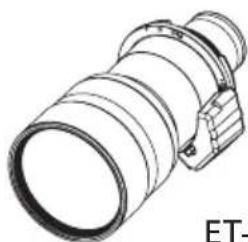
Lens coverPANASONIC ET-D3LEW50 - ■ Supplied Accessories - 1(The product is delivered with a lens cover attached.)1 each

Attaching the Lens / Detaching the Lens

Before replacing the projection lens

Return the projection lens to the home position before replacing or removing it.

For details on how to return the lens to the home position, refer to the operating instructions of the projector.

Attention

● Make sure that the projector power supply is switched off before attaching or detaching the projection lens.
● After removing the projection lens, store it safely away from vibration or impacts.
- Do not touch the electrical contacts of the projection lens with your fingers. Dust and dirt on the contacts may cause contact malfunctions, while static electricity may damage the unit.
- Do not touch the surface of the lens with bare hands. Finger prints and dirt on the surface of the lens will be magnified by the lens and lower the quality of the projected image. Place the supplied lens cover on the zoom lens when the projector is not in use.
● The lens is made of glass. The lens could be damaged if brought into contact with or rubbed against hard objects. Handle the lens carefully.
- Use a clean, soft and dry cloth to wipe away dust and dirt from the projection lens. Do not use fl uffy cloths containing oil, water or dust for cleaning. The lens is easily damaged, so do not apply excessive pressure when wiping it.

Attaching the Lens

Note

- If the lens hole cover is already removed, start from step 3.

The illustrations in this procedure depict attachment of the ET-D3LEW50 onto the PT-RZ21K.
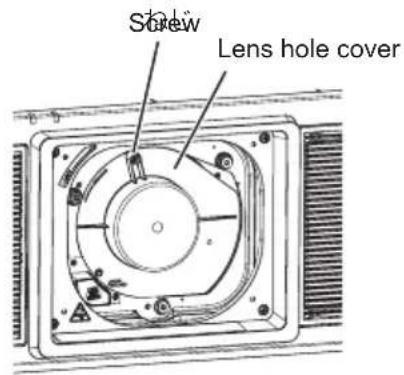
Screw Lens hole cover

1) Loosen the lens hole cover screw.

- Use a Phillips screwdriver to turn the lens hole cover screw counterclockwise until it is in its loosened state.
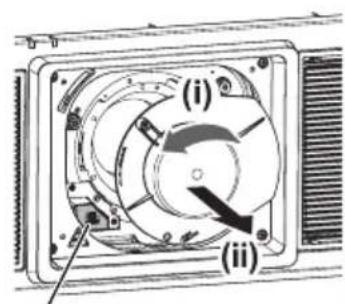
(i) (ii)

2) Remove the lens hole cover.

(i) While pressing the lens release button, turn the lens hole cover counterclockwise until its marker (O) aligns with the marker on the projector (O to the left of "LOCK"). (ii) Then remove the lens hole cover.

Attaching the Lens / Detaching the Lens (continued)
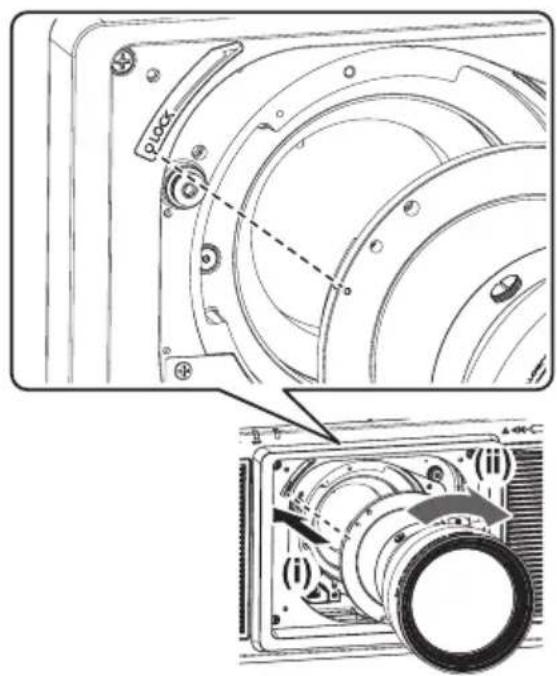
Technical diagram of a camera module with labeled parts and a zoomed-in view showing internal components.

3) (i) Insert the projection lens while aligning its marker (orange) with the marker on the projector (○ to the left of “LOCK”), and (ii) turn it clockwise until it clicks into place.
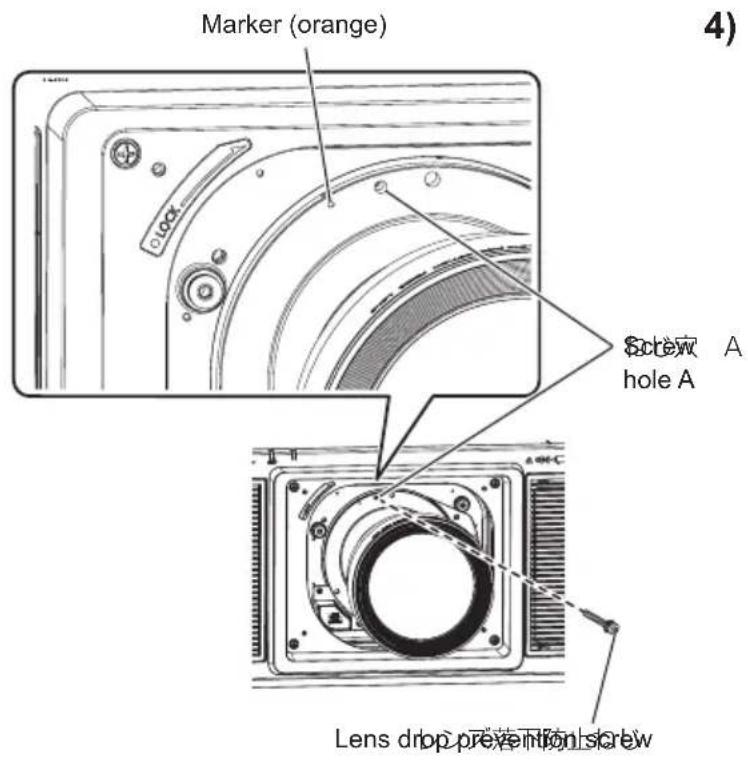
Marker (orange) Screw A hole A Lens drop prevention screw

4) Use the lens drop prevention screw supplied with the projector to secure the projection lens.

- Use a Phillips screwdriver to secure the screw in hole A to the right of the marker (orange) on the projection lens.

Attention

● Turn the projection lens counterclockwise, and verify that it is secure.
- Store the removed lens hole cover safely for future use.
● After attaching the projection lens, turn on the projector and perform lens calibration.
(→page 8)

6-ENGLISH

Attaching the Lens / Detaching the Lens (continued)

Peripheral focus adjustment function

When using the ET-D3LEW60 or ET-D3LEW50, the focus balance between the center of the projected image and the peripheral areas differs depending on the size of the image.

The ET-D3LEW60 and ET-D3LEW50 are equipped with a function for adjusting the peripheral focus.
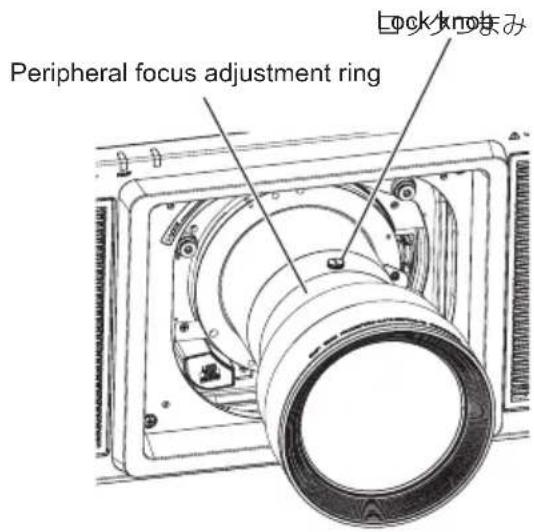
Peripheral focus adjustment ring Lock knob

The illustrations in this procedure depict attachment of the ET-D3LEW50 onto the PT-RZ21K.

■ Adjusting the focus

PANASONIC ET-D3LEW50 - ■ Adjusting the focus - 1

1) Operate the projector to align the focus of the center of the projected image.

2) Loosen the lock knob by turning it counterclockwise.
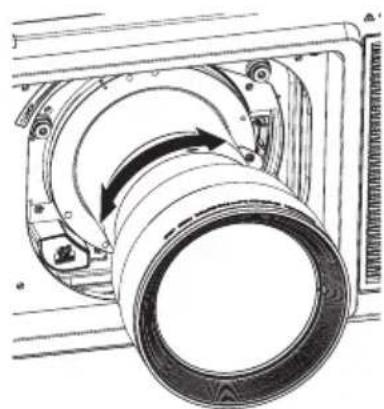
PANASONIC ET-D3LEW50 - ■ Adjusting the focus - 2

natural_image Technical line drawing of a mechanical assembly with a rotating component (no text or symbols)

3) Turn the peripheral focus adjustment ring in the directions of the arrows to align the focus of the peripheral areas of the image.
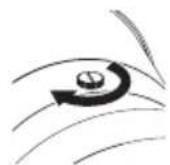
PANASONIC ET-D3LEW50 - ■ Adjusting the focus - 3

4) Tighten the lock knob by turning it clockwise.

Note

● The screen sizes displayed on the lens are approximate guides.

Attaching the Lens / Detaching the Lens (continued)

Lens calibration

Perform lens calibration after attaching the lens.

The lens calibration procedure differs depending on the projector you are using and the main version of the firmware.

● PT-RQ32K / PT-RZ31K / PT-RS30K: Main version is 3.00 or later
Refer to "Case 1" ( page 8).
● PT-RZ21K / PT-RS20K: Main version is 2.00 or later
Refer to "Case 1" (→ page 8).
● PT-RQ13K / PT-RZ12K / PT-RS11K / PT-DZ21K2 / PT-DS20K2 / PT-DW17K2 /
PT-DZ16K2 / PT-DZ13K / PT-DS12K / PT-DW11K / PT-DZ10K
Refer to "Case 2" (→ page 10). (Only ET-D3LEW50 is supported)

Case 1

● PT-RQ32K / PT-RZ31K / PT-RS30K (main version of the firmware is 3.00 or later)
● PT-RZ21K / PT-RS20K (main version of the firmware is 2.00 or later)
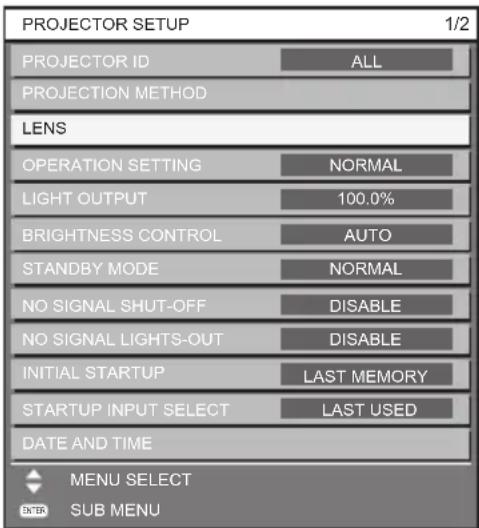
PROJECTOR SETUP 1/2 PROJECTOR ID ALL PROJECTION METHOD LENS OPERATION SETTING NORMAL LIGHT OUTPUT 100.0% BRIGHTNESS CONTROL AUTO STANDBY MODE NORMAL NO SIGNAL SHUT-OFF DISABLE NO SIGNAL LIGHTS-OUT DISABLE INITIAL STARTUP LAST MEMORY STARTUP INPUT SELECT LAST USED DATE AND TIME MENU SELECT SUB MENU

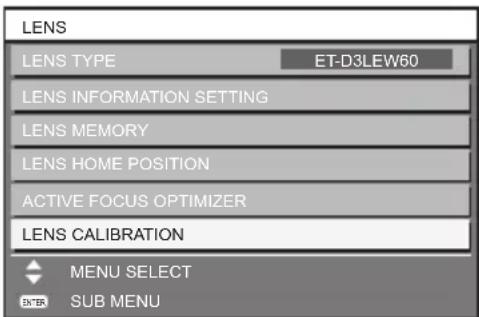
LENS LENS TYPE ET-D3LEW60 LENS INFORMATION SETTING LENS MEMORY LENS HOME POSITION ACTIVE FOCUS OPTIMIZER LENS CALIBRATION MENU SELECT SUB MENU

1) Press the

button.
2) Use the ▲ and ▼ buttons to select [PROJECTOR SETUP], and press the button.

● The [PROJECTOR SETUP] screen appears.

3) Use the ▲ and ▼ buttons to select [LENS], and press the button.

● The [LENS] screen appears.

4) Use the ▲ and ▼ buttons to select [LENS CALIBRATION], and press the button.

● The [LENS CALIBRATION] screen appears.
- When the ET-D3LEW50 is attached, a confirmation screen appears when the button is pressed. In such cases, proceed to step 6.

Attaching the Lens / Detaching the Lens (continued)

LENS CALIBRATION : ET-D3LEW60 SHIFT/FOCUS/ZOOM SHIFT/FOCUS ZOOM MENU SELECT EXECUTE

LENS CALIBRATION : ET-D3LEW60 Proceed LENS CALIBRATION, and return to HOME POSITION. OK CANCEL CHANGE EXECUTE

5) Use the ▲ and ▼ buttons to select [SHIFT/FOCUS/ZOOM], and press the button.

● The confirmation screen appears.

6) Use the ◀ and ▶ buttons to select [OK], and press the button.

● Lens calibration starts.

● The projection lens moves to the home position after adjustment range calibration is complete.

Note

- If lens calibration is not performed, the available zoom range will be narrowed.

Attaching the Lens / Detaching the Lens (continued)

Case 2

● PT-RQ13K / PT-RZ12K / PT-RS11K
● PT-DZ21K2 / PT-DS20K2 / PT-DW17K2 / PT-DZ16K2
● PT-DZ13K / PT-DS12K / PT-DW11K / PT-DZ10K

MAIN MENU PICTURE POSITION ADVANCED MENU DISPLAY LANGUAGE 3D SETTINGS DISPLAY OPTION PROJECTOR SETUP P IN P TEST PATTERN SIGNAL LIST SECURITY NETWORK MENU SELECT SUB MENU

PROJECTOR SETUP 2/3 INITIAL STARTUP LAST MEMORY STARTUP INPUT SELECT LAST USED DATE AND TIME TIME ZONE OFF RS-232C REMOTE2 MODE DEFAULT FUNCTION BUTTON LENS CALIBRATION NORMAL LENS MEMORY STATUS AC VOLTAGE MONITOR OFF SAVE ALL USER DATA CHANGEMENU SELECT EXECUTE

LENS CALIBRATION Proceed LENS CALIBRATION, and return to HOME POSITION. OK CANCEL CHANGE EXECUTE

1) Press the

button.
2) Use the ▲ and ▼ buttons to select [PROJECTOR SETUP], and press the button.
● The [PROJECTOR SETUP] screen appears.

3) Use the ▲ and ▼ buttons to select [LENS CALIBRATION].
4) Use the ◀ and ▶ buttons to select [NORMAL], and press the button.
● The confirmation screen appears.

5) Use the ◀ and ▶ buttons to select [OK], and press the button.

● Lens calibration starts.
● The projection lens moves to the home position after adjustment range calibration is complete.

Attaching the Lens / Detaching the Lens (continued)

Removing the Lens

Lens drop prevention screw

Lock Marker(Orange) (i) (ii) (iii) Lens Release Button

(ii) (i) Lens hole cover

Screw

Attention

  • Store the removed projection lens safely without subjecting it to vibration or impact.
  • Store the removed lens drop prevention screw safely for future use.

The illustrations in this procedure depict attachment of the ET-D3LEW50 onto the PT-RZ21K.

1) Remove the lens drop prevention screw.

- Use a Phillips screwdriver to remove the screw in first hole to the right of the marker (orange) on the projection lens.

2) (i) While pressing the lens release button, (ii) turn the projection lens counterclockwise, and (iii) remove it.

  • Turn the projection lens counterclockwise until its marker (orange) aligns with the marker on the projector (O to the left of "LOCK").
  • If you intend to transport or store the projector, proceed to step 3.

3) Attach the lens hole cover supplied with the projector.

(i) Insert the lens hole cover while aligning its marker (O) with the marker on the projector (O to the left of "LOCK"), and (ii) turn it clockwise until it clicks into place.

4) Secure the lens hole cover.

- Use a Phillips screwdriver to tighten the lens hole cover screw.

Projection relationships

The dimensional relationship between the screen and the projector is shown below.

■ Dimensional relationship diagram

Projected Image SH SD SW

Screen L (LW/LT) L1

SWSH L (LW/LT) Screen-UN L1

Note

● This diagram assumes that the size and position of the projected image will be adjusted so that the image fills the entire screen.
● This illustration is not drawn to scale.

L (LW / LT)1Projection distance
L1 Lens protrusion dimension
SH Projected image height
SW Projected image width
SD Projected image size

*1 LW: Minimum projection distance when using a zoom lens. LT: Maximum projection distance when using a zoom lens.

● L1 dimensions (approximate values) (Unit: m)

Projector modelLens modelPT-RQ32K / PT-RZ31K / PT-RS30KPT-RZ21K / PT-RS20KPT-RQ13K / PT-RZ12K / PT-RS11K / PT-DZ21K2 / PT-DS20K2 / PT-DW17K2 / PT-DZ16K2 / PT-DZ13K / PT-DS12K / PT-DW11K / PT-DZ10K
ET-D3LEW60 0.1820.212 -
ET-D3LES20 0.0910.121 -
ET-D3LET80 0.2240.254 -
ET-D3LEW50 0.1730.2030.203

Note

● The illustrations of projectors in this manual are for informational purposes only and do not represent a specific projector model. Configurations may vary with the model.

Attention

● To prevent obstruction of the intake and exhaust vents, install the projector with a clearance at least 500 mm (1 ft. 7 in.) from walls and objects.
If you are installing the projector in a sealed space, be sure to provide additional air conditioning equipment and ventilation equipment. Insufficient ventilation will result in an accumulation of heat and may activate the projector's protection circuit.
- Avoid setting up in places which are subject to sudden temperature changes, such as near an air conditioner or lighting equipment (studio lamps, etc.).

12-ENGLISH

Projection relationships (continued)

■ Dimensional relationship

For details on the projection distance (L), refer to “Projected image size and Projection distance” and “Projection distance formulas” in the Appendix.

Lens shift ranges

After moving the lens to the home position according to “Lens calibration” on page 8, you can use the position of the projected image at that position (i.e., the standard projection position) as a basis, and use the lens shift adjustment function on the projector to adjust the position of the projected image within the respective lens shift ranges.

Perform lens shift adjustment within the ranges shown in the following illustrations.

Moving the lens outside of the adjustment ranges may alter the focus.

ET-D3LEW60

PT-RQ32KPANASONIC ET-D3LEW50 - Lens shift ranges - 1
PT-RZ31K / PT-RZ21KPANASONIC ET-D3LEW50 - Lens shift ranges - 2
PT-RS30K / PT-RS20KPANASONIC ET-D3LEW50 - Lens shift ranges - 3

Lens shift ranges (continued)

  • ET-D3LES20 / ET-D3LET80
PT-RQ32KPANASONIC ET-D3LEW50 - Lens shift ranges (continued) - 1
PT-RZ31K / PT-RZ21KPANASONIC ET-D3LEW50 - Lens shift ranges (continued) - 2
PT-RS30K / PT-RS20KPANASONIC ET-D3LEW50 - Lens shift ranges (continued) - 3

Note

● The home position of the projector a point of origin position for the lens shift (i.e., vertical and horizontal positions of the lens) based on the results of lens calibration. It is not the optical center position of the screen.
- For the ET-D3LEW50, use the standard projection position, and do not perform lens shift adjustment.

Specifications

Check the specifications of each projection lens, and use the appropriate lens for your intended use.

Lens model ET-D3LEW60 ET-D3LES20ET-D3LET80 ET-D3LEW50
Lens type Zoom lensZoom lens Zoom lens Fixed focus lens
F value 2.5 2.5 2.5 to2.7 2.5
Focal length (f) 19.6 to 23.5 mm 35.0 to50.9 mm 154 to 289 mm 14.8 mm
Dimensions*1Width160 mm (6-5/16") 154 mm (6-1/16") 154 mm (6-1/16") 160 mm (6-5/16")
Height160 mm (6-5/16") 154 mm (6-1/16") 154 mm (6-1/16") 160 mm (6-5/16")
Depth357 mm(16-1/16")265 mm(10-7/16")404 mm(15-29/32")
MassApprox. 8.7 kg(19.2 lb.)Approx. 5.2 kg(11.5 lb.)Approx. 8.5kg(18.7 lb.)

*1: Excluding protrusions.

Dimensions

(Unit: mm)

Model number Dimensions
ET-D3LEW60PANASONIC ET-D3LEW50 - Dimensions - 1
ET-D3LES20PANASONIC ET-D3LEW50 - Dimensions - 2

Dimensions(continued)

(Unit: mm)

Model number Dimensions
ET-D3LET80PANASONIC ET-D3LEW50 - Dimensions(continued) - 1
ET-D3LEW50PANASONIC ET-D3LEW50 - Dimensions(continued) - 2

Information for users in the European Union

Importer's name and address within the European Union

Panasonic Marketing Europe GmbH

Panasonic Testing Centre

Winsbergring 15, 22525 Hamburg, Germany

Disposal of Old Equipment

Only for European Union and countries with recycling systems

PANASONIC ET-D3LEW50 - Only for European Union and countries with recycling systems - 1

This symbol on the products, packaging, and/or accompanying documents means that used electrical and electronic products must not be mixed with general household waste.

For proper treatment, recovery and recycling of old products, please take them to applicable collection points in accordance with your national legislation.

By disposing of them correctly, you will help to save valuable resources and prevent any potential negative effects on human health and the environment.

For more information about collection and recycling, please contact your local municipality.

Penalties may be applicable for incorrect disposal of this waste, in accordance with national legislation.

Information on Disposal in other Countries outside the European Union

This symbol is only valid in the European Union.

If you wish to discard this product, please contact your local authorities or dealer and ask for the correct method of disposal.

Product Information (for Turkey only)

PANASONIC ET-D3LEW50 - Product Information (for Turkey only) - 1

AEEE Yönetmeliğine Uygundur.

Eski Ekipman ve Bataryaların İşlenmesi.

Sadece geri dönüşüm sistemleri olan Avrupa Birliği ve ülkeleri için geçerlidir.

Ürünler, ambalaj ve/veya ekli belgeler üzerindeki bu semboller kullanılmış elektrik ve elektronik ürünlerin genel ev atığı ile karıştırılmaması gerektiğini ifade eder.

Eski ürünlerin toplanması ve geri kazanılması için bu atıklar lütfen yasayla belirlenmiş olan uygun toplama merkezlerine teslim ediniz.

Bu atıkların doğru işlenmesiyle, değerli kaynakların korunmasına ve insan sağlığı ve çevreye olası negatif etkilerinin engellenmesine yardımcı olabilirsiniz.

Atıkların toplanması ve geri dönüşümü için detaylı bilgi için lütfen bağlı olduğunu yerel yönetimlerle iletişime geçiniz.

Atıkların atılmasıyla ilgili yanlış uygulamalar yasayla belirlenmiş olan cezalara sebebiyet verebilir.

Panasonic Corporation

Web Site : https://panasonic.net/cns/projector/

© Panasonic Corporation 2018

Panasonic System Communications Company of North America

5th Floor, Two Riverfront Plaza, Newark, NJ 07102-5490

TEL: (877) 803 - 8492

Panasonic Canada Inc.

5770 Ambler Drive, Mississauga, Ontario L4W 2T3

TEL: (905) 624 - 5010

Table of contents Click a title to access it
Manual assistant
Powered by Anthropic
Waiting for your message
Product information

Brand : PANASONIC

Model : ET-D3LEW50

Category : Projector accessory