D270 - Telephone SAGEMCOM - Free user manual and instructions
Find the device manual for free D270 SAGEMCOM in PDF.


Pick your language and provide your email: we'll send you a specifically translated version.
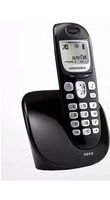
| Product Type | Cordless DECT telephone with base station and handset |
| Brand | Sagemcom |
| Model | D270 |
| Handset Dimensions | Approx. 160 × 50 × 28 mm |
| Base Station Dimensions | Approx. 105 × 90 × 55 mm |
| Weight | Handset approx. 120 g, base approx. 100 g |
| Power Supply | 230 V AC adapter for base, 2 × AAA Ni-MH rechargeable batteries in handset |
| Display | Backlit alphanumeric LCD with date, time and caller ID |
| Phonebook | Stores up to 100 names and numbers |
| Call Log | Last 50 incoming, outgoing and missed calls |
| Call Management | Caller ID, redial, mute, hold, volume control and ringer selection |
| Range | Up to 50 m indoors, up to 300 m outdoors |
| Handsets Supported | Expandable up to 5 handsets using GAP standard |
| Audio Features | Hands-free speakerphone with adjustable loudspeaker volume |
| Standards | DECT GAP compatible works with most analog and VoIP gateways |
| Care and Cleaning | Wipe with a soft dry cloth; do not use liquids, sprays or solvents |
| Safety | Intended for indoor use; avoid water, humidity, heat sources and direct sunlight |
| Spare Parts | Replacement batteries and AC adapters available; battery compartment accessible for user replacement |
| Repairability | Designed with detachable components and standard screws for professional repair |
Frequently Asked Questions - D270 SAGEMCOM
How do I register a new handset to the D270 base?
Press the paging/registration button on the base and then open the handset menu to select Register. Enter the base PIN, usually 0000, and wait for the confirmation tone.
Can I use this cordless phone with a VoIP line?
Yes, the Sagemcom D270 uses the DECT GAP standard and has a standard phone jack. Connect the base to a phone wall socket or to an analog terminal adapter supplied by your VoIP provider.
How do I change the ring melody?
Go to the handset Menu, choose Tone/ Sound Settings, then select Ring Melody. Pick from the available built-in melodies and confirm with the OK button.
What is the battery life and talk time?
The D270 uses two AAA Ni-MH rechargeable batteries. In typical use, it offers up to 10 hours of talk time and up to 100 hours of standby time. Actual performance depends on distance from the base and battery condition.
How can I improve the wireless range?
Place the base station in a central location, away from large metal objects, microwaves and walls. The D270 has a range of approximately 50 m indoors and 300 m outdoors in open space.
Does the D270 display the caller's name?
When connected to a network offering Caller Line Identification, the display shows the number and, if sent by your operator, the caller's name. You can also browse the call log of the last 50 calls.
How do I use the intercom between two handsets?
If you have at least two handsets registered, press the Intercom softkey on either handset, then select the target handset number. The call remains internal and does not use your line.
How do I set the date and time?
Open the Menu and select Settings, then choose Date & Time. Enter the current values using the keypad and confirm. Date and time are used for the call log and can be updated automatically by the network if available.
How should I clean and maintain the telephone?
Unplug the base and remove the handset batteries. Clean the surfaces with a soft dry cloth. Do not use alcohol, ammonia or abrasive products. Keep the phone away from moisture and heat.
What should I do if there is no dial tone?
Check that the telephone cord is firmly connected to the wall jack and the base. Confirm the base is powered and the handset shows registration to the base. Move closer to the base, or re-register the handset using its Registration menu.
User questions about D270 SAGEMCOM
0 question about this device. Answer the ones you know or ask your own.
Ask a new question about this device
No questions yet. Be the first to ask one.
Download the instructions for your Telephone in PDF format for free! Find your manual D270 - SAGEMCOM and take your electronic device back in hand. On this page are published all the documents necessary for the use of your device. D270 by SAGEMCOM.
USER MANUAL D270 SAGEMCOM

Manual assistant
Powered by Anthropic
Waiting for your message
Product information
Brand : SAGEMCOM
Model : D270
Category : Telephone