KDC-W3544WY - Car Radio KENWOOD - Free user manual and instructions
Find the device manual for free KDC-W3544WY KENWOOD in PDF.


Pick your language and provide your email: we'll send you a specifically translated version.
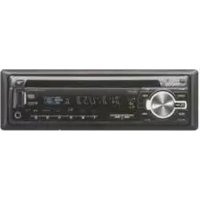
| Product Type | Car Radio / CD Receiver |
| Brand | Kenwood |
| Model | KDC-W3544WY |
| Chassis Size | 1-DIN (standard size) |
| Maximum Power Output | 50 watts x 4 channels |
| Built-in Amplifier | Yes, 4-channel amplifier |
| Display | Multi-colour LCD with illumination |
| Tuner Bands | FM and AM (FM1/FM2/FM3/AM1/AM2) |
| Preset Stations | 18 FM and 12 AM presets |
| CD Playback | Yes, plays CD, CD-R, CD-RW |
| MP3/WMA Playback | Yes, compatible with MP3 and WMA files |
| Equalizer | 3-band tone control with several preset curves |
| Audio Controls | Bass, treble, balance and fader |
| Detachable Face | Yes, removable faceplate with carry case |
| Auxiliary Input | Front 3.5 mm stereo auxiliary input |
| Dimensions (W x H x D) | 182 x 53 x 160 mm |
| Weight | 1.1 kg |
| Power Supply | 12 V DC (negative ground) |
| Installation | ISO-mounting compatible |
| Security | Detachable face panel for theft prevention |
Frequently Asked Questions - KDC-W3544WY KENWOOD
How do I remove the detachable face panel?
To remove the faceplate, press the release button at the top left corner and lift the panel off. Store it in the supplied carrying case to protect the contacts. Never force the panel if it does not release.
What audio formats can the KDC-W3544WY play?
The CD player supports standard CDs, CD-R and CD-RW discs, along with MP3 and WMA files burned onto recordable media. Ensure the disc is finalised for playback.
How do I tune in FM and AM stations?
Use the SRC button to select tuner mode. Press BAND to switch between FM1, FM2, FM3 and AM bands. Use the SEEK/TRACK knob to search for stations automatically or manual tune with the control dial.
Why is there no sound coming from my speakers?
Check the volume level and ensure attenuation is not active. Verify speaker connections and that the fader/balance settings are not set to one extreme. Also confirm the mute function is off.
Can I connect my portable music player to the radio?
Yes, the radio has a front auxiliary input (3.5 mm jack). Connect your device and repeatedly press the SRC button until AUX is displayed.
How do I set the clock?
Press and hold the DISP button. Then use the control dial to set the hour and minute. Press the dial to confirm. Note: Clock display appears when the unit is off.
What should I do if the CD disc is not playing?
Make sure the disc is inserted with the printed side up. Check if the disc is scratched or dirty. Clean the disc gently from the centre outward. If the radio is in a high moisture environment, wait for condensation to evaporate.
How do I reset the unit?
Press the reset button located on the front panel (usually behind the faceplate) using a pointed object. This restores factory settings and clears any electronic fault.
Can the faceplate be replaced?
Yes, replacement faceplates are available as spare parts. Contact any authorised Kenwood dealer for a replacement, and always handle the flexible connector with care.
How to clean the device?
Use a soft, dry cloth to wipe the front panel and display. Do not use solvents, alcohol, or abrasive cleaners, as they may damage the surface finish or the LCD screen.
User questions about KDC-W3544WY KENWOOD
0 question about this device. Answer the ones you know or ask your own.
Ask a new question about this device
No questions yet. Be the first to ask one.
Download the instructions for your Car Radio in PDF format for free! Find your manual KDC-W3544WY - KENWOOD and take your electronic device back in hand. On this page are published all the documents necessary for the use of your device. KDC-W3544WY by KENWOOD.
USER MANUAL KDC-W3544WY KENWOOD

Manual assistant
Powered by Anthropic
Waiting for your message
Product information
Brand : KENWOOD
Model : KDC-W3544WY
Category : Car Radio