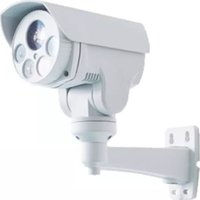
TC-1012WF - Security Camera TECNO - Free user manual and instructions
Find the device manual for free TC-1012WF TECNO in PDF.


Pick your language and provide your email: we'll send you a specifically translated version.
| Product Type | WiFi Security Camera |
| Brand | Tecno |
| Model | TC-1012WF |
| Connectivity | WiFi 2.4GHz |
| Video Resolution | 1080p Full HD |
| Night Vision | Infrared up to 10 meters |
| Motion Detection | Smart motion alerts via app |
| Two-Way Audio | Built-in microphone and speaker |
| Storage | MicroSD card slot (up to 128GB) |
| Power Supply | 5V/1A DC adapter (included) |
| Dimensions (H x W x D) | 10.5 cm x 7.2 cm x 6.8 cm |
| Weight | 240 g |
| Mounting | Free-standing or wall-mountable |
| Mobile App | Compatible with Tecno Home (iOS/Android) |
| Field of View | 120° wide angle |
| Audio Alerts | Audible siren in app |
| Maintenance | Wipe lens with dry soft cloth |
| Cleaning | Do not use liquids; unplug before cleaning |
| Safety Warnings | Indoor use only; avoid moisture and heat sources |
| Spare Parts | Replacement stand and power adapter available |
| Repairability | Battery and lens module replaceable by technician |
| General Info | Complies with CE and RoHS standards |
Frequently Asked Questions - TC-1012WF TECNO
How do I connect the camera to my Wi-Fi network?
Download the Tecno Home app, create an account, and follow the in-app instructions. Make sure your Wi-Fi is 2.4GHz and the camera is in pairing mode.
Can I reset the camera to factory settings?
Yes, press and hold the reset button on the back of the camera for about 5 seconds until you hear a beep. The camera will reboot and enter pairing mode.
How do I view recorded footage?
Open the Tecno Home app, select your camera, and tap the Playback option. You can view recordings saved on the microSD card or cloud storage (if enabled).
Does the camera support night vision?
Yes, it has built-in infrared LEDs that automatically switch on in low light, providing black-and-white night vision up to 10 meters.
Can I talk to someone through the camera?
Absolutely. The camera features two-way audio with a microphone and speaker, allowing you to listen and speak through the app.
How do I enable motion detection alerts?
In the app, go to camera settings and enable Motion Detection. You will receive push notifications when movement is detected.
What is the maximum microSD card size supported?
The camera supports microSD cards up to 128GB. Insert the card into the slot before using local recording.
Can I use this camera outdoors?
No, this model is designed for indoor use only. Do not expose it to rain or excessive moisture.
What power supply does the camera need?
The camera comes with a 5V/1A DC adapter. Use only the included adapter to avoid damage.
How do I clean the camera lens?
Use a soft, dry cloth to gently wipe the lens. Do not use any liquids or sprays; unplug the camera before cleaning.
User questions about TC-1012WF TECNO
0 question about this device. Answer the ones you know or ask your own.
Ask a new question about this device
No questions yet. Be the first to ask one.
Download the instructions for your Security Camera in PDF format for free! Find your manual TC-1012WF - TECNO and take your electronic device back in hand. On this page are published all the documents necessary for the use of your device. TC-1012WF by TECNO.
USER MANUAL TC-1012WF TECNO


Manual assistant
Powered by Anthropic
Waiting for your message
Product information
Brand : TECNO
Model : TC-1012WF
Category : Security Camera