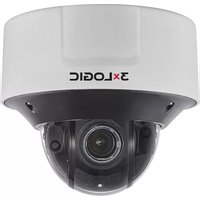
VX-2V-MD-RIWH - Security Camera 3xLOGIC - Free user manual and instructions
Find the device manual for free VX-2V-MD-RIWH 3xLOGIC in PDF.


Pick your language and provide your email: we'll send you a specifically translated version.
| Type of product | Security camera (IP) |
| Brand | 3xLOGIC |
| Model | VX-2V-MD-RIWH |
| Image resolution | 2 MP (1920 x 1080) |
| Sensor | 1/2.8" CMOS |
| Lens type | Fixed focal, 3.6 mm |
| Night vision | IR LEDs, range up to 30 meters |
| Video compression | H.264, MJPEG |
| Power supply | PoE (IEEE 802.3af) or 12 V DC |
| Dimensions | Ø 70 mm x 120 mm |
| Weight | 350 g |
| Housing rating | IP66 weatherproof |
| Temperature range | -35 °C to 50 °C |
| Storage slot | MicroSD up to 128 GB |
| Network interface | 10/100 Ethernet RJ-45 |
| Main functions | Motion detection, remote live viewing, two-way audio |
| Cleaning | Wipe with a soft dry cloth; avoid harsh chemicals |
| Maintenance | Periodic check of cables and lens cleanliness |
| Security features | Password-protected access, secure data transmission |
| Spare parts | Mounting bracket, lens, IR board available |
| Storage and operating | Plug and play with NVR software |
Frequently Asked Questions - VX-2V-MD-RIWH 3xLOGIC
How to restore factory settings on the VX-2V-MD-RIWH?
Press and hold the reset button for 10 seconds while the camera is powered. The camera will reboot to default. Ensure you reconfigure the network settings afterward.
Can this camera be used outdoors?
Yes, it has an IP66-rated housing, making it resistant to rain and dust. It is designed for outdoor surveillance.
What power options are available?
The camera supports Power over Ethernet (PoE) IEEE 802.3af and 12V DC. Use a PoE switch or an injector for simplified cabling.
How do I access the camera remotely?
Connect the camera to your network and assign an IP address. Use the 3xLOGIC viewer software or mobile app to log in with your credentials and view the stream from anywhere.
Does the camera support audio?
Yes, it has built-in microphone and speaker allowing two-way audio communication.
How can I clean the lens correctly?
Use a soft, dry microfiber cloth to gently wipe the lens. Avoid alcohol or abrasive cleaners, which may damage the coating.
Is there an SD card slot for local storage?
Yes, it supports microSD cards up to 128 GB. Insert the card in the slot and configure recording in the camera menu.
What is the night vision range?
The integrated IR LEDs allow the camera to capture clear video in total darkness up to a distance of 30 meters.
Can I connect it to existing NVR systems?
Yes, it supports standard ONVIF protocol, ensuring compatibility with most major NVR software and hardware.
How to update the firmware?
Download the latest firmware from the 3xLOGIC support website, log into the camera web interface, and upload the file under the maintenance/firmware section. Do not disconnect power during the update.
User questions about VX-2V-MD-RIWH 3xLOGIC
0 question about this device. Answer the ones you know or ask your own.
Ask a new question about this device
No questions yet. Be the first to ask one.
Download the instructions for your Security Camera in PDF format for free! Find your manual VX-2V-MD-RIWH - 3xLOGIC and take your electronic device back in hand. On this page are published all the documents necessary for the use of your device. VX-2V-MD-RIWH by 3xLOGIC.
USER MANUAL VX-2V-MD-RIWH 3xLOGIC
Manual assistant
Powered by Anthropic
Waiting for your message
Product information
Brand : 3xLOGIC
Model : VX-2V-MD-RIWH
Category : Security Camera