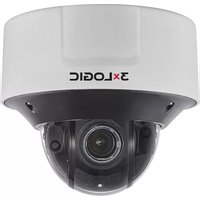
VX-6M-360-IA-02 - Security Camera 3xLOGIC - Free user manual and instructions
Find the device manual for free VX-6M-360-IA-02 3xLOGIC in PDF.


Pick your language and provide your email: we'll send you a specifically translated version.
| Product Type | IP Security Camera |
| Brand | 3xLOGIC |
| Model | VX-6M-360-IA-02 |
| Resolution | 6 MP (3072 x 2048) |
| Lens Type | 360° panoramic fisheye lens |
| Field of View | 360° horizontal, 180° vertical |
| Day/Night Functionality | Yes, with IR-cut filter |
| Infrared Range | Up to 15 m |
| Power Supply | Power over Ethernet (PoE) IEEE 802.3af |
| Power Consumption | < 12.95 W |
| Dimensions | Ø 150 mm x 50 mm (dome) |
| Weight | 0.5 kg |
| Operating Temperature | -10°C to 50°C |
| Storage Temperature | -20°C to 60°C |
| Ingress Protection | IP67 |
| Video Compression | H.265, H.264 |
| Audio | Built-in microphone |
| Analytics | Intelligent video analytics (IA) – motion detection, line crossing, tampering |
| Storage | MicroSD card slot (up to 256 GB), NAS, NVR |
| Network Protocols | ONVIF, RTSP, IPv4/IPv6, HTTP, HTTPS |
| Warranty | 3 years |
| Included Accessories | Mounting kit, power adapter (if non-PoE) |
Frequently Asked Questions - VX-6M-360-IA-02 3xLOGIC
How do I install the VX-6M-360-IA-02 camera?
Mount the camera to a ceiling or wall using the included bracket. Connect an Ethernet cable for power and data (PoE). Use the 3xLOGIC configuration tool or web interface to set up network parameters and adjust the field of view.
What software is required to view the camera feed?
You can use 3xLOGIC's VMS (Video Management System) or any ONVIF-compatible software. The camera also provides a direct web browser interface via its IP address.
Can I use this camera outdoors?
Yes, the camera has an IP67 rating, meaning it is dust-tight and can withstand water immersion up to 1 meter for 30 minutes. It is suitable for outdoor use in varied weather conditions.
How do I reset the camera to factory defaults?
Press and hold the reset button (located near the cable connector) for 10 seconds using a paperclip. The camera will reboot with default settings. Alternatively, perform a reset via the web interface.
What are the storage options for recorded video?
The camera supports local storage via a MicroSD card (up to 256 GB). It can also stream to a network video recorder (NVR) or NAS using ONVIF or RTSP protocols.
Does the camera support audio recording?
Yes, it has a built-in microphone for audio capture. Audio can be recorded synchronously with video and transmitted over the network. External audio input is not available.
How do I clean the camera lens?
Use a soft, lint-free cloth slightly dampened with water or a mild glass cleaner. Avoid abrasive materials. Gently wipe the dome in a circular motion. Do not spray liquid directly onto the camera.
What is the maximum number of users that can view the camera simultaneously?
The camera supports up to 10 simultaneous live streams. For higher user loads, use a video management system that distributes the streams.
Can I set up motion detection zones?
Yes, via the web interface or VMS, you can define up to 4 configurable motion detection zones. The camera's Intelligent Analytics can also detect line crossing, tampering, and loitering.
What should I do if the camera is not connecting to the network?
Check the Ethernet cable connection and ensure your switch provides PoE (or use the included power adapter). Verify that the camera's IP address is correctly set (default DHCP). Use the 3xLOGIC Discovery Tool to locate the camera on the network.
User questions about VX-6M-360-IA-02 3xLOGIC
0 question about this device. Answer the ones you know or ask your own.
Ask a new question about this device
No questions yet. Be the first to ask one.
Download the instructions for your Security Camera in PDF format for free! Find your manual VX-6M-360-IA-02 - 3xLOGIC and take your electronic device back in hand. On this page are published all the documents necessary for the use of your device. VX-6M-360-IA-02 by 3xLOGIC.
USER MANUAL VX-6M-360-IA-02 3xLOGIC
Manual assistant
Powered by Anthropic
Waiting for your message
Product information
Brand : 3xLOGIC
Model : VX-6M-360-IA-02
Category : Security Camera