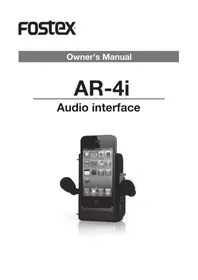
AR-4i - Soundcard FOSTEX - Free user manual and instructions
Find the device manual for free AR-4i FOSTEX in PDF.


| Product Type | Audio interface (sound card) for recording and playback |
| Compatibility | iOS devices (iPhone, iPad) and computers with USB connectivity |
| Connectivity | Lightning connector and USB 2.0 port |
| Channel Count | 4 input / 4 output channels |
| Sample Rate | Up to 96 kHz with 24-bit resolution |
| Analog Inputs | 2 combo XLR-1/4" inputs with preamps |
| Analog Outputs | 2 balanced 1/4" line outputs |
| Headphone Output | 1/4" stereo headphone jack with dedicated volume control |
| Phantom Power | 48V switchable per channel |
| Power Supply | Bus-powered via Lightning or USB connection |
| Dimensions (W x H x D) | 170 mm x 45 mm x 120 mm |
| Weight | 450 g |
| Main Functions | Multi-channel recording, playback, monitoring and mixing |
| Controls | Input gain knobs, master volume, monitor mix control |
| LED Indicators | Power, signal and clip status LEDs |
| Mounting Options | Desk stand or mounting holes for studio rack |
| Included Accessories | USB cable and user manual |
| Maintenance and Cleaning | Wipe the exterior with a soft, dry cloth; avoid liquids and solvents |
| Safety Precautions | Use the device in a dry environment; do not expose to rain or extreme temperatures |
| Spare Parts and Repairability | Contact qualified service center for repairs; no user-serviceable parts inside |
| General Information | Designed for mobile recording and production with Apple devices and computers |
Frequently Asked Questions - AR-4i FOSTEX
User questions about AR-4i FOSTEX
0 question about this device. Answer the ones you know or ask your own.
Ask a new question about this device
Download the instructions for your Soundcard in PDF format for free! Find your manual AR-4i - FOSTEX and take your electronic device back in hand. On this page are published all the documents necessary for the use of your device. AR-4i by FOSTEX.
USER MANUAL AR-4i FOSTEX
CAUTION
RISK OF ELECTRIC SHOCK DO NOT OPEN

CAUTION: TO REDUCE THE RISK OF ELECTRIC SHOCK,
DO NOT REMOVE COVER (OR BACK).
NO USER - SERVICEABLE PARTS INSIDE.
REFER SERVICING TO QUALIFIED SERVICE PERSONNEL.
The lightning flash with arrowhead symbol, within an equilateral triangle, is intended to alert the user to the presence of uninsulated “dangerous voltage” within the product’s enclosure that may be of sufficient magnitude to constitute a risk of electric shock to persons.

The exclamation point within an equilateral triangle is intended to alert the user to the presence of important operating and maintenance (servicing) instructions in the literature accompanying the appliance.
"WARNING"
"TO REDUCE THE RISK OF FIRE OR ELECTRIC SHOCK, DO NOT EXPOSE THIS APPLIANCE TO RAIN OR MOISTURE."
SAFETY INSTRUCTIONS
1) Read these instructions.
2) Keep these instructions.
3) Heed all warnings.
4) Follow all instructions.
5) Do not use this apparatus near water.
6) Clean only with dry cloth.
7) Do not block any ventilation openings.
Install in accordance with the manufacturer's instructions.
8) Do not install near any heat sources such as radiators, heat registers, stoves, or other apparatus (including amplifiers) that produce heat.
9) Do not defeat the safety purpose of the polarized or grounding-type plug. A polarized plug has two blades with one wider than the other. A grounding type plug has two blades and a third grounding prong. The wide blade or the third prong are provided for your safety. If the provided plug does not fit into your outlet, consult an electrician for replacement of the obsolete outlet.
10) Protect the power cord from being walked on or pinched particularly at plugs, convenience receptacles, and the point where they exit from the apparatus.
11) Only use attachments/accessories specified by the manufacturer.
12) Use only with the cart, stand, tripod, bracket, or table specified by the manufacturer, or sold with the apparatus. When a cart is used, use caution when moving the cart/apparatus combination to avoid injury from tip-over.

13) Unplug this apparatus during lightning storms or when unused for long periods of time.
14) Refer all servicing to qualified service personnel. Servicing is required when the apparatus has been damaged in any way, such as power-supply cord or plug is damaged, liquid has been spilled or objects have fallen into the apparatus, the apparatus has been exposed to rain or moisture, does not operate normally, or has been dropped.
15) Excessive sound pressure from earphones and headphones can cause hearing loss.
FCC (U.S.A.) & ICES-003 (Canada) INFORMATION
1. IMPORTANT NOTICE
This product, when installed as indicated in the instructions contained in this manual, meets FCC and ICES-003 requirements. Changes or modifications not expressly approved by Fostex Company for compliance could void the user's authority to operate the equipment. DO NOT MODIFY THIS PRODUCT.
2. IMPORTANT
In order to comply with FCC and ICES-003 requirements, use high quality shielded cables for connection to accessories and / or another products. If any cables are supplied with this product, they MUST be used. Follow all installation instructions. Failure to do so could void your FCC / ICES-003 authorization to use this product in the USA / Canada.
3. NOTE
This equipment has been tested and found to comply with the limits for a Class B digital device, pursuant to Part 15 of the FCC Rules. These limits are designed to provide reasonable protection against harmful interference in a residential installation. This equipment generates, uses and can radiate radio frequency energy and, if not installed and used in accordance with instructions, may cause harmful interference to radio communications. However, there is no guarantee that interference will not occur in a particular installation. If this equipment does cause harmful interference to radio or television reception, which can be determined by turning the equipment off and on, the user is encouraged to correct the interference by one or more of the following measures:
- Reorient or relocate the receiving antenna.
- Increase the separation between the equipment and receiver.
- Connect the equipment into an outlet on a circuit different from that to which the receiver is connected.
-
Consult the dealer or an experienced radio/TV technician for help.
-
Compliance with Part 15 of FCC Rules and Canadian ICES-003.
This device complies with Part 15 of the FCC Rules. Operation is subject to the following two conditions: (1) This device may not cause harmful interference, and (2) this device must accept any interference received, including interference that many cause undesired operation.
This Class B digital apparatus complies with Cana - dian ICES-003.
Thank you very much for purchasing the Fostex AR-4i audio interface unit for iPhone 4.
The AR-4i is the best solution to improve audio quality of iPhone video recording and streaming.
For details about iOS applications for the AR-4i, see the Fostex website (http://www.fostex.com).
Fostex is not responsible for any damages of the unit or the iPhone 4 caused by dropping down.
Main features
- You can make high quality audio recordings in stereo by using the high-performance supplied microphones or external microphones.
* Note that depending on the iOS application for the AR-4i, recording may be made in mono. - You can control the audio input level.
- You can monitor the audio recording condition via LED metering as well as headphones.
- Tripod or mono pod ready vertically or horizontally for stable recording.
Supplied accessories
The following are supplied with the AR-4i.
- Microphones x 2
- AAA batteries x 2
- Mono pod x 1
- Pouch x 1
- Owner's manual (this manual) x 1
After purchasing the AR-4i, check that all accessories are included in the package.
Specifications
- Supplied power voltage for a plug in microphone: 2.5 V
• USB power voltage: 5 V - External dimensions: 70 (W) x 106 (H) x 50 (D) mm
- Weight: 200 g
* Specifications and appearance are subject to change without notice for product improvement.
* "Made for iPhone," means that an electronic accessory has been designed to connect specifically to iPhone, and has been certified by the developer to meet Apple performance standards. Apple is not responsible for the operation of this device or its compliance with safety and regulatory standards. Please note that the use of this accessory with iPhone may affect wireless performance.
* iPhone is a trademark of Apple Inc., registered in the U.S. and other countries.
Features and controls
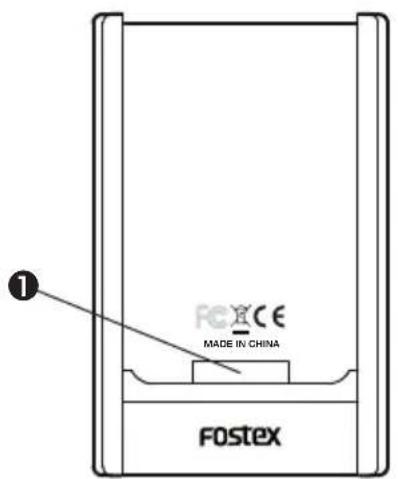
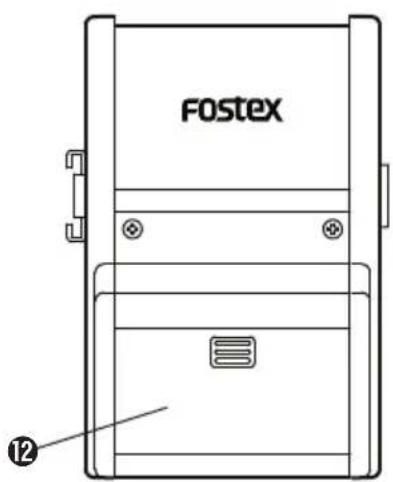
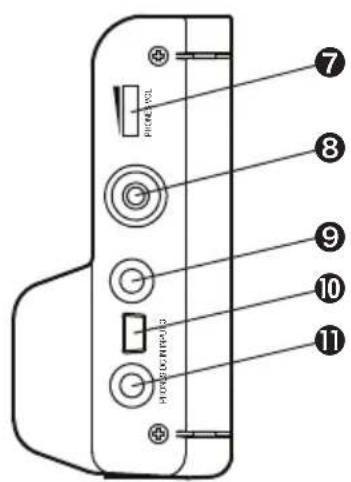
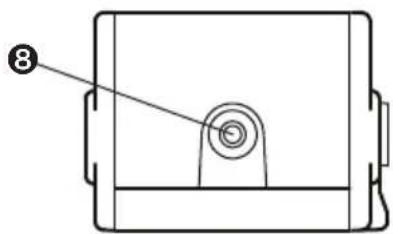
① Dock connector
Used for setting the iPhone 4.
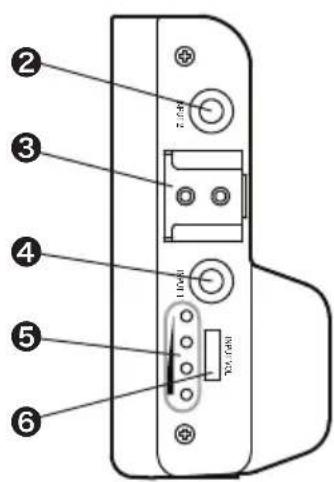
② [INPUT 2] jack (mini jack)
Connects the supplied microphone, a general plug-in powered microphone, or a line level source to this jack.
Using an iOS application, you can select stereo or mono recording. By default, this jack is for the left channel source of stereo recording.
③ Camera accessory shoe
Used for mounting a microphone for a camera.
④ [INPUT 1] jack (mini jack)
Connects the supplied microphone, a general plug-in powered microphone, or a line level source to this jack.
Using an iOS application, you can select stereo or mono recording. By default, this jack is for the right channel source of stereo recording.
⑤ LED indicators
Four LED indicators show the audio signal level as well as the unit's system status.
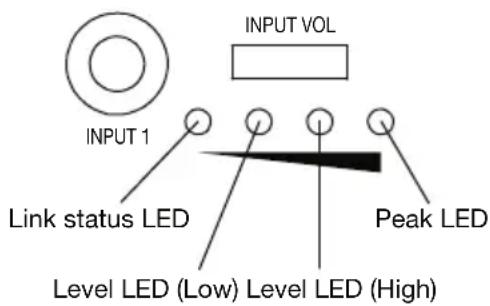
In the normal condition
According to the audio input level currently being received from the [INPUT 1] through [INPUT 3] jacks, the appropriate LEDs are lit.
- When the receiving signal is relatively low: The Level LED (low) is lit.
- When the receiving signal is relatively high: The Level LED (high) is lit.
- When the receiving signal is too high: The Peak LED is lit.
When the battery voltage is too low
The Peak LED flashes.
If a proper power supply is connected to the [DC-IN] jack, the LEDs returns to show the input audio condition as above.
When an error occurs
The Peak LED quickly flashes.
When the unit is recognized by the iPhone 4 The Link status LED is lit.
When the iPhone 4 audio is preferentially being output from the [PHONES] jack.
The Link status LED quickly flashes.
⑥ [INPUT VOL] control
Adjusts the audio input levels of the [INPUT 1] through [INPUT 3] jacks.
⑦ [PHONES VOL] control
Controls the monitor level of headphones connected to the [PHONES] jack.
⑧ Mounting holes for mono pod/tripod
Used for mounting the supplied mono pod or a tri-pod for a compact camera.
Two mounting holes are available on the bottom and the side panel. Use either hole according to whether the unit is used vertically or horizontally.
⑨ [INPUT 3] jack (mini jack)
Connects the supplied microphone, a general plug-in powered microphone, or a line level source to this jack.
Using an iOS application, you can select stereo or mono recording. By default, this jack is for the left channel source of stereo recording.
Note that when both the [INPUT 2] and [INPUT 3] jacks are connected to audio sources, the [INPUT 2] jack takes priority over the [INPUT 3] jack and the audio connected to the [INPUT 3] jack is disabled.
⑩ [DC IN] jack(mini USB port)
By connecting a external USB battery or personal computer using a USB cable, the unit receives external power.
The power received by the [DC IN] jack is used for the unit operation as well as iPhone 4 battery charge. (Note that the unit is not charged.)
⑪ [PHONES] jack
By connecting a stereo headphones, you can monitor the input signal, as well as playback audio of the iPhone 4.
⑫ Battery compartment
Press down and slide the cover off, and insert two AAA batteries in the correct direction.
This compartment also acts as a grip that serves for stable holding.
Declaration of EC Directive
This equipment is compatible with the EMC Directive (2004/108/EC) - Directive on approximation of member nation's ordinance concerning the electromagnetic compatibility and with the Low Voltage Directive (73/23/EEC) - Directive on approximation of member nation's ordinance concerning electric equipment designed to be used within the specified voltage range.
The Affect of Immunity on This Equipment
The affect of the European Specification EN61000-6-1 (coexistence of electromagnetic waves - common immunity specification) on this equipment are as shown below.
In the electrical fast transient/burst requirements, surge, conducted disturbances by radio-frequency fields, power frequency magnetic field, radiate electromagnetic field requirements and static electricity discharging environment, this could be affected by generation of noise in some cases.
FOSTEX DISTRIBUTORS LIST IN EUROPE
* Including non-EU countries (as of July 2011)
NAME: Mega Audio GmbH
ADD: Stromberger Str. 32, D-55411 Bingen, Germany
TEL: (+49) 6721-94330, FAX: (+49) 6721-32046
NAME: General Audio
ADD: P. O. Box 22, FIN-02631 Espoo, Finland
TEL: (+358) 9-5259330, FAX: (+358) 9-52593352
NAME: Sennheiser France
ADD: 128 bis, avenue Jean-Jaures, 94851 Ivry-sur-Seine Cedex,
France
TEL: (+33) 1 4987 0300, FAX: (+33) 1 4987 0324
NAME: Mega Audio GmbH
ADD: Stromberger Str. 32, D-55411 Bingen, Germany
TEL: (+49) 6721-94330, FAX: (+49) 6721-32046
NAME: Bon Studio S. A.
ADD: 6 Zaimi Street, Exarchia, 106.83 Athens, Greece
TEL: (+30) 210-3809-605, 606, 607, 608
FAX: (+30) 210-3845-755, 210-3827-868
NAME: ATEC Hungary Kft
ADD: H-110/ Budapest, Fogado u. 3, Hungary
TEL: (+36) 1-4319005, FAX: (+36) 1-4319006
NAME: I. D. elrf. electronic Ltd.
ADD: ARMULA 38 108 REYKJAVIK, ICELAND
TEL: (+354) 588 5010, FAX: (+354) 588 5011
NAME: Proel S. p. A.
ADD: Zona Via Alla Ruenia, 37/43 64027 - Sant'Omero (Teramo), Italy
TEL: (+39) 0861-81241, FAX: (+39) 0861-887862
NAME: IEMKE ROOS AUDIO B. V.
ADD: Kuiperbergweg 20, 1101 AG Amsterdam, The Netherlands
TEL: (+31) 20-697-2121, FAX: (+31) 20-697-4201
NAME: Siv. Ing. Benum AS
ADD: P. O. Box 145, Vinderen, 0319 Oslo, Norway
TEL: (+47) 2213 9900, FAX: (+47) 2214 8259
NAME: Mega Music Spolka z o.o
ADD: Ul. Lesna 15, 81-876 Sopot, Poland
TEL: (+48) 58-551-18-82, FAX: (+48) 58-551-18-72
NAME: Letusa S. A.
ADD: C/Laguna 10, 28923 Alcorcon, Madrid, Spain
TEL: (+34) 91-4862800, 91-4470898, FAX: (+34) 91-6414597
NAME: Benum Nordic A/S
ADD: Aldermansvagen 17, 171 48 Solna, Sweden
TEL: (+46) 8 207710
NAME: Audio Bauer Pro AG
ADD: Bernerstrasse-Nord 182, CH-8064 Zurich, Switzerland
TEL: (+41) 1-4323230, FAX: (+41) 1-4326558
NAME: SCV London
ADD: 40 Chigwell Lane, Oakwood Hill Industrial Estate, Loughton, Essex IG10 3NY U. K.
TEL: (+44) 20-8418-0778, FAX: (+44) 20-8418-0624



- CAUTION
- WARNING
- SAFETY INSTRUCTIONS
- FCC (U.S.A.) & ICES-003 (CANADA) INFORMATION
- IMPORTANT NOTICE
- IMPORTANT
- NOTE
- MAIN FEATURES
- SUPPLIED ACCESSORIES
- SPECIFICATIONS
- FEATURES AND CONTROLS
- ① DOCK CONNECTOR
- ② [INPUT 2] JACK (MINI JACK)
- ③ CAMERA ACCESSORY SHOE
- ④ [INPUT 1] JACK (MINI JACK)
- ⑤ LED INDICATORS
- IN THE NORMAL CONDITION
- WHEN THE BATTERY VOLTAGE IS TOO LOW
- WHEN AN ERROR OCCURS
- WHEN THE IPHONE 4 AUDIO IS PREFERENTIALLY BEING OUTPUT FROM THE [PHONES] JACK
- ⑥ [INPUT VOL] CONTROL
- ⑦ [PHONES VOL] CONTROL
- ⑧ MOUNTING HOLES FOR MONO POD/TRIPOD
- ⑨ [INPUT 3] JACK (MINI JACK)
- ⑩ [DC IN] JACK(MINI USB PORT)
- ⑪ [PHONES] JACK
- ⑫ BATTERY COMPARTMENT
- DECLARATION OF EC DIRECTIVE
- THE AFFECT OF IMMUNITY ON THIS EQUIPMENT
- FOSTEX DISTRIBUTORS LIST IN EUROPE
Brand : FOSTEX
Model : AR-4i
Category : Soundcard