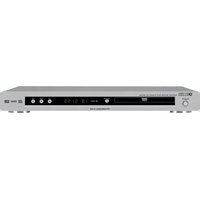
DV-C6860 - DVD player YAMAHA - Free user manual and instructions
Find the device manual for free DV-C6860 YAMAHA in PDF.


Pick your language and provide your email: we'll send you a specifically translated version.
| Product type | DVD Player |
| Brand | Yamaha |
| Model | DV-C6860 |
| Category | DVD player / 5-disc changer |
| Dimensions (W x H x D) | 435 mm x 99 mm x 332 mm |
| Weight | 4.6 kg |
| Power supply | AC 220-240 V, 50/60 Hz |
| Power consumption | 14 W (standby < 0.6 W) |
| Disc capacity | 5 discs |
| Playable disc formats | DVD-Video, DVD-R/RW, DVD+R/RW, CD, CD-R/RW, MP3 |
| Video output types | Composite (RCA), S-Video, Component (Y/Pb/Pr) |
| Audio output types | Analog stereo (RCA), Optical digital, Coaxial digital |
| Progressive scan | Yes (NTSC/PAL) |
| Video DAC | 108 MHz / 12-bit |
| Audio DAC | 192 kHz / 24-bit |
| Signal-to-noise ratio | 115 dB |
| Dynamic range | 108 dB |
| Total harmonic distortion | 0.002 % |
| Frequency response | 4 Hz – 44 kHz (48/96 kHz sampling) |
| Maintenance and cleaning | Wipe the cabinet with a soft, dry cloth; avoid solvents |
| Safety precautions | Place on a flat, level surface; ensure adequate ventilation |
| Spare parts and repairability | Contact authorized Yamaha service centers; genuine parts recommended |
| General information | Includes remote control; parental lock function |
Frequently Asked Questions - DV-C6860 YAMAHA
How do I connect the DV-C6860 to a TV?
Use the composite, S-Video or component video outputs to connect to your TV. For audio, connect the RCA outputs or use an optical/coaxial cable to a receiver.
Can I play MP3 discs?
Yes, the DV-C6860 supports CD-R/RW discs with MP3 files. Burn your MP3s to a disc and insert it into the magazine.
How many discs can I load at once?
This model is a 5-disc changer. Load up to 5 discs in the supplied magazine and select them via the front panel or remote.
Does it support progressive scan?
Yes, it has progressive scan output for both NTSC and PAL. Enable it in the setup menu when using component video.
How do I clean the player?
Clean the cabinet with a soft, dry cloth. Do not use liquid cleaners or sprays. For the lens, use a lens cleaner disc occasionally.
What disc formats are compatible?
It plays DVD-Video, DVD±R/RW, CD, CD-R/RW, and MP3 discs. It may not play all recordable discs depending on the recording quality.
How to get sound through an AV receiver?
Connect the optical or coaxial digital output to your AV receiver's corresponding input. You can also use the stereo analog RCA outputs.
Why is there no picture on the TV?
Check that the video cables are connected securely and the TV input is correct. Also verify the player's video output setting matches the TV (composite, S-Video or component).
Can I program the remote for other brands?
Yes, the remote can control some TV sets and other components. Refer to the manual for the list of manufacturer codes and programming procedure.
Is it necessary to use original spare parts?
For safety and reliability, use genuine Yamaha parts and have repairs done by authorized service centers. Generic parts may affect performance.
User questions about DV-C6860 YAMAHA
0 question about this device. Answer the ones you know or ask your own.
Ask a new question about this device
No questions yet. Be the first to ask one.
Download the instructions for your DVD player in PDF format for free! Find your manual DV-C6860 - YAMAHA and take your electronic device back in hand. On this page are published all the documents necessary for the use of your device. DV-C6860 by YAMAHA.
USER MANUAL DV-C6860 YAMAHA

Manual assistant
Powered by Anthropic
Waiting for your message
Product information
Brand : YAMAHA
Model : DV-C6860
Category : DVD player