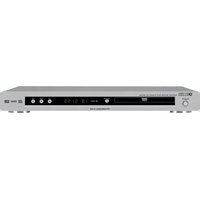
DV-S5450 - DVD player YAMAHA - Free user manual and instructions
Find the device manual for free DV-S5450 YAMAHA in PDF.


Pick your language and provide your email: we'll send you a specifically translated version.
| Product Type | DVD Player |
| Brand | Yamaha |
| Model | DV-S5450 |
| Disc Compatibility | DVD Video, DVD-R/RW, DVD+R/RW, CD, CD-R/RW |
| Playback Formats | MP3, JPEG, WMA |
| Video System | Multi-system (NTSC/PAL) |
| Progressive Scan | Yes (3:2 pulldown) |
| Video DAC | 10-bit / 27 MHz |
| Audio DAC | 24-bit / 192 kHz |
| Audio Decoders | Dolby Digital, DTS, MPEG-2 Audio |
| Signal-to-Noise Ratio | 110 dB |
| Outputs | Component, S-Video, Composite, Digital Optical, Coaxial, Stereo Analog |
| Other Functions | Virtual Surround, Dialog Normalization, Zoom |
| Power Consumption | 12 W |
| Power Supply | AC 120 V/230 V, 50/60 Hz |
| Dimensions (W x H x D) | 17.1" × 1.9" × 9.4" (435 × 49 × 240 mm) |
| Weight | 5.3 lbs (2.4 kg) |
| Remote Control | Included with batteries |
| Cleaning and Maintenance | Wipe with a soft, dry cloth; do not use solvents |
| Spare Parts and Repairability | Contact an authorized Yamaha service center |
Frequently Asked Questions - DV-S5450 YAMAHA
How do I connect the DVD player to my TV?
Connect the component or composite video output to your TV. For audio, use the digital optical or coaxial output connected to an amplifier, or the analog stereo output to the TV's input. Ensure the player is set to the correct output mode.
What disc formats does the DV-S5450 support?
The DV-S5450 supports DVD Video, DVD-R/RW, DVD+R/RW, CD, CD-R/RW, and includes playback of MP3, JPEG, and WMA files on compatible discs.
How can I change the audio language on a DVD?
During playback, press the Audio button on the remote to cycle through available audio languages or sound tracks as recorded on the disc.
Why is there no picture on my TV?
Check that the video cable is securely connected, the TV is set to the correct input, and the player's video output matches your TV's capability. If using component video, ensure the cables are color-matched.
How do I clean the DVD player?
To clean the player, use a soft, dry cloth to wipe the exterior. For the disc lens, use a lens cleaning disc periodically. Never use liquid cleaners directly on the player.
Can I play MP3 files on this player?
Yes, you can play MP3 files recorded on CD-R/RW or DVD-R/RW discs. Navigate using the on-screen menu.
What is progressive scan and should I use it?
Progressive scan delivers a smoother picture by displaying all lines in a single frame. Enable it only if your TV supports progressive scan via component video input.
How do I set the output resolution?
Press the Setup button, enter the Video menu, and select Video Output. Choose from component interlaced, progressive, or RGB depending on your TV.
Is this player compatible with PAL and NTSC DVDs?
The player is multi-system and can handle both NTSC and PAL discs. However, your TV must also support the video system of the disc for proper playback.
How do I reset the DVD player to factory settings?
To reset, press Standby to power off, then press and hold Stop on the front panel for about 5 seconds. The unit will power on with factory defaults restored.
User questions about DV-S5450 YAMAHA
0 question about this device. Answer the ones you know or ask your own.
Ask a new question about this device
No questions yet. Be the first to ask one.
Download the instructions for your DVD player in PDF format for free! Find your manual DV-S5450 - YAMAHA and take your electronic device back in hand. On this page are published all the documents necessary for the use of your device. DV-S5450 by YAMAHA.
USER MANUAL DV-S5450 YAMAHA

Manual assistant
Powered by Anthropic
Waiting for your message
Product information
Brand : YAMAHA
Model : DV-S5450
Category : DVD player