ThunderForms - Subwoofer MTX Audio - Free user manual and instructions
Find the device manual for free ThunderForms MTX Audio in PDF.


Pick your language and provide your email: we'll send you a specifically translated version.
| Type of product | Powered subwoofer system with built-in amplifier |
| Brand | MTX Audio |
| Model | ThunderForms |
| Category | Subwoofer |
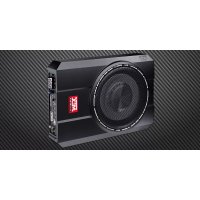
| Design | Custom-fit molded enclosure for under-seat vehicle installation |
| Subwoofer size | 10-inch subwoofer |
| Amplifier power (RMS) | 250W |
| Amplifier type | Class-D |
| Frequency response | 20 Hz - 200 Hz |
| Sensitivity | 85 dB |
| Impedance | 2 ohms |
| Dimensions (W x H x D) | 14.5 x 8.5 x 3.5 in (37 x 22 x 9 cm) |
| Weight | 12 lb (5.4 kg) |
| Power requirement | 12V DC vehicle electrical system |
| Fuse rating | 25A |
| Audio inputs | High-level speaker inputs |
| Control features | Remote bass control knob |
| Additional features | Auto turn-on, thermal and overload protection |
| Installation | Vehicle-specific custom fit |
| Maintenance | Wipe with a soft, dry cloth |
| Safety | Full understanding of vehicle electrical system required before installation |
| Spare parts | Available through MTX Audio authorized dealers |
| Repairability | Amplifier module can be serviced by qualified MTX technicians |
Frequently Asked Questions - ThunderForms MTX Audio
What is a ThunderForms subwoofer?
The MTX ThunderForms is a powered subwoofer system that combines a high-performance subwoofer and a built-in amplifier in a custom-fit enclosure, designed to deliver deep bass while saving space.
How do I install the ThunderForms in my vehicle?
The ThunderForms features a vehicle-specific custom fit. To install, place the enclosure in the designated location under the seat, connect the high-level inputs to your stereo speaker wires, and connect the 12V power wire to your battery with an in-line fuse.
What is the power requirement for the amplifier?
The built-in amplifier operates on a 12V DC electrical system, typical of all vehicles. It draws about 25A of current, so we recommend a 25A fuse in the power wire for safety.
Can I use the ThunderForms with my factory radio?
Yes, the ThunderForms accepts high-level speaker inputs, meaning it can be connected directly to your factory stereo's speaker wires without any additional adapters.
How do I adjust the bass level?
Use the included remote bass control knob to adjust the subwoofer volume independently from your main stereo, allowing you to fine-tune the bass output from the driver's seat.
What maintenance does the subwoofer require?
The ThunderForms requires minimal maintenance. Clean the exterior with a soft, dry cloth to remove dust and avoid any moisture contact. Periodically check all wiring connections.
Is the ThunderForms compatible with all vehicles?
The ThunderForms is available in different custom-fit models for specific vehicle makes and models. Make sure to select the correct model for your vehicle to ensure a proper fit.
What should I do if the amplifier heats up?
The amplifier has thermal and overload protection circuits. If it shuts off due to heat, allow it to cool and ensure there is adequate ventilation around the enclosure. Check that the impedance and wiring are correct.
Can I replace the subwoofer driver myself?
In most cases, the subwoofer driver is not user-replaceable. For repairs, contact MTX Audio authorized dealers so the enclosure can be properly serviced without causing damage.
Does the ThunderForms come with a warranty?
MTX Audio provides a limited warranty for the ThunderForms. Please check your warranty card or contact MTX customer service for specific terms and coverage details.
User questions about ThunderForms MTX Audio
0 question about this device. Answer the ones you know or ask your own.
Ask a new question about this device
No questions yet. Be the first to ask one.
Download the instructions for your Subwoofer in PDF format for free! Find your manual ThunderForms - MTX Audio and take your electronic device back in hand. On this page are published all the documents necessary for the use of your device. ThunderForms by MTX Audio.
USER MANUAL ThunderForms MTX Audio

Manual assistant
Powered by Anthropic
Waiting for your message
Product information
Brand : MTX Audio
Model : ThunderForms
Category : Subwoofer