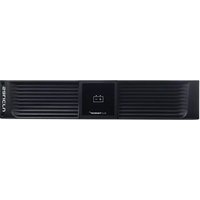
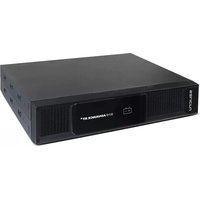
698BT000002 - Inverter Salicru - Free user manual and instructions
Find the device manual for free 698BT000002 Salicru in PDF.


Pick your language and provide your email: we'll send you a specifically translated version.
| Product Type | Uninterruptible Power Supply (UPS) / Inverter |
| Brand | Salicru |
| Model | 698BT000002 |
| Rated Power | 1000 VA / 600 W |
| Input Voltage Range | 160–290 VAC |
| Output Voltage | 220/230/240 VAC ± 2% |
| Frequency Range | 50/60 Hz (auto-sensing) |
| Transfer Time | < 10 ms |
| Battery Type | Sealed lead-acid, maintenance-free |
| Battery Capacity | 12 V / 9 Ah |
| Charging Time | 4–6 hours to 90% |
| Protection Features | Overload, short-circuit, deep-discharge, surge |
| Cooling System | Temperature-controlled fan |
| Communication Interface | USB and RS-232 ports |
| Operating Temperature | 0 °C to 40 °C |
| Noise Level | < 40 dB at 1 meter |
| Dimensions (W × H × D) | 280 × 145 × 220 mm |
| Weight | 9.5 kg |
| Safety Compliance | CE, IEC 62040-1 |
| Accessories Included | User manual, AC power cable, USB cable |
| Maintenance | Clean the exterior with a dry cloth; ensure ventilation |
| Warranty | 2 years |
Frequently Asked Questions - 698BT000002 Salicru
How do I connect the UPS to my equipment?
Connect the UPS to a properly grounded wall outlet, then plug your essential devices into the UPS's output sockets. Ensure the total power consumption does not exceed the rated capacity of the UPS.
How long is the battery backup time?
The backup time depends on the load. At full load (600 W), the UPS provides approximately 5 minutes of runtime. With a lighter load, runtime can extend to 20 minutes or more.
Can I replace the battery myself?
Yes, the battery is user-replaceable. Open the front cover, disconnect the wires, and replace the old battery with a new one of the same voltage and capacity. Follow the safety instructions in the manual.
What should I do if the UPS beeps continuously?
A continuous beep usually indicates overload or battery failure. Check the connected equipment's power draw and reduce the load if necessary. If the problem persists, inspect the battery status or contact support.
Is the UPS compatible with generators?
Yes, the UPS features an auto-sensing frequency (50/60 Hz) and a wide input voltage range, making it compatible with most generators. However, ensure the generator provides stable and clean power to avoid frequent switching.
How do I install the monitoring software?
Use the included USB cable to connect the UPS to your computer. Download the latest Salicru Power Manager software from the official website, install it, and the UPS will be automatically detected.
What is the recommended maintenance?
Keep the UPS in a clean, dry, and well-ventilated area. Dust the vents regularly and check the battery every few months. Perform a self-test function to ensure the battery is functioning properly.
Can I use the UPS for high-power devices like refrigerators?
No, the UPS is designed for electronic devices such as computers, monitors, and network equipment. High-power appliances like refrigerators can overload the UPS and may not be supported.
Does the UPS protect against surges?
Yes, the UPS includes surge protection for both power input and output. It absorbs and dissipates transient voltages, safeguarding your connected equipment from lightning strikes and grid spikes.
How do I reset the UPS after an overload?
Disconnect the overloaded devices, press the power button to turn off the UPS, then press it again to restart. If the overload condition persists, check the total wattage of connected equipment.
User questions about 698BT000002 Salicru
0 question about this device. Answer the ones you know or ask your own.
Ask a new question about this device
No questions yet. Be the first to ask one.
Download the instructions for your Inverter in PDF format for free! Find your manual 698BT000002 - Salicru and take your electronic device back in hand. On this page are published all the documents necessary for the use of your device. 698BT000002 by Salicru.
USER MANUAL 698BT000002 Salicru

Manual assistant
Powered by Anthropic
Waiting for your message
Product information
Brand : Salicru
Model : 698BT000002
Category : Inverter