6A0BT000003 - Inverter Salicru - Free user manual and instructions
Find the device manual for free 6A0BT000003 Salicru in PDF.


User questions about 6A0BT000003 Salicru
0 question about this device. Answer the ones you know or ask your own.
Ask a new question about this device
Download the instructions for your Inverter in PDF format for free! Find your manual 6A0BT000003 - Salicru and take your electronic device back in hand. On this page are published all the documents necessary for the use of your device. 6A0BT000003 by Salicru.
USER MANUAL 6A0BT000003 Salicru
natural_image
Exterior view of a black Sable TV tower with two connected devices, one displaying a digital display (no visible text or symbols on the main body)UNINTERRUPTIBLE POWER SUPPLY
SPS.ADVANCE RT
General index
1. Introduction.
1.1. Acknowledgement letter.
2. Information for safety.
2.1. Using this manual.
2.1.1. Conventions and used symbols.
3. Quality and standard guarantee.
3.1. Declaration of the management.
3.2. Standard.
3.3. Environment.
4. Presentation.
4.1. Views.
4.1.1. Equipment views.
4.1.2. Legend corresponding to the equipment views.
4.2. Definition of the product.
4.2.1. Nomenclature.
4.3. Description and operating principle.
4.3.1. Main features.
4.4. Options.
4.4.1. Isolation transformer.
4.4.2. External maintenance manual bypass.
4.4.3. Integration in IT networks by means of the SNMP adaptor.
4.4.4. AS400 card.
4.4.5. MODBUS protocol.
4.4.6. Extensible rail kit for rack cabinet assembling.
5. Installation.
5.1. To be considered in the installation.
5.2. Reception of the equipment.
5.2.1. Unpacking, content checking and inspection.
5.2.2. Storage.
5.2.3. Unpacking.
5.2.4. Vertical assembling -tower type- or rack.
5.2.4.1. Removing or fitting the beauty cover.
5.2.4.2. Rotation of control panel with LCD panel.
5.2.4.3. Vertical assembling -tower type-.
5.2.4.4. Vertical assembling -tower type-, with extended back up time (battery module).
5.2.4.5. 19" rack cabinet assembling.
5.2.4.6. 19" rack cabinet assembling, with extended back up time (battery module).
5.3. Connection.
5.3.1. Connection of input.
5.3.2. Connection of the IEC outlets.
5.3.3. Connection of the external batteries (extended back up time).
5.3.4. Connection of main input earth terminal ( 12 ) and the earth bonding terminal ( 12 ).
5.3.5. EPO terminals in UPSs >1kVA (Emergency Power Off).
5.3.6. Communication port.
5.3.6.1. RS232 and USB interface.
5.3.6.2. Smart slot.
5.3.6.3. AS400 Interface with DB9 output (option).
5.3.6.4. Protection against transient voltages for modem / ADSL / Fax / ... lines.
- 3.7. S of t wa re.
5.3.8. Considerations before commissioning with load connected.
6. Operating.
6.1. Start up.
6.1.1. Controls before commissioning.
6.2. UPS start up and shutdown.
6.2.1. Initial UPS start up.
6.2.2. UPS start up, with mains present.
6.2.3. Start up of the UPS, with no mains present.
6.2.4. UPS shutdown, with mains present.
6.2.5. UPS shutdown, with no mains present.
7. Control panel.
7.1. Functionalities.
7.1.1. Button functions.
7.1.2. Acoustic alarms.
7.1.3. UPS status and colour of the LCD panel, depending on the condition.
7.1.4. Graphics displayed in the LCD panel.
7.1.5. User settings.
7.1.6. Explanations about the user settings and other ones.
7.1.6.1. Operating modes.
7.1.6.2. IEC outlet groups.
7.1.6.3. Setting the UPS to connect it with "n" battery modules.
7.1.6.4. Setting the "Green" function.
8. Maintenance, warranty and service.
8.1. Maintenance of the battery.
8.1.1. Notes for installing and replacing the batteries.
8.2. UPS Trouble Shooting guide.
8.2.1. FAQ. Acoustic alarms.
8.2.2. FAQ. General indications.
8.3. WARRANTY CONDITIONS.
8.3.1. Warranty terms.
8.3.2. Out of scope of supply.
8.4. Technical service network.
9. Annexes.
9.1. Main general specifications.
9.2. Glossary.
1. Introduction.
1.1. Acknowledgement letter.
We would like to thank you in advance for the trust you have placed in us by purchasing this product. Read this instruction manual carefully in order to be familiarized with its contents, because, as much as you know and understand the equipment the highest will be your satisfaction and safety levels and their features will be optimized too.
We remain at you entire disposal for any further information or any query you should wish to make.
Yours sincerely.
SALICRU
- The equipment here described can cause important physical damages due to wrong handling. This is why, the installation, maintenance and/or fixing of itself must be done by our staff or qualified personnel exclusively.
- Although we have made every effort to guarantee a complete and accurate information in this user's manual, we are not responsible for any errors or omissions that may exist.
The images included in this document are mere illustrations and they could not represent the part of the equipment exactly, therefore they are not contractual. Nevertheless, differences that could exist will be alleviated or solved with the correct labelling of the equipment. - According to our policy of constant evolution, we reserve the right to modify the specifications, operating or described actions in this document without forewarning.
- Any reproduction, copy or third party concession, modification or partial or in whole translations of this manual or document, in any format or media, is prohibited without the previous written authorization of our firm, being reserved the full and exclusive ownership right over it.
2. Information for safety.
2.1. Using this manual.
The generic information of the equipment is supplied in digital format in a CD-ROM, and it includes among other documents the own user's manual of the system and the EK266*08 document concerning to «Safety instructions». Before doing any action over the equipment regarding installation or commissioning, change of location, setting or handling, read them carefully.
This user's manual is intended to provide information regarding the safety and to give explanations about the procedures for the installation and operating of the equipment. Read them carefully and follow the stated steps in the established order.

Compliance as regards to “Safety instructions” is mandatory, being the user the legal responsible regarding to its observance and application.
The equipments are delivered duly labelled for the correct identification of any their parts, which combined with the instructions described in this user's manual, allows the end-user to make any operating of both installation and commissioning, in an easy and ordered way without doubt.
Finally, once the equipment is installed and operative, for future requests or doubts that could arise, it is recommended to keep the CD-ROM documentation in a safe place with easy access.
The following terms are used in the document indistinctly to be referred to:
- «ADVANCE, ADVANCE RT, RT, equipment, unit o UPS».- Uninterruptible Power Supply.
Depending on the context of the sentence, it can be referred either to the own equipment or to the equipment with batteries, although all is assembled in one cabinet or metallic enclosure.
- «batteries or accumulators».- Group or set of elements that store the electron flow through electrochemical means.
• «T.S.S.».- Technical Service & Support.
- «client, fitter, operator or end-user».- are used indistinctly and by extension, to be referred to the fitter and/or operator which will make the corresponding actions, being responsible the same person about the actions to take on behalf of himself.
2.1.1. Conventions and used symbols.
Some symbols can be used and shown in the equipment and/or in the description of this user's manual.
For more information, see section 1.1.1 of EK266*08 document as regards to «Safety instructions».
3. Quality and standard guarantee.
3.1. Declaration of the management.
Our target is the client's satisfaction, therefore this Management has decided to establish a Quality and Environmental policy, by means of installation a Quality and Environmental Management System that becomes us capable to comply the requirements demanded by the standard ISO 9001 and ISO 14001 and by our Clients and concerned parts too.
Likewise, the enterprise Management is committed with the development and improvement of the Quality and Environmental Management System, through:
- The communication to all the company about the importance of satisfaction both in the client's requirements and in the legal and regulations.
- The Quality and Environmental Policy diffusion and the fixation of the Quality and Environment targets.
• To carry out revisions by the Management.
• To provide the needed resources.
3.2. Standard.
The SPS. ADVANCE RT product is designed, manufactured and commercialized in accordance with the standard EN ISO 9001 of Quality Management Systems. The Cmarking shows the conformity to the EEC Directive by means of the application of the following standards:
• 2014/35/EU. - Low Voltage Directive (LVD).
• 2014/30/EU. - Electromagnetic Compatibility (EMC).
- 2011/65/EU. - Restriction of Hazardous Substances in electrical and electronic equipment (RoHS).
In accordance with the specifications of the harmonized standards. Standards as reference:
- EN-IEC 62040-1. Uninterruptible power supply (UPS). Part 1-1: General and safety requirements for UPS's used in accessible areas by end users..
- EN-IEC 60950-1. IT equipments. Safety. Part 1: General requirements.
- EN-IEC 62040-2. Uninterruptible power supply (UPS). Part 2: EMC requirements.

The manufacturers responsibility is excluded in the event of any modification or intervention in the product by the customer's side.

WARNING!: SPS.ADVANCE RT 0,75.. 3 kVA. This is a category C1 UPS product.

Declaration of conformity CE of the product is at the client disposal under previous request to our headquarters offices.
3.3. Environment.
This product has been designed to respect the environment and has been manufactured in accordance with the standard ISO 14001.
Equipment recycling at the end of its useful life:
Our company commits to use the services of authorised societies and according to the regulations, in order to treat the recovered product at the end of its useful life (contact your distributor).
Packaging:
To recycle the packaging, follow the legal regulations in force, depending on the particular standard of the country where the equipment is installed.
Batteries:
The batteries mean a serious danger for health and environment. The disposal of them must be done in accordance with the standards in force.
4. Presentation.
4.1. Views.
4.1.1. Equipment views.
Figures 1 to 3 shows the illustrations of the equipment according to the format of the enclosure and related to the power of the model. Nevertheless and due to the constant evolution of the product, several discrepancies or small contradictions can arise. If you have any doubt, the labelling on the equipment will always prevail.

In the nameplate sticked in the equipment, all the data referred to the main features of the equipment can be locked. Act in accordance with the installation.
4.1.2. Legend corresponding to the equipment views.
| Symbol and their meaning | |||
| Symbol Meaning Symbol Meaning | |||
 | Warning Earth | ||
 | Electrical shock Alarm silenced | ||
 | UPS ON /Battery test | Overload | |
| [438S] | UPS OFF Battery | ||
 | UPS on Standbyor shutdown | Recycling | |
 | Alternating (AC) | Keep the UPS ia well ventilatedplace | |
 | Direct (DC) | ||
Tabla 1. Used symbology in the equipment and/or this manual..

text_image
Control panel with LCD Fixing screws, Plastic beauty front Plastic beauty front Front virew ADVANCE RT Front view battery module for ADVANCE RTFig. 1. Front view models from 0,7 to 1 kVA and battery modules for extended back up times.
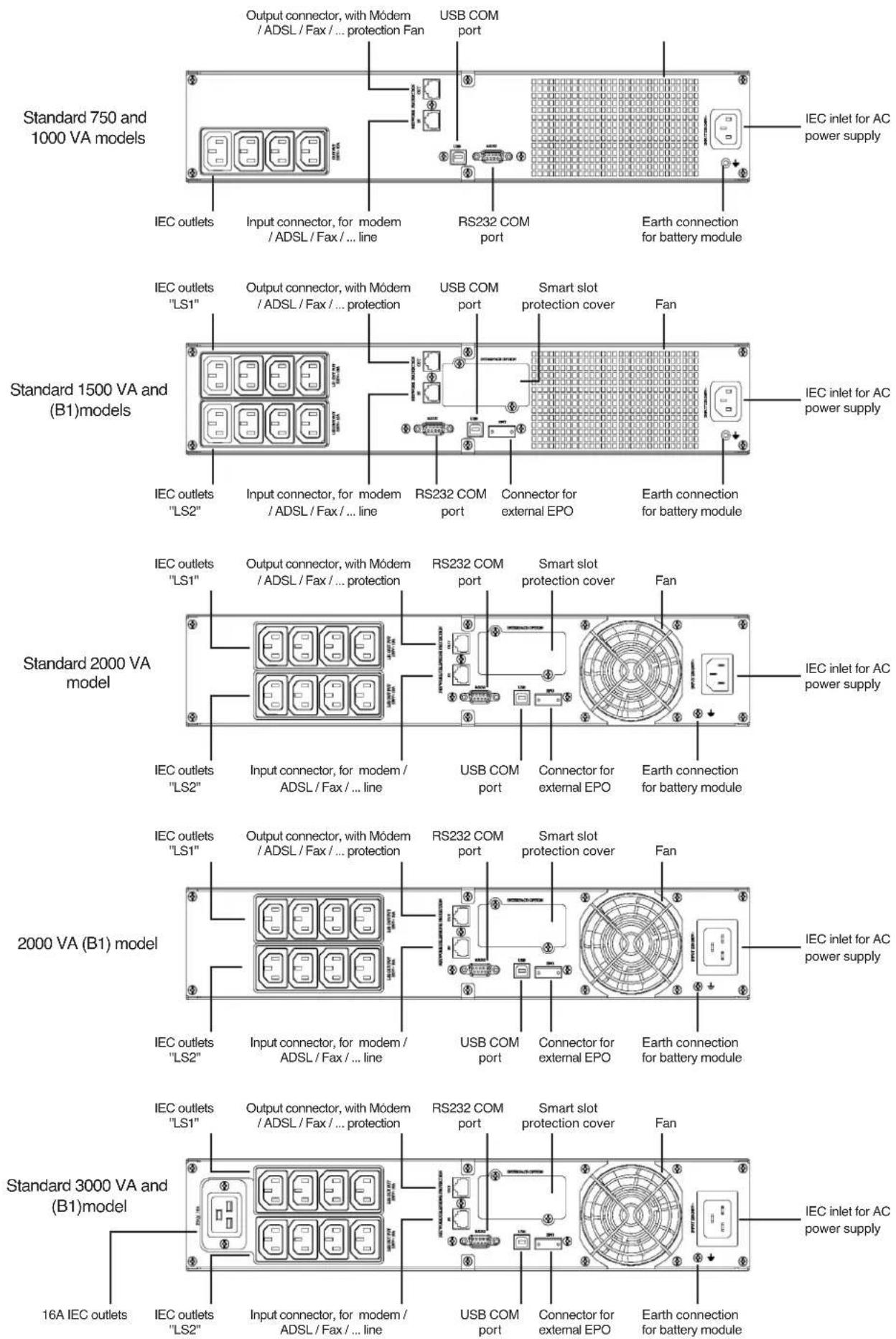
Fig. 2. Rear view according to the model and power rate of the equipments.
Battery module

The connection of the battery module with the equipment and/or with other module is done through the front. To do it it will be needed to remove the front plastic trim of all the racks, to have access to the connection connectors ready for this purpose.
Fig. 3. Rear view of the battery modules for extended back up times.
4.2. Definition of the product.
4.2.1. Nomenclature.
SPS.1000.ADV RT (B1) WCO 220/220 "EE29503"
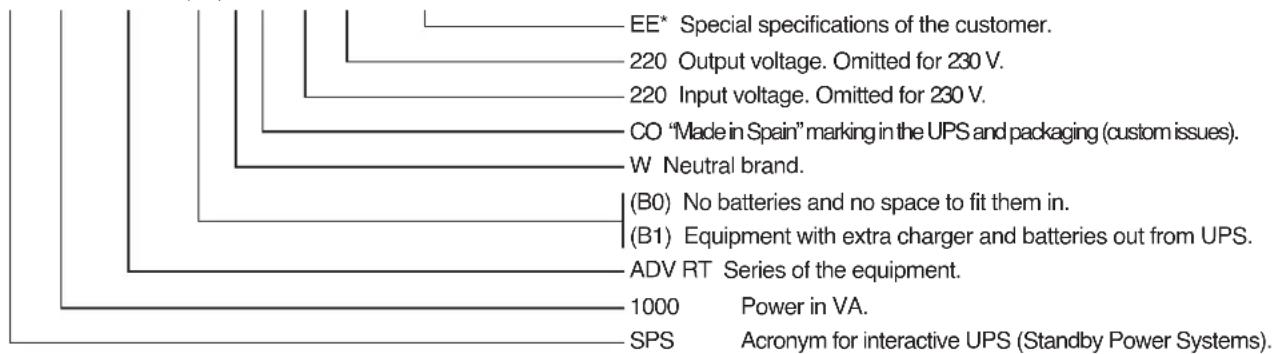
text_image
EE* Special specifications of the customer. 220 Output voltage. Omitted for 230 V. 220 Input voltage. Omitted for 230 V. CO "Made in Spain" marking in the UPS and packaging (custom issues). W Neutral brand. (B0) No batteries and no space to fit them in. (B1) Equipment with extra charger and batteries out from UPS. ADV RT Series of the equipment. 1000 Power in VA. SPS Acronym for interactive UPS (Standby Power Systems).MOD BAT ADV RT 2x6AB003 3x40A WCO "EE29503"
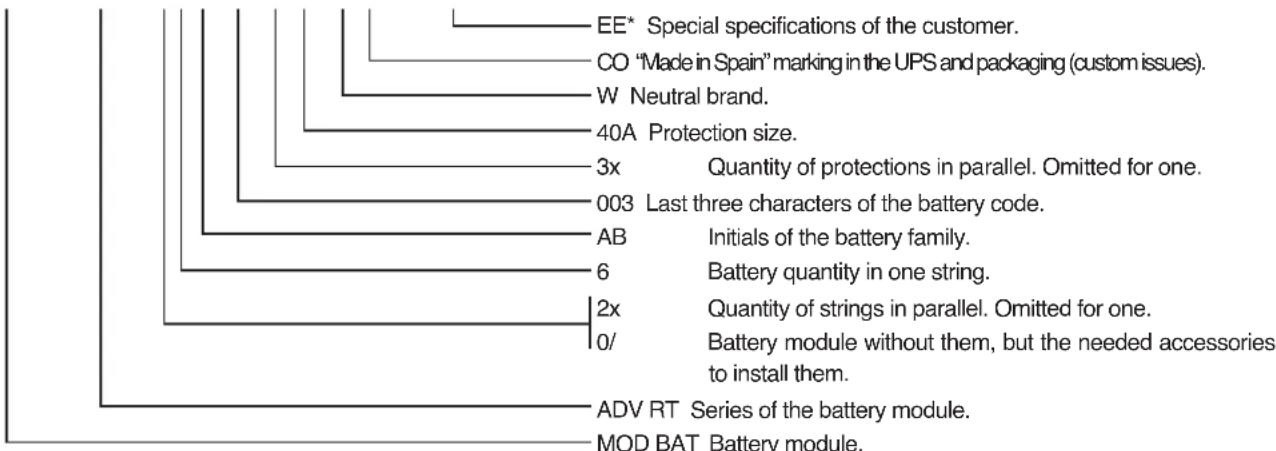
text_image
EE* Special specifications of the customer. CO "Made in Spain" marking in the UPS and packaging (custom issues). W Neutral brand. 40A Protection size. 3x Quantity of protections in parallel. Omitted for one. 003 Last three characters of the battery code. AB Initials of the battery family. 6 Battery quantity in one string. 2x Quantity of strings in parallel. Omitted for one. 0/ Battery module without them, but the needed accessories to install them. ADV RT Series of the battery module. MOD BAT Battery module.
Note relative to the batteries. B0 and B1 acronyms stated the nomenclature related to batteries:
(B0) The equipment is supplied without batteries and without accessories for them (screws and electrical cables).
Batteries are property of the client, and they will be fitted out of the UPS case or cabinet.
Under request, it is possible to supply the accessories (screws and electrical cables), needed to install and connect the external batteries.
(B1) Equipment with extra battery charger. The equipment is supplied without batteries and without accessories for them
(screws and electrical cables), corresponding to the stated batteries in the model.
Under request, it is possible to supply the accessories (screws and electrical cables), needed to install and connect the batteries.
For those equipments requested without batteries, the acquisition, installation and connection of themselves will always be done by client and under his responsibility.
Regarding the battery data of quantity, capacity and voltage are stated in the battery label sticked beside the nameplate of the equipment, respect this data and the polarity of the battery connection strictly.
4.3. Description and operating principle.
This user's manual describes the installation and operating of the Uninterruptible Power Supply (UPS) from SPS.ADVANCE RT series, for power ranges between 750 and 3000VA.
These Line-interactive equipments with pure sinewave output, are designed to protect the most critical electronic devices against problems of the power supply like undervoltages, peaks, brownouts, noise in the line and electrical mains fault.
Among other applications, we can quote, PCs, servers, workstations, and other IT networks devices.
The design allows both the rack-mounting assembling with 2U height to be fitted in 19" cabinet, previous installation of the side metallic support with L shape and tower format by using the plastic supports as a plinth.
The UPS has a front panel with LCD and four buttons (Start up switch, Silent/UPS test, Setting and Enter) allow an easy monitoring: Configuration and control, AC input line, inform about the wiring fault and the load status. It also includes two LCD bar graphs, one indicates the battery charge level and the other one the level of the load connected at its output. Each bar is divided into five parts, which each one is equivalent to 20% of the total value.
The equipment has four acoustic alarms (Back up time mode -discharge of the battery-, low battery - end of back up time-, overload and UPS fault). By means of the Silent/UPS test button located at the front panel, the acoustic alarm can be deactivated or to initiated the autotest procedure.
The SPS.ADVANCE RT equipments are fed from AC commercial mains and supply AC energy at their output through the IEC outlets installed at the rear side of the equipment. In case the power supply is correct, the load/s are fed through the stabilizer with «Boost» and «Buck» technology.
In case of mains fault or voltage and/or frequency out of the acceptable range, load/s will be fed from the batteries through the inverter for a determined time, depending on the model, battery charge level and the own load connected at the output.
For models higher than 1000 VA, it is possible to increase the standard back up time of the equipments, by connecting additional modules and/or to optimise the recharging time of the accumulators, by fitting chargers with better quality performances (B1).
All the power range has serial and USB communication ports for communication and equipment control. The serial port supports the direct communications with a server and the protocol is according to a RS-232 interface.
Also, all models have RJ-45 connectors for modem / ADSL / Fax line protection.
Likewise, the models over 1000 VA have:
- EPO connector, to install the option and external by the own user, of an emergency power off button.
• Smart slot to install one of the following communication cards:
☐ AS-400 relay interface, with DB9 connection.
☐ SNMP for controlling the equipment via Web.
☐ Card for Internet or Intranet management.
This manual is applicable to the standardized and stated models in table 2.
4.3.1. Main features.
• Control by microprocessor with high reliability.
• Design of high frequency.
• Stabilizer with «Boost» and «Buck» technology.
- Selectable output range and line sensitivity.
- Cold start.
• Standard communication ports: RS-232 and USB.
• Possible communication extend through the slot.
- Extended back up time by means of the battery modules for models higher than 1000 VA.
- As an option, more powerful battery chargers, for models higher than 1000 VA.
- Protection against overload, short-circuit and overtemperature.
- Design 2 in 1, as 19" rack with 2 U height or Tower.
| Model Type | |
| SPS.750.ADV RT | Standard |
| SPS.1000.ADV RT | |
| SPS.1500.ADV RT | |
| SPS.2000.ADV RT | |
| SPS.3000.ADV RT | |
| SPS.1500.ADV RT (B0) | No batteriesSPS.2000.ADV RT (B0) |
| SPS.3000.ADV RT (B0) | |
| SPS.1500.ADV RT (B1) | Large back up time with additional charger |
| SPS.2000.ADV RT (B1) | |
| SPS.3000.ADV RT (B1) |
Tabla 2. Standardised models.
4.4. Options.
Depending on the selected configuration, the equipment can include any of the following options:
4.4.1. Isolation transformer.
The isolation transformer, provides a galvanic isolation that allows isolating the output from the input completely.
The installation of an electrostatic shield between the primary and secondary windings of the transformer provides a high level of attenuation of the electrical noises.
The isolation transformer can be installed at the input or output of the UPS from SPS.ADVANCE RT series and it will always be located out from the equipment enclosure.
4.4.2. External maintenance manual bypass.
The purpose of this option is to isolate electrically the equipment from mains and critical loads, without breaking the power supply to the loads. Therefore, in this way the maintenance or fixing tasks can be done in the equipment with no interruption on the power supply energy to the protected system, at the same time that unnecessary risks are avoided to the technical staff.
4.4.3. Integration in IT networks by means of the SNMP adaptor.
The big IT systems based on LANs and WANs that integrate servers with different platforms, they have to include an easy way of controlling and management at the manager system disposal. This facility is got through the SNMP adaptor, which is well-known by the main software and hardware manufacturers
The available SNMP option for SPS.ADVANCE RT series is a card to be inserted into the slot that the UPS has in its rear side.
The connection of the UPS with the SNMP is internal meanwhile the connection between the SNMP and the IT network is done through a RJ45 connector 10 base.
4.4.4. AS400 card.
See section 5.3.6.3.
4.4.5. MODBUS protocol.
The big IT systems based on LANs and WANs, many times they require that the communication with any device has to be integrated in the IT network and it has to be done by means of an industrial standard protocol.
One of the most used industrial standard protocols in the market is the MODBUS protocol. SPS.ADVANCE RT series is also ready to be integrated in this type of environments through the external "SNMP TH card" device with MODBUS protocol.
4.4.6. Extensible rail kit for rack cabinet assembling.
There is available only one model of telescopic guide kit for all models, suitable for any type of rack cabinet.
These guides allow installing any unit of the SPS.ADVANCE RT equipment and their possible battery modules, in case of extended back up times, as it was a rack with its respective cabinet.
5. Installation.
• Check the Safety instructions (see chapter 2).
- Check that the data in the nameplate are the required by the installation.
- A wrong connection or manoeuvring, can make faults in the UPS and/or loads connected to itself. Read carefully the instructions of this manual and follow the stated steps in the established order.
- The equipments can be installed and used by personnel with no specific training just with the help of this «Manual».
- All connections of the equipment including the control (interface, remote panel, ...), will be done with the switches at rest and no voltage present (UPS power supply switch to «Off»).
- Never forget that the UPS is an electrical energy generator, so the user has to take the needed cautions against direct and indirect contacts.
• Under request, we are able to supply a manual bypass panel.
- Battery circuit is not isolated from input voltage. Hazardous voltages can be found out between the battery terminals and earth. Check that there is not input voltage before doing any intervention on them.
5.1. To be considered in the installation.
- All the range has a power cord with plug for input and IEC outlets for output, as connection parts for power. The rest of connections are done through the connectors, including the connection of the equipment with the battery module (it is not available on equipments below 1000VA).
- Cross cable section of the bypass, input and output lines, will be calculated from the currents stated in the nameplate of each equipment, and respecting the Local and/or National Low Voltage Electrotechnical Regulations.
- Protections of the switchgear panel, will have the following features:
☐ For input line, type B for RCD devices and C characteristic for circuit breakers.
☐ For the output (load feeding), C characteristic for circuit breaker.
Regarding the size, they will be as minimum to the currents stated in the nameplate of each UPS.
- In the nameplate of the equipment there are only printed the nominal currents as it is stated in the safety standard EN-IEC 62040-1. To calculate the input current, the power factor and the efficiency of the equipment have been considered.
Overload conditions are considered as nonpermanent and exceptional operating mode.
- If it is added peripherals to the input and/or output like transformers or autotransformers to the UPS, the currents stated in the own nameplates of those elements has to be considered in order to use the suitable cross sections, by respecting the Local and/or National Low Voltage Regulation.
- When an equipment incorporates a galvanic isolation transformer, as standard, as an option or either installed by yourself, either at the UPS input or output or at all of them, protections against indirect contact has to be fitted in (residual current device) at the output of each transformer,
because due to its specification of isolation it will prevent the triggering of the protections fitted in the primary of the transformer in case of electrical shock in the secondary (output of the isolation transformer).
- Remind you that all external isolation transformers already installed or supplied from factory, has the neutral of the secondary connected to earth by means of a cable bridge between both terminals. If it were required an isolated output neutral, remove this cable bridge, keeping the precautions stated in the respective local and/or national low voltage regulations.
- All the UPSs have batteries inside the same rack enclosure of the equipment. Battery protection is by means of fuse and internal, so it is no accessible by the end-user.
Battery modules have internal protections by fuse, and they are not accessible by the end-user too.
5.2. Reception of the equipment.
5.2.1. Unpacking, content checking and inspection.
• To unpack, see section 5.2.3.
- On receiving the device, make sure that it has not suffered any damage in transport (impact, drop, ...) and its features correspond with the ones in the order, so it is recommended to unpack the UPS and make a first visual inspection.
- In case of observing damages, make all pertinent claims to the transport agency or in their lack to our company.
Never start up an equipment when external damages can be observed.
- Also check that the data in the nameplate sticked in the packaging and in the equipment, correspond to the ones stated in the order, so it is required to unpack it (see section 5.2.3). Otherwise, make a nonconformity as soon as possible, by quoting the serial number of the equipment and references in the delivery note.
- Check the contents of the packaging. Depending, if we are checking an equipment or battery module, the contents will vary.

□ Equipment:
- The own equipment.
- Quick guide in paper.
- 1 power cord for input connection -schuko plug and IEC connector-.
- 2 cables for output connection with IEC connectors.
- 1 communication cable USB.
- 4 plastic pieces to be joint two by two to fit the UPS in vertical position.
- Two metallic pieces with L shape to adapt the equipment to rack format.
Battery module:
- The own equipment.
- 1 connection cable for protection earth, to link the equipment and module.
- 2 plastic pieces to adapt the supports of vertical installation of the UPS and batteries (battery modules for equipments up to 3 kVA only).
- 1 metallic piece and bolt to joint the battery module with the equipment on tower format.
- Once the reception is finished, it is advisable to pack the UPS and the battery module/s again till its commissioning in order to protect it against mechanical shocks, dust, dirt, etc...
5.2.2. Storage.
- Storage of the equipment will be done in a dry place, safeguard from rain, protected from dust, water jets or chemical agents. It is advisable to keep the equipment and the battery pack/s, into their original packages, which have been designed to assure the maximum protection during the transport and storage.
- In equipments that include Pb-Ca batteries, the figures, stated in table 2 of the EK266*08 document, of charge period time depending on the temperature that they are exposed, must be respected, otherwise the warranty will be invalidated.
- Do not store the devices where the ambient temperature exceeds above 50°C or below -15°C, otherwise it may degrade the electrical characteristics of the batteries.
5.2.3. Unpacking.
- The packaging of the equipment consists of a cardboard enclosure, expanded polystyrene corner pieces (EPS) or polyethylene foam (EPE), polyethylene sleeve and band, all of them are recyclable materials; therefore they should be disposed according to current regulations. We recommend to keep the packaging in case its use is necessary in the future.
• Proceed as follows:
☐ Cut the strips of cardboard enclosure.
☐ Remove the accessories (cables, supports, ...)
☐ Remove the equipment or battery module from the packaging, keeping in mind that the it is needed the help of a second person depending on the weight of the model.
☐ Remove the protection corners from the packaging and the plastic bag.

Do not leave the plastic bag at the children hand, due to the risk that it means.
☐ Check the equipment before proceeding and in case damages where confirmed, contact with the supplier or in lack of it with our firm.
5.2.4. Vertical assembling -tower type- or rack.
- All the UPSs from SPS.ADVANCE RT series are designed to assemble the equipment as tower format -vertical position of the equipment- or rack -horizontal position- for its installation in 19" cabinets.
Follow the instructions stated in the sections related to any of both possibilities, attending the particular configuration of your equipment.
- Figures from 4 to 9 show as an example the graphics of an equipment. These illustrations are only for help and orientation in the steps to follow and they are not particular for any model, although in practice, the actions to make are the same for all models.
Nevertheless when the generic illustrations differ, there will be new illustrations to show it.
- All the instructions relating to connections will detailed later on, less those ones regarding the battery connection. There-
fore, this section will only describe the works linked with the assembling.
5.2.4.1. Removing or fitting the beauty cover.

text_image
"D" "C"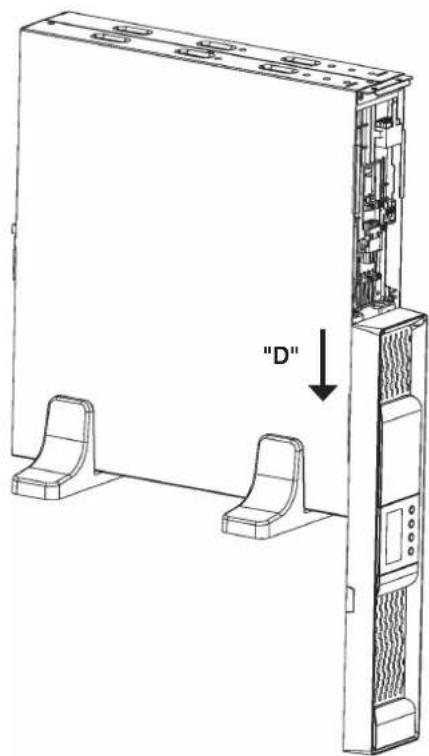
text_image
"D"Fig. 4. Taking out the beautiful front cover.
- To take out the beautiful front cover, proceed as follows (see figure 4):
☐ Remove the two fixing screws "C" from beautiful plastic front cover.
☐ Move the front cover to "D" direction, by applying a hard and moderated knock on its side (side without screws), to free the trim entered into the metallic frame.
The front is free, but still joint to the equipment through the connection bus of the control panel.
- To put the beautiful front cover back, proceed in the reverse way to its removing.
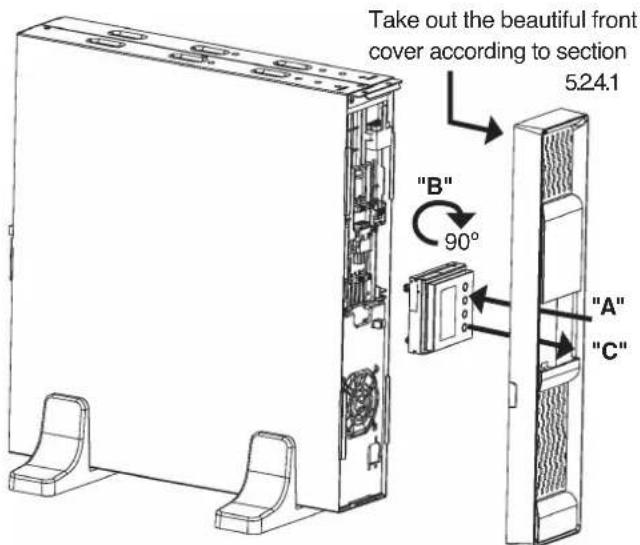
5.2.4.2. Rotation of control panel with LCD panel.
text_image
Take out the beautiful front cover according to section 5.24.1 "B" 90° "A" "C"Fig. 5. Rotation of the control panel with LCD over the beautiful plastic front cover.
- To make easier the message reading when the equipment is vertically installed, it is advisable to rotate 90° clockwise the control panel with LCD (see figure 5).
- Also, it is advised to rotate the control panel, if any tower type equipment requires to be assembled as rack. Consider that the rotation of the control panel will be counter clockwise.
• Proceed as follows:
☐ Remove the beautiful front cover as it is stated in section 5.2.4.1
☐ Slightly open the nails of the four trims that hold the control panel with LCD to the beautiful front cover to free it and push inward "A" to separate both parts.
☐ Rotate it 90° on clockwise "B" and insert it again into the beautiful front cover till click it "C". Check the correct closing of the fixing nails.
☐ Put the beautiful front cover back, in the reverse way as its removing (see section 5.2.4.1).
5.2.4.3. Vertical assembling -tower type-.
- Rotate the control panel according to section 5.2.4.2.
- Take the 4 plastic pieces "A" with angle shape supplied with the equipment and joint them two by two till obtain two supports or stabilizers "B".
- Put the UPS vertical between the two stabilizers supports "B" (see figure 6).
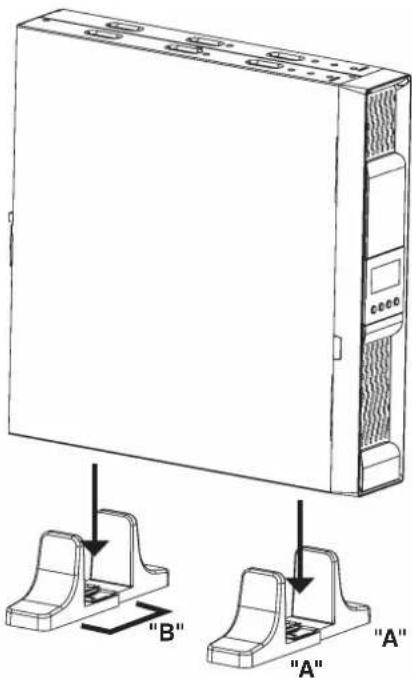
text_image
"B" "A" "A"
natural_image
Line drawing of a server rack unit with two mounting brackets (no text or symbols)Fig. 6. Vertical -tower type- assembling.
5.2.4.4. Vertical assembling -tower type-, with extended back up time (battery module).
- The description of this section is based on an equipment with only one battery module (see figure 7). For a higher quantity of modules proceed to the connection among them.
- Rotate the control panel of the equipment according to section 5.2.4.2.
- Take the 4 plastic pieces "A" with angle shape and supplied with the UPS and the two supplied with the battery module "B", and joint them till obtain two supports or stabilizers "C" to hold the equipment and battery module.
- Put the UPS and battery module on vertical position between the stabilizers supports "C".
- Fix the "D" metallic piece that joint UPS and battery module by means of the supplied screws "E".
- Regarding the connections of the UPS with the battery module, make the following steps, but reading section 5.3.3 previously:
☐ Connect the supplied earth joint cable "F", between the UPS and battery module.
☐ Remove the beautiful front cover of the equipment and battery module, as it is described in section 5.2.4.1.
☐ Take the extensible cable with connector "H" of the battery module and connect it with the "G" connector of the equipment.
To connect it with other battery modules, there is the "J" connector. Take the extensible cable with "H" connector of the beside battery module and connect it to the "J" connector of the previous one. Repeat the same steps for a high quantity of modules.

text_image
"C" "A" "B" "A"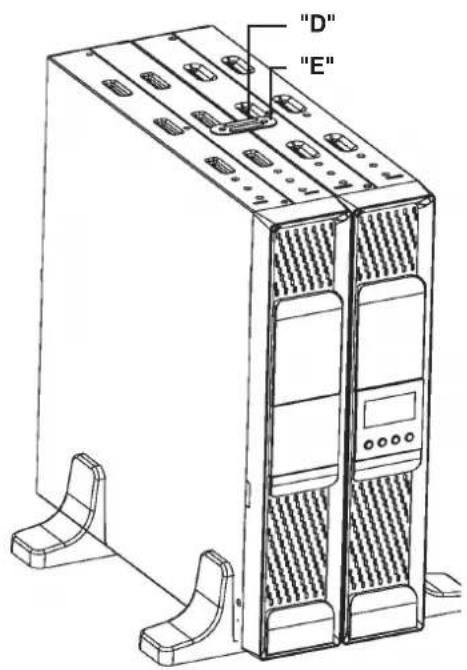
text_image
"D" "E"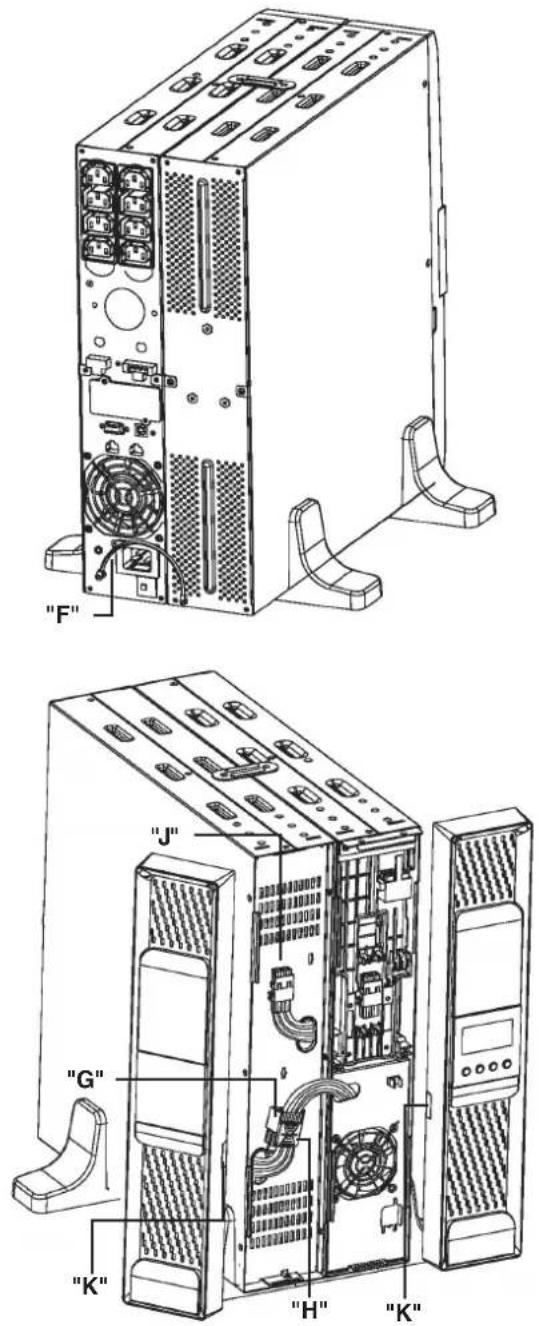
text_image
"F" "G" "K" "H" "J" "K"Fig. 7. Model in vertical -tower type- assembling with extended back up time (battery module).
☐ In the side of each front cover, there are the "K" trims as a notch to go the cables through it with the battery modules. Break the needed trims to pass the connection bus.
☐ Put the beautiful front cover back of the equipment and battery module, as it is stated in section 5.2.4.1.
5.2.4.5. 19" rack cabinet assembling.
- All models can be installed in a 19" rack cabinet, attending the height of each one of them is 2 units.
• Proceed as follows (see figure 8):
☐ Fix both adaptor angles "A" of the equipment as rack, to its side by means of the supplied screws.
☐ Put a UPS in a rack cabinet, it is needed to have the side internal rail as support mode "C". In lack of them and under request, a rails can be supplied as a guide, to be
installed by the end user. Make the assembling at the required height, assuring the correct torque of the fixing screws.
☐ Face the equipment over the rails and enter it to the bottom. Depending on the model of the equipment and as a result of the weight, it is recommended to make the installation works by two persons, and even more when they are done on the top and bottom of the cabinet.
☐ Fix the equipment to the frame of the cabinet by means of the screws "B".

text_image
"A""C"
natural_image
Technical line drawing of a server rack unit with labeled component "B" (no text or symbols beyond label)Fig. 8. 19" rack cabinet assembling.
5.2.4.6. 19" rack cabinet assembling, with extended back up time (battery module).
- This section describes a single equipment with only one battery module (see figure 9). For higher quantity of modules reproduce the connection procedure among them.
- All models can be installed in a 19" rack cabinet, attending the height of each one of them is 2 units.
• Proceed as follows:
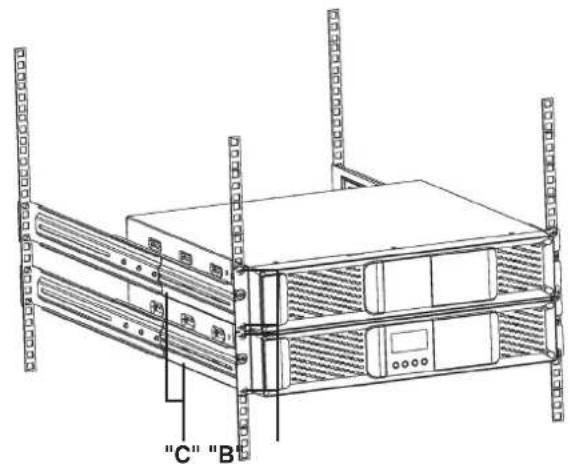
☐ Fix both adaptor angles "A" to the equipment and to the battery module as rack, on their side, by means of the supplied screws.
text_image
"C" "B"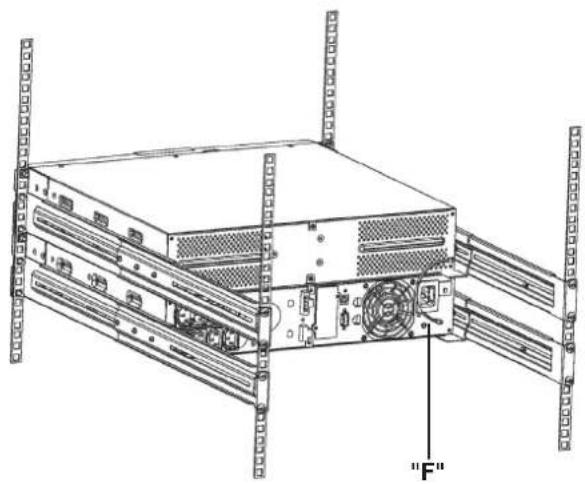
natural_image
Technical line drawing of a server rack with cooling fans and ventilation unit (no text or symbols)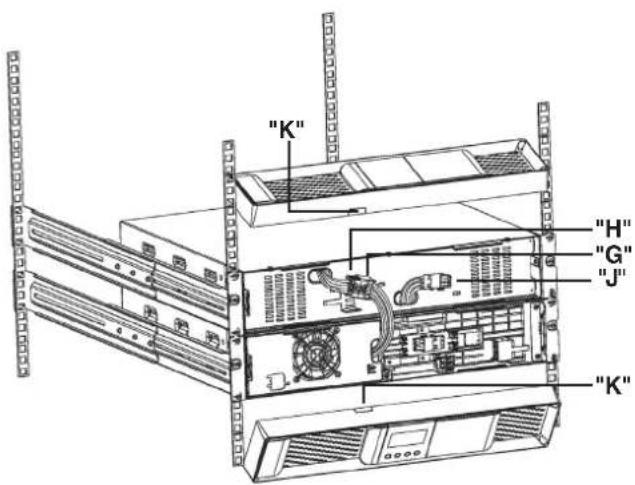
text_image
"K" "H" "G" "J" "K"Fig. 9. Model in rack-mounting format in 19" cabinet, with extended back up time (battery module).
☐ Put a UPS in a rack cabinet, it is needed to have the side internal rails as support mode "C". In lack of them and under request, a universal rails can be supplied as a guide, to be installed by the end user. Make the assembling at the required height, assuring the correct torque of the fixing screws.
☐ Face the equipment over the rails and enter it to the bottom. Proceed in the same way for the battery module.
Depending on the weight of model of the equipment and battery module, it is recommended to make the installation works by two persons.
☐ Fix the equipment to the frame of the cabinet by means of the screws "B".
- Regarding the connections of the UPS with the battery module, make the following steps, but reading section 5.3.3 previously:
☐ Connect the supplied earth joint cable "F", between the UPS and battery module.
☐ Remove the beautiful front cover of the equipment and battery module, as it is described in section 5.2.4.1.
☐ Take the extensible cable with connector "H" of the battery module and connect it with the "G" connector of the equipment.
To connect it with other battery modules, there is the "J" connector. Take the extensible cable with "H" connector of the beside battery module and connect it to the "J" connector of the previous one. Repeat the same steps for a high quantity of modules.
☐ In the side of each front cover, there are the "K" trims as a notch to go the cables through it with the battery modules. Break the needed trims to pass the connection bus.
☐ Put the beautiful front cover back of the equipment and battery module, as it is stated in section 5.2.4.1.
5.3. Connection.
- Cross cable section used in the power supply of the equipment and loads to feed, will be sized according to the nominal current stated in the nameplate sticked on the equipment, by respecting the Low Voltage Electrotechnical Regulations or norms of the corresponding country.
- Installation will have the suitable input protections sized to the current of the equipment and stated in the nameplate of the equipment (residual current devices type B and circuit breaker with C characteristic or any other equivalent one).
Overload conditions are considered as a nonpermanent an exceptional operating mode, so these currents will not be kept in mind when sizing the protections.
- Output protection will be done with a circuit breaker of C characteristic or any other equivalent one.
The equipments can be installed and used by personnel with not specific training, just with only help of this «Manual».
- To insert the option cards, it is needed to remove the fixing screws of the smart slot and the own cover.
When finalising the corresponding tasks, the cover will be installed and its fixing screws again.
5.3.1. Connection of input.
- As this is a device with class I protection against electric shocks, it is essential to install a protective earth conductor (connect earth(⊥)). Connect the conductor before connecting the power supply to the input power block.
- Take the power cord with schuko plug and IEC connector and connect the IEC connector to the UPS inlet. Next insert the schuko plug to the AC mains outlet.
5.3.2. Connection of the IEC outlets.
- As this is a device with class I protection against electric shocks, it is essential to install a protective earth conductor (connect earth(⊥)). Connect the conductor to the terminal, before connecting the power supply to the input power block.
- All the equipments have female IEC outlets, in greater or lesser numbers depending on the power rate of the equipment:
☐ Models up to 1 kVA: 1 group of 4 IEC outlets of 10A.
☐ Models of 1,5 and 2 kVA: 2 groups of 4 IEC outlets of 10A labelled as LS1 and LS2, which can be set through the control panel and/or Win Power.
☐ Models of 3 kVA: 2 groups of 4 IEC outlets of 10A labelled as LS1 and LS2, which can be set through the control panel and/or Win Power, plus a IEC connector of 16A.
☐ Loads can be connected to the IEC outlets, meanwhile the features of the equipment and IEC outlets limitations are not exceeded, otherwise there will be sudden blackouts in the power supply of the connected loads at the output.
- If besides of the critical loads, it is required to connect lagging loads of high consumption, like laser printers or CRT monitors, the inrush currents of these peripherals will be kept in mind in order to avoid blocking the equipment under the worst conditions.
It is better to not connect the loads of this kind, due to the high quantity of energy resources that take from the UPS.
5.3.3. Connection of the external batteries (extended back up time).
- As this is a device with class I protection against electric shocks, it is essential to install a protective earth conductor (connect earth(⊥)). Connect the conductor to the terminal, before connecting the power supply to the input power block.
- To not respect the stated indications in this section and the safety instructions (see chapter 2), means a high risk of electrical discharge and even the death.
- To connect the batteries with the equipment, follow the described steps in sections 5.2.4.4 and 5.2.4.6.
- All the standard UPSs have batteries in the same enclosure, less the B0 and B1 (not available for models equal or below 1kVA). Battery protection is done by internal fuses and not accessible for the end-user.
Battery modules have internal protections for the batteries too and they are not accessible for the end-user.
- IMPORTANT FOR SAFETY: In case of installing the batteries by yourself, the accumulators has to be provided with a two pole circuit breaker protection sized to the features stated in table 3.
- Before starting the connection between the battery module/s and the equipment, check that the equipment and loads are in "Off" position.
Likewise when batteries are installed by the own user, the fuse or switch has to be turned off.
- Connection terminals of external batteries with the equipment are done with a polarised Anderson connector. This connector is not available in models up to 1kVA.
- For battery connection with the equipment, follow the stated steps in sections 5.2.4.4 and 5.2.4.6, keeping in mind the model.
- Each battery module is independent for each equipment. It is completely forbidden to connect to equipments to the same battery module.
| Model | Batteries (U_elemento × N^) = U_nominal / U_floating | Minimum features of fast fuse type | |
| Voltage DC (V) | Current (A) | ||
| SPS.1500.ADV RT | (12 V x 3) = 36 V / 41.4 V | 250 | 50 |
| SPS.2000.ADV RT | (12 V x 6) = 72 V / 82.8 V | 60 | |
| SPS.3000.ADV RT 60 | |||
Tabla 3. Specifications of the protection between the equipment and battery module.
5.3.4. Connection of main input earth terminal (♀ and the earth bonding terminal (♀
- As this is a device with class I protection against electric shocks, it is essential to install a protective earth conductor (connect earth(⊥)). Connect the conductor to the terminal, before connecting the power supply to the input power block.
- Make sure that all the loads connected to the UPS are only connected to the protective earth bonding terminal ( ). The fact of not restricting the earthing of the load or loads and/or the batteries case/s or cabinet/s to this single point will create a return loops to earth which will affect the quality of the supplied power.
- All terminals identified as earth bonding ( 12 ), are joined together, to the main protective earthing terminal ( 12 ) and to the frame of the device.
5.3.5. EPO terminals in UPSs > 1kVA (Emergency Power Off).
- All UPSs have two terminal to install an external button, for Emergency Power Off (EPO).
- As an illustration mode, figure A, it is shown a connector of two pins.
- By default, the equipment is supplied from factory with the EPO circuit as open (NO). So, the UPS will break the output power supply, emergency power off, when opening the circuit:
☐ Either by removing the female connector inserted in the plinth. This connector has a cable bridge to close the circuit (Fig. A).
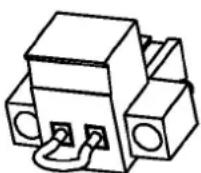
Fig. A
☐ Or by turning on the external button installed and belonging to the end-user. The connection in the button has to be in normally closed because it will open the circuit when turning it on.
- To restore the normal operating mode of the UPS, the connector with the cable bridge has to be fitted back in the terminal strip or to deactivate the EPO button and later on to cancel the EPO status in the control panel. The equipment will be operative.
5.3.6. Communication port.
5.3.6.1. RS232 and USB interface.
- Communication line (COM) is a very low voltage circuit of safety. To preserve the quality, it has to be installed separate from other lines that have dangerous voltages (energy distribution line).
- RS232 and USB interfaces are used by the monitoring software and firmware updating.
• It is not possible to use both ports at the same time. - Signal pin-out of the DB9 connector are shown in table 4. In the connector, the RS-232 signal and dry contacts through optocouplers can be found, not available on models SPS.750.ADV RT and SPS.1000.ADV RT.
RS232 port consists in a serial data transmission, so an important quantity of information can be sent through a communication cable of 3 wires.
| Pin # Description | Input / Output | |
| 1 (*) | Low battery | Output |
| 2 | RXD | Input |
| 3 | TXD | Output |
| 5 (**) | GND / common | - |
| 8 (*) | Mains fault Output | |
(*) Normally open dry contacts (NO), maximum applicable voltage and current is 30V DC and 1A.
Not available on models SPS.750.ADV RT and SPS.1000.ADV RT.
(**) GND for RS232 and common for dry contacts.
Tabla 4. Pin-out of the RS232 and optocouplers dry contact in the DB9 connector.
- USB communication port is compatible with the USB 1.1 protocol for communication software.
5.3.6.2. Smart slot.
- UPSs have a unique slot, hidden rear the cover stated in the views of the equipment as "Smart slot", and allows inserting any of the following options cards:
☐ SNMP for control via Web.
☐ Remote UPS management through Internet or Intranet.
☐ AS400 (for more details see the next section).
- For more information, contact with our S.T.S or our nearest distributor.
5.3.6.3. AS400 Interface with DB9 output (option).
- Communication line (COM) is a very low voltage circuit of safety. To preserve the quality, it has to be installed separate from other lines that have dangerous voltages (energy distribution line).
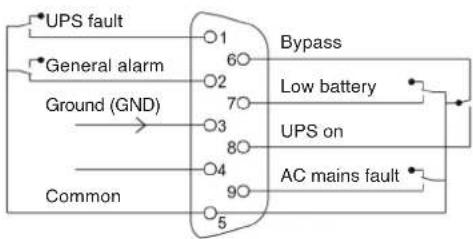
- UPS has a dry contact card for the AS400 communication protocol, it provides digital signals in a free potential way, with a maximum applicable voltage and current of 240 V ac or 30 V dc and 1A. Pin-out of the DB9 connector are stated in figure 10 and detailed in table 5.
- The most common use of this type of ports is to provide the needed information for the closing file software.
- For more information, contact with our S.T.S or our nearest distributor.
flowchart
graph TD
    A["UPS fault"] --> B["Ground (GND)"]
    C["General alarm"] --> B
    D["Common"] --> E["Ground (GND)"]
    B --> F["1"]
    B --> G["2"]
    B --> H["3"]
    B --> I["4"]
    B --> J["5"]
    F --> K["6"]
    G --> L["7"]
    H --> M["8"]
    I --> N["9"]
    J --> O["10"]
    K --> P["Bypass"]
    L --> Q["Low battery"]
    M --> R["UPS on"]
    N --> S["AC mains fault"]
Fig. 10. AS400 dry contact pin-out.
| Description Pin-out Input output | ||
| UPS fault 1 Output | ||
| General alarm 2 Output | ||
| Ground (GND) 3 Input | ||
| Common 5 Input | ||
| Bypass 6 Output | ||
| Low battery | 7 Output | |
| UPS "On" | 8 Output | |
| AC mains fault | 9 Output | |
Tabla 5. AS400 dry contacts alarms.
Installation.
- Remove the screws that fix the protection cover of the slot of the equipment and the own cover.
- Take the AS400 card and insert it into the smart slot. Make sure that it is well connected, so the resistance that the own connector inside the slot makes has to be overcome.
• Fix the card with the previous removed screws. - Connect the DB9 connector from AS400 with the peripheral to be communicated.
5.3.6.4. Protection against transient voltages for modem / ADSL / Fax / ... lines.
- Communication line (COM) is a very low voltage circuit of safety. To preserve the quality, it has to be installed separate from other lines that have dangerous voltages (energy distribution line).
- Connect the main line for the modem / ADSL / Fax /... to the RJ45 connector of the equipment, labelled as "Input".
- Connect the own modem / ADSL / Fax /... to RJ45 connector of the equipment, labelled as "Output".
5.3.7. Software.
• Free software download - WinPower.
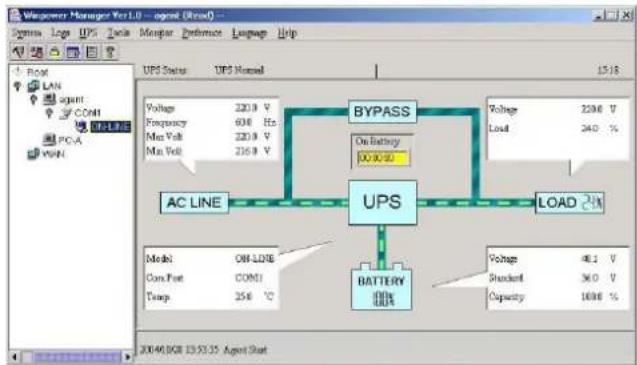
WinPower is a UPS monitoring software, which makes a user-friendly interface of monitoring and management. This software supplies an auto Shutdown for a system based on several PCs in case of an electrical blackout. With this software, the end-users can monitor and manage any UPS in the same IT network, through the RS232 or USB communication port, never mind the distance between them.
flowchart
graph TD
    A["UPS"] --> B["BYPASS"]
    B --> C["AC LINE"]
    B --> D["BATTERY 100kV"]
    B --> E["LOAD 24kV"]
    A --> F["Voltage: 220.9 V, Frequency: 608 Hz, Max Vol: 220.9 V, Max Well: 216.9 V"]
    B --> G["On Battery 30.0-30"]
    B --> H["Voltage: 220.6 V, Load: 240 %"]
    A --> I["Model: ON-LONE"]
    A --> J["Com Port: COM1"]
    A --> K["Temp: 256 °C"]
    A --> L["Voltage: 48.1 V, Standard: 36.0 V, Capacity: 100%"]
Fig. 11. Main screen of the monitoring software.
• Installation procedure:
☐ Go to website:
http://support.salicru.com
☐ Choose the operating platform that you need and follow the instructions described in the web site to download the software.
☐ When downloading the needed files from Internet, enter the following licence to install the software:
511C1-01220-0100-478DF2A.
When the computer is rebooted, WinPower software will be shown as an icon with plug shape and green colour in the system tray, near the clock.
5.3.8. Considerations before commissioning with load connected.
- It is recommended to charge the batteries for 12 hours as minimum before using the UPS for first time. When supplying voltage to the equipment, the battery charger will automatically work.
- (B) equipments with extended back up time has a battery charger with higher quality performances. It is recommended to charge the batteries for 12 hours as minimum before using the UPS for first time.
- Nevertheless, those equipments with extended back up time and with no additional battery charger, it's recommended to charge the batteries of each battery module for 12 hours.
- Although the equipment can work without charging the batteries during the stated time without any problem, the risk of a long blackout has to be valued during the first operating hours and the available autonomy time in the UPS.
- Do not start up the equipment and loads completely till chapter 6 states it.
Nevertheless, when it is done, it will be done gradually to avoid any problem, as minimum in the first commissioning.
- If inductive loads with big inrush current apart from sensitive ones are required to be connected like laser printers or CRT monitors, keep in mind the start inrush currents of these peripherals in order to avoid that the equipment becomes blocked under the worst conditions.
It is better to not connect the loads of this kind, due to the high quantity of energy resources that take from the UPS.
6. Operating.
6.1. Start up.
6.1.1. Controls before commissioning.
- Make sure that all the connections have been made properly, respecting the labelling of the equipment and the instructions of chapter 5.
- Check that the UPS is turned Off (shutdown).
- Be sure that all the loads are turned «Off».
Turn off the connected loads before starting up the UPS, and start up the loads one by one, when the UPS is started up only. Before shutdown the UPS, check all the loads are out of service (Off).
• It is very important to proceed in the established order.
• For UPS view, see figures 1 to 3.
6.2. UPS start up and shutdown.
6.2.1. Initial UPS start up.
- Check that the power supply connection is correct.
- Connect the power cord from UPS input to mains power supply. The LCD panel lights and shows the UPS status, "STBY" (Wait mode).
- Press over the start up key (for more than 3 seconds. The UPS will shift to "NORM" mode (Line mode).
- Check that there are not any alarm or warning activated in the UPS screen and in case of them fix them before proceeding (consult the troubleshooting guide).
- In case of having battery modules connected to the equipment, it is needed to set the complete system (UPS - quantity of battery modules), see section 7.1.6.3.
- To change or modify other factory preset values, consult section 7 of this document.
- In the initial start up, the UPS auto-senses the input frequency and established it as the standard one.
In extreme cases can happen, although is almost not possible, that the mains frequency is very high or low from the nominal and takes as a default value the wrong one. Check the frequency in the control panel and repeat the procedure if this circumstance would occur.
6.2.2. UPS start up, with mains present.
- For the daily start up of the equipment, press over the start up key for more than 3 seconds, the acoustic alarm will beep for 1 sec. and the UPS will start up.
- Fan will be started up and the LCD from control panel will show the status of the equipment.
- After several seconds, the UPS is established on "NORM" (Line mode). If the mains voltage is wrong, the UPS will shift
to battery mode "BATT", with no break in the power supply to the outlets.
- Start up the load/s, without overloading the equipment.
6.2.3. Start up of the UPS, with no mains present.
- Press over the start up key for more than 3 seconds, the acoustic alarm will beep for 1 sec. and the UPS will start up. Fan will be started up and the LCD from control panel will show the status of the equipment.
- After several seconds, the UPS is established on battery mode "BATT". If mains is restored, the UPS will shift to line mode "NORM", with no break in the power supply to the outlets.
- Start up the load/s, without overloading the equipment.
6.2.4. UPS shutdown, with mains present.
- Shutdown the load/s.
- Press over the start up key (for more than 3 seconds to shutdown the inverter. Several seconds after, the LCD panel is shutdown and the complete equipment will be out of service.
- Outlets will be with no voltage.
6.2.5. UPS shutdown, with no mains present.
- Shutdown the load/s.
- Press over the start up key for more than 3 seconds to shutdown the UPS. Several seconds after, the LCD panel is shutdown and the complete equipment will be out of service.
- Outlets will be with no voltage.
7. Control panel.
7.1. Functionalities.

text_image
BAT 888 Hz Vcc 888 Hz Vcc 1 V·12 INPUT OUTPUTFig. 12. Control panel view.
The UPS has a graphic screen with LCD panel with four keys and to colour backlight, blue and red. It is used the blue colour as backlight with black text. When any critical alarm of the equipment is triggered, the light changes to red (see table 8).
7.1.1. Button functions.
| Button Function | Description | |
 | Start up and shutdown ON/OFF | To start up or shutdown the equipment:Press the key for more than 3 sec.. |
| To escape from fault mode:Turn off the input protection from mains or unplug the schucko plug from the wall outlet and press this key for more than 2 seconds. | ||
 | UPS test.acoustoc alarm silencer | To do a battery test:Hold this key pressed for more than 3 seconds.To do the battery lifetime test:Hold this key pressed for more than 10 seconds.To deactivate the acoustic alarm:Press this key for one seconde. |
 | Selection | Press this key to select the setting value, one by one. |
 | Enter | Enter into the setting mode:Hold this key pressed for more than 3 seconds.Introducir la opción de ajuste:Hold this key pressed for more than 1 second.The equipment allows setting the blinking parameters and the characters chain.Confirm settings:Hold this key pressed for 1 second.Escape from setting mode:Hold this key pressed for 3 seconds or the key ON/OFF for 0,5 seconds. |
Tabla 6. Functionality of the control panel keypad.
• Make sure that batteries are completely charged before doing any corresponding test.
- The following critical alarms do not allow deactivating the own acoustic alarm:
Low battery, Fan fault, internal Over temperature in the equipment and battery fault or damaged. - The acoustic alarm can be deactivated when beeping, but it will be activated again as soon as a new alarm is triggered.
7.1.2 Acoustic alarms.
| Code | Condition | Modulation | Alarm silent function |
| BAT T Warning Every 4 sec. It can be silenced | |||
| BTOP Warning Every 1 sec. It can be silenced | |||
| TEST Warning Every 2 sec. It can be silenced | |||
| OPVH | Fault | Continuous | It can be silenced |
| OPVL | Fault | Continuous | It can be silenced |
| OPST | Fault | Continuous | It can be silenced |
| OVLD | Warning | Every 1 sec. | It can be silenced |
| BATH | Warning | Continuous | It can be silenced |
| BATL | Warning | Every 1 sec. | It can't be silenced |
| OVTP | Warning | Every 1 sec. | It can't be silenced |
| OVTP | Fault | Continuous | It can't be silenced. It is silenced when temperature decreases. |
| FNLK | Fault | Continuous | It can't be silenced. It is silences whtn fan works. |
| BTWK | Warning | Continuous | It can be silenced |
Tabla 7. Acoustic alarms. Condition and modulation.
7.1.3. UPS status and colour of the LCD panel, depending on the condition.
By means of an abbreviated chain of 3 to 4 characters (code), in the LCD panel is displayed the status of the equipment.
The following table 8 shows the corresponding description to each letter sequence or chain.
| Code | Condition | Description | LCD colour |
| STBY | Status | UPS working on Standby. | Blue |
| IPVL | Status | Input voltage too low. | Blue |
| IPVH | Status | Input voltage too high. | Blue |
| IPFL | Status | Input frequency too low. | Blue |
| IPFH | Status | Input frequency too high. | Blue |
| NORM | Status | UPS working on line mode. | Blue |
| AVR | Status | UPS working on stabilizer mode. | Blue |
| BATT | Warning | UPS working on battery mode. | Blue |
| BTOP | Warning | Battery disconnected. | Red |
| TEST | Warning | UPS working on battery in life / function test. | Blue |
| OPVH | Fault | Battery mode with output voltage too high. | Red |
| OPVL | Fault | Output voltage is too low. | Red |
| OPST | Fault | Short-circuit at the output. | Red |
| OVLD | Warning | Overload. | Red |
| BATH | Warning | Battery voltage is too high. | Red |
| Code C | Condition Description | LCD colour | |
| BATL | Warning | Battery voltage is too low. | Red |
| OVTP Fault | Fault due to internal temperature too high. | Red | |
| FNLK | Fault | Fan is faulty or doesn't work. | Red |
| BTWK | Warning | Battery faulty or damaged. | Red |
Tabla 8. UPS status and LCD panel colour depending on the condition.
7.1.4. Graphics displayed in the LCD panel.
| Icon | Description | Function |
| 888^Hz_Vnc | Input voltage and frequency. | It displays the voltage and frequency values of the input. |
 | Input plug indicator. | The icon is displayed in the screen, if the mains is inside the permissible range of the equipment. |
| 888^Hz_Vnc | Output voltage and frequency. | It displays the voltage and frequency values of the output. |
| C · H2 | Output plug indicator. | The UPS has two outlets groups, >1 kVA models. the icon is displayed when their respective outlets have voltage. |
 | UPS status / User setting screen. | Acronym chain of the status mode. They diosplay the condition of the equipment (see table 8). Acronym chain of the values. They displays the options of the user setting (see table10). |
| Warning indicator. | It is activated as warning fault mode or alarm in the equipment. | |
| Setting or configuration. | It is activated when the equipment is on setting or configuration mode . | |
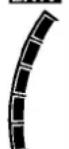 | Battery level graph. | It displays the battery charge level in %, which is equal to the available energy capacity. The bar is divided into five parts, each part corresponds to a 20 % of the total capacity of the battery set. |
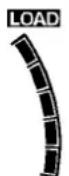 | Load level graph. | It displays the load level connected at the output of the equipment in %, equivalent to the power consumed in real time. The bar is divided into five parts, each part corresponds to a 20 % of the load or nomknal power of the equipment. |
Tabla 9. Button or control panel keypad functionality.
7.1.5. User settings.
By means of an abbreviated chain of 2 to 4 characters (code), the configurable parameters are displayed in the LCD panel.
Table 10 shows the corresponding description to each one of these letters sequences or chain, as well as the possible selectable variables or values.
| Code | Description | Values |
| OPV Output voltage selection. | (220)=220V(230)=230V(240)=240V | |
| AVR | Input voltage type | (000)=Normal range(001)=Wide range(002)=Gen set |
| EBM External battery module | 0 - 9 it is the quantity of battery modules | |
| TEST | Auto test. | (000) Deactive(001) Active |
| AR | Automatic restart. | (000) Deactive(001) Active |
| GF | Green mode. | (000) Deactive(001) Active |
| BZ | Acoustic alarm control. | (000) Deactive(001) Active |
| LS1 | IEC outlets group 1(not available in equipments ≤ 1 kVA) | (000) Deactive(001) Active |
| LS2 | IEC outlets group 2(not available in equipments ≤ 1 kVA) | (000) Deactive(001) Active |
Tabla 10. UPS status and character chain description.
7.1.6. Explanations about the user settings and other ones.
7.1.6.1. Operating modes.
• Normal range: In this mode, the input voltage range are ±20%.
- Wide range: In this mode, the input voltage range are from +20% to -30%.
- Gen mode: On this mode the load is transferred to battery mode (inverter output), when frequency is higher than the upper and lower threshold, of 40 and 70 Hz respectively.
- Battery mode (inverter output): When the UPS is working out from the range or during a blackout, the acoustic alarm beeps every four seconds. Also the LCD panel displays the "BATT" indication, corresponding to the status of the equipment to show the UPS operating mode -Battery mode-. If on this condition, the battery capacity is low, the alarm beeps once per second and the LCD panel displays the "BATL" indication.
- Standby mode.
When the UPS is shutdown and it remains connected to the wall outlet, it will be on standby mode. In the LCD panel will display "STBY" to show that the power supply to the loads is not available. On this mode the battery will be charged, if it was needed.
7.1.6.2. IEC outlet groups.
- It is possible to set the status (active or deactive) of the both available connector groups LS1 and LS2, at any time and separately.

This function is not available in equipments ≤ 1 kVA, because there is only one IEC connector group.
- To set the IEC outlet group through the LCD panel of the equipment, proceed as follows:
☐ 1.- Enter into the configuration mode.
Press the key for more than 3 seconds and the UPS will shift to setting mode.
☐ 2.- Select the configuration elements.
Press the key to select the configurable elements stated in table 10 and go forward or backward till reaching "LS1" or "LS2" as it is required.
☐ 3.- Validate the configuration element.
When the LCD panel displays "LS1" or "LS2", press the key for more than one second to enter into the element to set. The values of the variables blink (blinking mode).
☐ 4.- Select the configuration value.
Press the key to select the configuration value. Select the value (001) or (000) to set the desired IEC outlet group, as turned on or off respectively.
☐ 5.- Confirm the configuration.
Press the key for one second, the UPS will return to the previous point 2.
6.- Escape from setting mode.
Press the key ← for 3 seconds or the key fob0,5 seconds, to escape from the setting mode.
7.1.6.3. Setting the UPS to connect it with "n" battery modules.
- In order to be sure that the LCD panel displays the correct remaining capacity of the batteries, the available quantity of battery modules has to be set and updated when facing any modification, otherwise the displayed data will not be real.

Models ≤ 1 kVA do not have connectors to extend the back up time.
• Proceed as follows:
☐ 1.- Enter into the configuration mode.
Press the key for more than 3 seconds and the UPS will shift to setting mode.
☐ 2.- Select the configuration elements.
Press the key ↑ to select the configurable elements stated in table 10 and go forward or backward till reaching "EBM".
☐ 3.- Validate the configuration element.
When the LCD panel displays "EBM", press the key for more than one second to enter into the element to set.
☐ 4.- Select the configuration value.
Press the key ↗ to select the quantity of battery modules available for the UPS.
☐ 5.- Confirm the configuration.
Press the key for one second, the UPS will return to the previous point 2.
6.- Escape from setting mode.
Press the key ← for 3 seconds or the key ☐0,5 seconds, to escape from the setting mode.
7.1.6.4. Setting the "Green" function.
- If this function is activated, the UPS disable the output when it is on battery mode when it is not detected a minimum of consumption. By default, this feature is deactivated, if it is needed to modify it, proceed as follows:
☐ 1.- Enter into the configuration mode.
Press the key for more than 3 seconds and the UPS will shift to setting mode.
☐ 2.- Select the configuration elements.
Press the key to select the configurable elements stated in table 10 and go forward or backward till reaching "GF".
☐ 3.- Validate the configuration element.
When the LCD panel displays "GF", press the key for more than one second to enter into the element to set.
☐ 4.- Select the configuration value.
Press the key ☐ select the configuration value. Select the value (001) to activate function.
☐ 5.- Confirm the configuration.
Press the key for one second, the UPS will return to the previous point 2.
6.- Escape from setting mode.
Press the key ← for 3 seconds or the key for 0,5 seconds, to escape from the setting mode.
8. Maintenance, warranty and service.
8.1. Maintenance of the battery.
- Pay attention to the safety instructions regarding battery (see document EK266*08).
- The equipment from SPS.ADVANCE RT series only requires a minimum maintenance. The used battery in the standard models is Pb-Ca, sealed, VRLA and maintenance free. These models require a minimum of reparations. The only requirement is to charge the UPS regularly, in order to prolong the battery lifetime. Meanwhile, it is connected to the power supply, never mind if the UPS is ON or OFF, it will keep the batteries charged.
- In equipments that include Pb-Ca batteries, the figures, stated in table 2 of the EK266*08 document, of charge period time depending on the temperature that they are exposed, must be respected, otherwise the warranty will be invalidated.
- Under normal conditions, the battery lifetime is from 3 to 5 years 25^ C. In case that the battery was not in good conditions, it has to be replaced before. This replacement has to be done by qualified staff.
• Always replace them with the same quantity and type. - Do not replace one battery only. All batteries have to be replaced at the same time and following the instructions of the manufacturer.
8.1.1. Notes for installing and replacing the batteries.
- If it is needed to replace the connection of any wire, purchase original parts through authorised distributors or service centres in order to avoid overheating or sparks with risk of fire because the size could not be enough.
- Do not short the + and - poles of the batteries, there is risk of fire or electrocution.
- Be sure that there is no voltage before touching the batteries. Battery circuit is not isolated from the input circuit. Hazardous voltages can be found between the battery and earth terminals.
- Even with the input circuit breaker switch from protection panel is turned off, the internal parts of the UPS are still connected to the batteries, so there are hazardous voltages inside.
Therefore, before doing any reparation or maintenance task, the internal battery fuses and/or the interlink connections between them and the UPS, have to be removed.
- Batteries have hazardous voltages. The battery maintenance and replacement have to be done by qualified personnel and familiarised with them. Nobody else can manipulate them.
8.2. UPS Trouble Shooting guide.
If the UPS doesn't work properly, check the information given by the LCD of the control panel, according to the models and power of the equipment. Try to solve the problem by means of the established steps in the tables 11 and 12. In case the problem persists, consult with our Service and Technical Support S.T.S..
When it is needed to contact with our Service and Technical Support S.T.S., provide the following information:
• UPS model and serial number.
• Date when the problem occurred.
- Complete description of the problem, including the information given by the LCD panel and the status of the alarms.
- Power supply condition, type of load and the level connected to the UPS, ambient temperature, cooling conditions.
- Information of the batteries (capacity and battery quantity), if the equipment is (B0) or (B1) -with external batteries-.
• Other informations that you may think that they are important.
821. FAQ. Acoustic alarms.
| Acoustic alarm Possible cause | Solution | |
| Beep every 4 seconds. The equipment is on battery mode | Check the input voltage and/or the power cord is connected to the AC wall outlet. | |
| Beep every second with LCD from control panel with "BATL" indication. | Low battery voltage. Save the taks in process and shutdown the load/s and the UPS. | |
| Beep every second with LCD from control panel with "OVLD" indication. | Overload at the output. | Check the load level connected at the output and proceed to remove the exceeded one, keeping in mind the critical loads. |
| LCD panel is still on red colour | UPS fault. | Consult with the S.T.S.. |
Tabla 11. Acoustic alarms.
8.2.2. FAQ. General indications.
| Problem Possible cause Solution | ||
| The equipment doesn't start up when pressing over the corresponding key. | Internal fuse blown. Consult with the S.T.S.. | |
| The equipment is ON but the loads do not have power supply | Jumpers at the output are not connected properly. | Connect the output jumpers. |
| There is no voltage in the outlets. | Check LS1 and LS2 (not available in models up to 1 kVA), are selected from "001" to "000". | |
| Back up time is too short. | Battery is low or the load level is very low. | Recharge the battery for 12 hours as minimum. |
| Battery is depleted or damaged Consult with the S.T.S. to replace it. | ||
| Continuous alarm and LCD in red colour. | Equipment fault | Consult with the S.T.S.. |
| Buttons or keys are not operative. | Setting mode is not the suitable. Check the setting procedure. | |
| Buttons or keys are faulty. Consult with the S.T.S.. | ||
Tabla 12. Troubleshooting guide. Warning indications.
8.3. WARRANTY CONDITIONS.
8.3.1. Warranty terms.
The warranty conditions for the acquired product can be found in our website and in that you will be able to register it. It is recommended to do it as soon as possible in order to include it in the Technical Service & Support (T.S.S.) database. Among other advantages, it will be easier to make any regulatory process to allow the T.S.S. action in case of any hypothetical fault.
8.3.2. Out of scope of supply.
Our company is not forced by the warranty if it appreciates that the defect in the product doesn't exist or it was caused by a wrong use, negligence, installation and/or inadequate testing, tentative of non-authorised repairing or modification, or any other cause beyond the foreseen use, or by accident, fire, lightnings or other dangers. Neither it will cover, in any case, compensations for damages or injuries.
8.4. Technical service network.
Coverage, both national and international, from our Technical Service & Support (T.S.S.), can be found in our Website.
9. Annexes.
9.1. Main general specifications.
| Models: SPS.ADV RT | ||||||||
| Available powers (kVA / kW) | 0.750 / 0.675 | 1 / 0.9 | 1.5 / 1.35 | 1.5 / 1.35 (B1) | 2 / 1.8 | 2 / 1.8 (B1) | 3 / 2.7 | 3 / 2.7 (B1) |
| Technology Line Interactive with sinewave output | ||||||||
| Input | ||||||||
| Permissible power factor of the laods 0.9 | ||||||||
| Cold start (from batteries) Yes, by default with 50 Hz frequency | ||||||||
| Input topology Single phase | ||||||||
| Quantity of wires | 3 wires - Phase R(L) + Neutral (N) and earth | |||||||
| Voltage | 220 / 230 / 240 V AC | |||||||
| Voltage range | 176 ÷ 288 V AC | |||||||
| Transfer voltage: | ||||||||
| - To battery due to low voltage mains | 176 / 184 / 192 V AC (±4 %) -Normal; 154 / 161 / 168 V AC (±4 %) -Wide ranges- | |||||||
| - Return from battery due to voltage restored | 186 / 194 / 202 V AC (±4 %) -Normal; 164 / 171 / 178 V AC (±4 %) -Wide ranges- | |||||||
| - Limit voltage Boost | 198 / 207 / 216 V AC (±4 %) | |||||||
| - Return voltage Boost | 206 / 215 / 255 V AC (±4 %) | |||||||
| - Limit voltage Buck | 233 / 243 / 254 V AC (±4 %) | |||||||
| - Return voltage Buck | 225 / 236 / 246 V AC (±4 %) | |||||||
| - To battery due to high voltage mains | 264 / 276 / 288 V AC (±4 %) | |||||||
| - Return from battery due to voltage restored | 254 / 266 / 278 V AC (±4 %) | |||||||
| Protection range against overvoltages | L-N: 320V 460 Joules / 6500 A | |||||||
| Input frequency range - Normal | (45 - 55 / 55 - 65 Hz) (±0,1 Hz); Autosensing | |||||||
| Input frequency range - Genset mode | 40 - 70 Hz | |||||||
| Generator set | Yes | |||||||
| Output | ||||||||
| Power factor | 0.9 | |||||||
| Power (kVA) | 0.750 | 1 | 1.5 | 2 | 3 | |||
| Power (kVW) | 0.675 | 0.900 | 1.350 | 1.8 | 2.7 | |||
| Wave shape | Pure sinewave | |||||||
| Nominal voltage | 220 / 230 / 240 V AC, selectable | |||||||
| Voltage accuracy (battery mode) | ±5 % | |||||||
| Voltage THD linear load | <10 % | <3 % | ||||||
| Voltage THD non-linear load | <12 % | <6 % | ||||||
| Frequency | With mains present, synchronised to nominal of the input (45-55 / 55-65 Hz) | |||||||
| Free running (battery mode) 50 / 60 ±0.1 Hz | ||||||||
| Permissible load power factor | 0.5 to 1 inductive | |||||||
| Transfer time | ||||||||
| Line mode to battery mode (normal mode) | 2 - 6 ms. | |||||||
| Line mode to battery mode (Genset mode) | 13 ms as maximum | |||||||
| Efficiency at full load: | ||||||||
| Line mode with charged battery | 98 % | 96 % | 98 % | |||||
| Buck mode with charged battery | >95 % | |||||||
| Boost mode with charged battery | >92 % | |||||||
| Battery mode | 82 % | |||||||
| Overload on line mode | 110 % ± 10 % : 3 min. | 110 - 118 % : 3 min. | ||||||
| 150 % ± 10 % : 0,2 sec. | 119 - 160% : 0,2 sec. | |||||||
| Overload on battery mode | ≥110 % ± 10 % : 30 sec. | ≥110 % ± 6 % : 30 sec. | ||||||
| ≥120 % ± 10 % : 0,1 sec. | ≥120 % ± 6 % : 0,1 sec. | |||||||
| Crest factor | 3:1 | |||||||
| Batteries (AGM sealed 3 - 5 years lifetime) | ||||||||
| Voltage | 12 V DC | |||||||
| Capacity | 9 Ah | 7 Ah | 9 Ah | |||||
| Quantity of batteries in serial / voltage string | 2 / 24V DC | 3 / 36 V DC | 6 / 72 V DC | 6 / 72 V DC | ||||
| Low battery voltage, block | 11.4 V DC | |||||||
| Low battery voltage | 10.8 V DC block | |||||||
| End voltage blocking | 9.6 V DC block | |||||||
| Internal battery charger | ||||||||
| Floating voltage per block | 13.6 - 13.8 V DC | |||||||
| Maximum charging current | 1.1 A | 1.5 A | - | 1.5 A | - | 1.5 A | - | |
| Recharging time (charger 1.1 or 1.5 A) | 8 hours at 90% | 4 hours at 90% | 3 hours at 90% | 4 hours at 90% | ||||
| Optional charger | - | - | 7 A | - | 7 A | - | 7 A | |
| Generals | ||||||||
| Cold start Yes | ||||||||
| Green mode Yes (selectable) | ||||||||
| IEC inlet connectors 10 A 16 A | ||||||||
| IEC outlet connectors | 4 x IEC 10A | 8 x IEC 10A (4 x LS1 + 4 x LS2) + 1 IEC 16 A (3kVA UPS only) | ||||||
| Communication ports | 2 (RS232 -DB9- and USB, mutually exclusive) | |||||||
| Dry contacts (*) | Yes, through optocouplers (low battery and mains fault). Included in the same connector as the RS232 port. | |||||||
| Protection connectors for Modem / ADSL / Fax | 1 input / 1 output | |||||||
| Installation connector for external EPO | No | Yes | ||||||
| Slot for COM option cards | No | Yes | ||||||
| Option cards (to insert into the slot) | No | AS400, SNMP, remote management internet or intranet | ||||||
| Monitoring software | WinPower (free download) | |||||||
| Ruido acústico a 1 m en modo línea | < 40 dB | < 45 dB | ||||||
| Acoustic noise at 1 m on battery mode | < 45 dB | < 50 dB | ||||||
| Operating temperature | 0.. +40 °C | |||||||
| Storage temperature | -15.. +50 °C | |||||||
| Storage temperature with no batteries | -20.. +70 °C | |||||||
| Operating altitude | ≤ 1500 m (0.. +40 °C) | |||||||
| 1501 - 3000 m (0.. +35 °C) | ||||||||
| Relative humidity | 0-95 % non-condensing | |||||||
| Protection degree | IP20 | |||||||
| UPS dimensions -Depth x Width x Height- (mm) | 436 x 438 x 86.5 (2U) | 608 x 438 x 86.5 (2U) | ||||||
| Bat. dimensions -Depth x Width x Height- (mm) | - | 436 x 438 x 86.5 (2U) | 608 x 438 x 86.5 (2U) | |||||
| UPS weight (kg) | 13 | 14 | 18.5 | 12.5 | 28 | 15 | 29 | 17 |
| Battery modules weight (kg) | - | 20.5 | 33.5 | |||||
| Safety | EN-IEC 62040-1; EN-IEC 60950-1 | |||||||
| Electromagnetic compatibility (EMC) | EN-IEC 62040-2 | |||||||
| Marking | CE | |||||||
| Quality system | ISO 9001 and ISO 140001 | |||||||
(*) Not available on models SPS.750.ADV RT and SPS.1000.ADV RT.
Tabla 13. General technical specifications.
9.2. Glossary.
- AC.- It is nominated as alternating current (abbreviation in Spanish CA and in English AC) to the electrical current in which the magnitude and direction varies in a cyclic way. The most common wave shape of the alternating current is sinewave, because the energy transmission is better. Nevertheless, some applications could need other period wave shapes, like triangular or square.
- Bypass.- Manual or automatic, it is the physical junction between the input and the output electric device.
- DC.- The direct current (CC in Spanish, DC in English) is the continuous electron flow through a cable between two points with different potential. Unlike the alternating current, in direct current the electrical loads always flow in the same direction from the highest potential point to the lowest one. Although, usually the direct current is identified with the constant current (for example the one supplied by the battery), it is continuous any current that always maintain the polarity.
-
DSP.- It is the acronym of Digital Signal Processor. A DSP is a system based on a processor or microprocessor that has instructions in it, a hardware and an optimised software to develop applications where numerical operations are needed with very fast speed. Due to this, it is very useful to process analogical signals in real time: in a system that runs in this way (real time) samples are received, usually coming from an analogical/digital converter(ADC).
-
Power factor.- It is defined as power factor, p.f., of an alternating current circuit, as the ratio between the active power, P, and the apparent power, S, or as the cosines of the angle that make the current and voltage vectors, designating as , being the value of that angle.
- GND.- The term ground, as its name states, refers to the potential of the earth surface.
- EMI filter.- Filter able to decrease the electromagnetic interferences, which is the perturbation that happens in a radio receptor or in any other electrical circuit caused by the electromagnetic radiation coming from an external source. Also it is known as EMI, ElectroMagnetic Interference, Radio Frequency Interference or RFI. This perturbation can derate or limit the efficiency of the circuit.
- IGBT.- The Insulated Gate Bipolar Transistor is a semiconductor device that is used as a controlled switch in power electronic circuits. This device has the feature of the gate signal of the effect field transistors with the capacity of high current and low voltage saturation of the bipolar transistor, combining an isolated FET gate for the input and a bipolar transistor as switch in a single device. The triggering circuit of the IGBT is as the MOSFET one, while the driving features are like the BJT.
-
Interface.- In electronic, telecommunications and hardware, an interface (electronic) is the port (physical circuit) through which are sent or received signals from a system or subsystems toward others.
-
KVA.- The voltampere is the unit of the apparent power in electrical current. In direct current is almost equal to the real power but in alternating current can defer depending on the power factor.
- LCD.- LCD acronym of Liquid Crystal Display, device invented by Jack Janning, who was employee of NCR. It is an electric system of data presentation based on 2 transparent conductor layers and in the middle a special crystal liquid that have the capacity to orientate the light when trespassing.
- LED.- LED acronym of Light Emitting Diode, is a semiconductor device (diode) that emits light almost monochrome with a very narrow spectrum, it means, when it is direct polarized and it is crossed by an electric current. The colour, (wave longitude), depends on the semiconductor material used in its construction, being able to vary from the ultraviolet one, going through the visible spectrum light, to the infrared, receiving these last ones the denomination of IRED (Infra Red Emitting Diode).
- Circuit breaker.- A circuit breaker or switch, is a device ready to break the electrical current of a circuit when it overcomes the maximum set values.
- On-Line mode.- Regarding to an equipment, it is on line when it is connected to the system, and it is in operation, and usually has its power supply turned on.
- Inverter.- An inverter, is a circuit used to convert direct current into alternating current. The function of an inverter is to change an input voltage of direct current into a symmetrical output voltage of alternating current, with the required magnitude and frequency by the user or the designer.
- Rectifier.- In electronic, a rectifier is the element or circuit that allows to convert the alternating current into direct current. This is done by rectifier diodes, which can be solid state semiconductors, vacuum or gassy valves as the mercury vapour. Depending on the features of the alternating current power supply used, it is classified as single phase, when they are fed by a single phase electrical mains, or three phase when they are fed by the three phases. Depending on the rectification type, they can be half wave, when only one of the current semi-cycles is used, or full wave, where both semicycles are used.
- Relay.- The relay(in French relais, relief) is an electromechanical device that works as a switch controlled by an electric circuit where, through an electromagnet, a set of contacts are moved and it allows to open or to close other independent electric circuits.
- SCR.- Abbreviation of «Silicon Controlled Rectifier», called commonly as Thyristor: semiconductor device of 4 layer that works as almost an ideal switch.
- THD.- They are the acronyms of «Total Harmonic Distortion». The total harmonic distortion is done when the output signal of a system is not equivalent to the one that enter into it. This lack of linearity affects to the wave shape, because the equipment has introduced harmonics that they were not in the input signal. As they are harmonics, it means multiple of the input signal, this distortion is not so dissonant and it is more difficult to detect.


salicru
The Technical Service & Support (T.S.S.) network, Commercial network and warranty information are available in website:
www.salicru.com
Product Range
Uninterruptible Power Supplies (UPS)
Lighting Flow Dimmer-Stabilisers
DC Power Systems
Static Inverters
Photovoltaic Inverters
Voltage stabilisers

@salicru_SA
www.linkedin.com/company/salicru


