
OPTOMA HD700X - Projector

HD700X - Projector OPTOMA - Free user manual and instructions

Find the device manual for free HD700X OPTOMA in PDF.

📄 51 pages English EN Download 💬 AI Question 1 questions
Notice OPTOMA HD700X - page 1
View the manual : Français FR English EN
Pick your language and provide your email: we'll send you a specifically translated version.

User questions about HD700X OPTOMA

1 question about this device. Answer the ones you know or ask your own.

Ask a new question about this device

The email remains private: it is only used to notify you if someone responds to your question.

How to unlock a blocked source on the OPTOMA HD700X projector?
Frequently Asked Questions - 17/01/2026
Response Notice-Facile

On the OPTOMA HD700X projector, the Source Lock function controls the detection of connection ports. When this function is enabled (On), the projector only searches for the currently defined port and ignores other inputs, which can give the impression that a source is blocked when the device is turned off.

To unlock the source and restore automatic detection, follow these steps: Turn on the projector and press the Menu button on the remote control or control panel. Use the directional keys to navigate to Options and press Enter. Scroll down to Source Lock and select it.

In the Source Lock menu, you will see two options: On (locks the projector to the currently connected port) and Off (enables automatic detection on all ports). Set this option to Off to allow the projector to automatically search for a source on all ports (VGA, HDMI, Composite, etc.) when it starts up. Confirm with Enter and exit the menu.

If the problem persists after this procedure, check that all signal cables are properly connected and in good condition. You can also try a complete restart of the projector: turn it off by pressing Power twice, wait for the cooling cycle (about 10 to 15 seconds), unplug the power cord for 30 seconds, then plug it back in and turn the device on. This reset may resolve source detection issues.
Respond (be the first)

Download the instructions for your Projector in PDF format for free! Find your manual HD700X - OPTOMA and take your electronic device back in hand. On this page are published all the documents necessary for the use of your device. HD700X by OPTOMA.

USER MANUAL HD700X OPTOMA

natural_image Symbolic illustration of a computer monitor with a red X mark and eye, enclosed in an oval (no text or symbols)
natural_image Line drawing of a projector with a small inset showing the lens (no text or symbols)
natural_image Coiled black cable with multiple colored connectors (red, blue, green) attached, no visible text or symbols.
natural_image Coiled black cable with two connectors, no visible text or symbols
text_image Diagram of a projector with numbered parts labeled 1 through 6

OPTOMA HD700X - 1

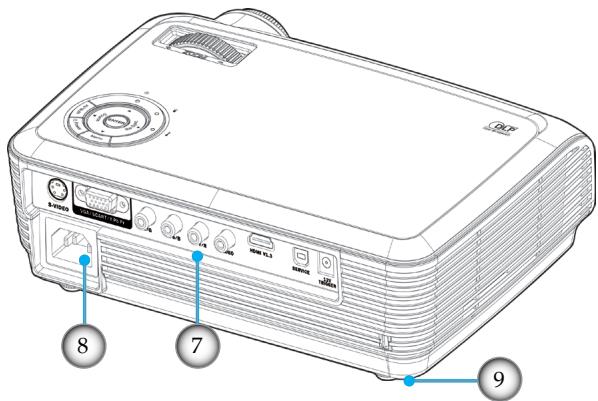
text_image 8 7 9
natural_image Technical line drawing of a projector with visible blades and casing (no text or symbols)
natural_image Composite image showing illuminated skyscrapers at night and a cable-stayed bridge at night, both without visible text or symbols.

If ceiling mounted, use caution when opening lamp panel - Please see user manual for details

text_image Exploded view diagram of a projector with numbered parts and directional arrows indicating assembly steps

Unit A, 27/F Dragon Centre,

79 Wing Hong Street, Tél : +852-2396-8968

Manual assistant
Powered by Anthropic
Waiting for your message
Product information

Brand : OPTOMA

Model : HD700X

Category : Projector