DC917S - Doorbell HONEYWELL - Free user manual and instructions
Find the device manual for free DC917S HONEYWELL in PDF.


Pick your language and provide your email: we'll send you a specifically translated version.
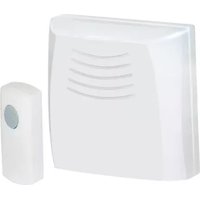
| Type | Wireless doorbell with melody selection |
| Brand | Honeywell |
| Model | DC917S |
| Colour | White (typical) |
| Housing Material | ABS plastic |
| Receiver Dimensions | Approx. 8 x 12 x 3 cm (3.1 x 4.7 x 1.2 in) |
| Transmitter Dimensions | Approx. 4 x 7 x 2 cm (1.6 x 2.8 x 0.8 in) |
| Total Weight | Approx. 120 g (4.2 oz) including batteries |
| Power Source | Receiver: 3x AA batteries; Transmitter: 1x 12V battery (e.g. 23A) |
| Operating Range | Up to 150 m (490 ft) in open field |
| Sound Level | Adjustable, up to 80 dB |
| Number of Chimes | 36 selectable melodies |
| Volume Levels | 4 levels including silent mode |
| Visual Alert | LED flash on receiver |
| Waterproof Rating | IP44 (transmitter) |
| Intended Use | Indoor receiver, outdoor push button |
| Installation | No wiring required; screws and adhesive tape included |
| Maintenance | Clean with a soft, dry cloth; avoid moisture and harsh chemicals |
| Safety Features | Low battery indicator; CE marked |
| Spare Parts | Replacement batteries, transmitter, receiver mount |
| Repairability | User-replaceable batteries; no special tools required |
| Compliance | RoHS compliant, CE marked |
| Package Contents | Receiver, transmitter, mounting kit, instruction manual |
Frequently Asked Questions - DC917S HONEYWELL
How do I install the Honeywell DC917S doorbell?
The installation is simple. Mount the transmitter outside using the included screws or adhesive tape. Plug the receiver into an indoor power socket or insert batteries, then pair the devices if needed. No wiring is required.
What batteries does the doorbell require?
The receiver uses 3x AA batteries, and the transmitter requires a 12V battery (type 23A). Always replace batteries with fresh ones of the correct type for optimal performance.
Can I change the chime melody?
Yes, the DC917S offers 36 different melodies. Press the melody button on the receiver to cycle through the options until you find the one you prefer. The selection is saved automatically.
How can I adjust the volume?
The receiver has 4 volume levels, including a silent mode. Use the volume button to cycle through the settings. The chosen level is retained even after a power cycle.
What is the wireless range in real-world conditions?
The specified range is up to 150 m (490 ft) in an open field. In a typical home, walls and metal objects reduce the effective range; however, it usually covers a standard house without issues.
Is the outdoor push button weatherproof?
Yes, the transmitter has an IP44 rating, which means it is protected against splashing water and light rain. Avoid submerging it in water.
How do I reset or clear the doorbell?
To reset the pairing, remove the batteries from both units for a few seconds, then reinsert them. Press and hold the pairing button on the receiver and activate the transmitter to re-link them.
Why is the doorbell not ringing?
First, check that batteries are properly installed in both units. Ensure the transmitter is within range and not blocked by large metal objects. If the LED on the transmitter flashes but the receiver is silent, try resetting the pairing or selecting a new volume level.
Can I use the doorbell without wiring?
Absolutely, the Honeywell DC917S is 100% wireless. It runs on batteries for both the transmitter and the receiver, so you can install it anywhere without connecting to your home's electrical system.
Where can I find spare parts or accessories?
Spare parts such as replacement transmitters, receivers, and mounting brackets are available from Honeywell's official website or authorized dealers. For common items like batteries, check any local electronics store.
User questions about DC917S HONEYWELL
0 question about this device. Answer the ones you know or ask your own.
Ask a new question about this device
No questions yet. Be the first to ask one.
Download the instructions for your Doorbell in PDF format for free! Find your manual DC917S - HONEYWELL and take your electronic device back in hand. On this page are published all the documents necessary for the use of your device. DC917S by HONEYWELL.
USER MANUAL DC917S HONEYWELL


Manual assistant
Powered by Anthropic
Waiting for your message
Product information
Brand : HONEYWELL
Model : DC917S
Category : Doorbell