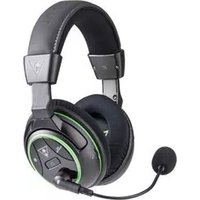
731855040407 - Headphones TURTLE BEACH - Free user manual and instructions
Find the device manual for free 731855040407 TURTLE BEACH in PDF.


Pick your language and provide your email: we'll send you a specifically translated version.
| Product Type | Gaming Headset |
| Brand | Turtle Beach |
| Model Number | 731855040407 |
| Design | Over-ear, circumaural |
| Connectivity | Wired 3.5mm audio jack, USB connection for power/audio |
| Compatibility | PC, Xbox, PlayStation, Nintendo Switch, Mobile devices |
| Speaker Diameter | 50mm neodymium drivers |
| Frequency Response | 20 Hz – 20 kHz |
| Impedance | 32 ohms |
| Microphone | Noise-cancelling flip-to-mute mic with flexible boom |
| Audio Controls | On-ear volume wheel, mic mute button |
| Power Source | Powered via 3.5mm jack or USB (no batteries required) |
| Cable Length | 1.2 meters braided cable |
| Dimensions (W x H x D) | 20 x 18 x 9 cm |
| Weight | 310 g |
| Maintenance & Cleaning | Wipe ear cushions and headband with soft dry cloth; do not immerse in water |
| Safety Warnings | Keep volume at moderate levels to prevent hearing damage |
| Spare Parts & Repairability | Replaceable ear cushions and cable available via Turtle Beach official website |
| Warranty | 1 year limited manufacturer warranty |
| Package Contents | Headset, detachable microphone, USB/audio cable, user manual |
Frequently Asked Questions - 731855040407 TURTLE BEACH
How do I connect the Turtle Beach headset to my Xbox?
Connect the 3.5mm audio cable to your Xbox controller's headset port. For advanced chat features, use the USB connection to the console. Compatibility includes Xbox. Xbox One and Xbox Series X/S work with the integrated sound card.
Can I use this headset on a PlayStation and Nintendo Switch?
Yes, the headset is compatible with PlayStation and Nintendo Switch. Plug the 3.5mm cable into the controller or console's headphone jack. For Switch in handheld mode, use the headset directly via the USB-C to USB adapter (not included).
How do I adjust the game/chat balance?
Use the on-ear volume wheel to control overall volume. If connected via USB, you can adjust game/chat mix via the console's party chat settings or the Turtle Beach Audio Hub software on PC. The headset supports independent audio mixing.
How do I mute the microphone on the headset?
The microphone has a flip-to-mute mechanism. Simply rotate the mic boom upward to mute; rotate down to unmute. You will hear a slight click when muted.
Can I connect the headset to my mobile phone or PC with a single cable?
Yes, the 3.5mm cable is compatible with most smartphones, tablets, and PCs. For PC usage, you can also use the USB cable for a better digital audio experience and microphone quality. The headset is plug-and-play.
How should I clean the ear cushions?
Remove the ear cushions gently and wipe them with a soft, damp cloth. Let them air dry completely before reattaching. Do not use harsh chemicals or submerge the headset in water.
What should I do if there is no sound from one side?
Check the audio cable connections and ensure the 3.5mm plug is fully inserted. Try a different device to isolate the issue. If the problem persists, contact Turtle Beach support for warranty service.
Can I replace the ear cushions or cable?
Yes, ear cushions and cables are replaceable. Visit the official Turtle Beach website for spare parts. The headset is designed with reparability in mind, allowing simple replacement.
Does the headset have active noise cancellation?
The headset features noise-isolating ear cushions that passively reduce ambient noise. The microphone has noise cancellation for clear voice pickup. It does not have active noise cancellation (ANC).
Can I use the headset for music and movies?
Absolutely, the headset is not only for gaming. It delivers high-quality audio for music, movies, and calls. The 50mm drivers provide rich bass and clear highs, making it versatile for all multimedia.
User questions about 731855040407 TURTLE BEACH
0 question about this device. Answer the ones you know or ask your own.
Ask a new question about this device
No questions yet. Be the first to ask one.
Download the instructions for your Headphones in PDF format for free! Find your manual 731855040407 - TURTLE BEACH and take your electronic device back in hand. On this page are published all the documents necessary for the use of your device. 731855040407 by TURTLE BEACH.
USER MANUAL 731855040407 TURTLE BEACH
Manual assistant
Powered by Anthropic
Waiting for your message
Product information
Brand : TURTLE BEACH
Model : 731855040407
Category : Headphones