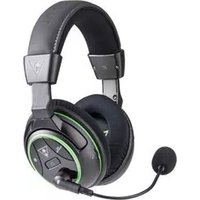
Ear Force P21 - Headphones TURTLE BEACH - Free user manual and instructions
Find the device manual for free Ear Force P21 TURTLE BEACH in PDF.


Pick your language and provide your email: we'll send you a specifically translated version.
| Product Type | Wired gaming headset |
| Brand | Turtle Beach |
| Model | Ear Force P21 |
| Compatibility | PlayStation 3, PC, Mac |
| Connectivity | 3.5 mm audio jack, USB for power/amplification |
| Driver Size | 50 mm |
| Frequency Response | 20 Hz - 20 kHz |
| Impedance | 32 ohms |
| Sensitivity | 110 dB |
| Microphone Type | Noise-cancelling boom microphone |
| Microphone Frequency Response | 100 Hz - 10 kHz |
| Cable Length | 3 m |
| Weight | 250 g |
| Power Source | USB (5 V DC) via in-line amplifier |
| Controls | In-line volume wheel, mute switch, Bass Boost button |
| Features | Amplified stereo sound, Bass Boost, Variable Mic Monitoring |
| Ear Cushions | Padded leatherette ear cushions |
| Headband | Adjustable padded headband |
| Care Instructions | Wipe with a soft dry cloth; avoid exposure to moisture |
| Safety Warning | Use moderate volume to prevent hearing damage |
| Spare Parts and Repairability | Replacement ear cushions and cables available; contact Turtle Beach support |
| Package Contents | Headset, in-line amplifier, USB cable, audio cables, quick start guide |
Frequently Asked Questions - Ear Force P21 TURTLE BEACH
How do I connect the Ear Force P21 headset to my PlayStation 3?
Connect the USB cable to your PS3 for power, then plug the audio cables into your TV or console. Adjust the volume using the in-line control. The headset will be ready for game audio and chat.
Is the Ear Force P21 compatible with PC or Mac?
Yes, the P21 works with PC and Mac. Use the included RCA-to-3.5mm cable to connect to your computer's audio output. The USB cable supplies power for the amplifier and microphone function.
How do I enable Bass Boost?
Press the Bass Boost button on the in-line control box. An LED lights up indicating the boost is activated. Press again to deactivate.
What is Variable Mic Monitoring and how do I adjust it?
Mic monitoring lets you hear your own voice in the headset to avoid shouting. Adjust it using the Mic Monitoring slider on the in-line amplifier.
Can I replace the ear cushions?
Yes, the ear cushions are designed to be replaceable. Gently pull the old cushions and snap the new ones in place. Contact Turtle Beach support for accessories.
The microphone is not working. What should I do?
Check that the cable connections are secure and the mute switch is off. Also verify the microphone volume in the audio settings of your console or PC.
How do I adjust the headset volume and mute?
Use the volume wheel on the in-line control box. To mute the microphone, press the mute switch; an indicator light will show mute status.
How should I maintain and clean my headset?
Wipe the ear cushions and headband with a soft dry cloth. Do not use harsh chemicals or submerge in water. Ensure all connectors are clean and dry before use.
Can I use this headset with Xbox One or Nintendo Switch?
The P21 is designed for PlayStation 3 and PC. It may not be fully compatible with Xbox One or Switch. Consider using a dedicated adapter or a newer Turtle Beach headset for those platforms.
Does the headset require batteries?
No. The inline amplifier is powered via USB. Plug the USB cable into a powered USB port for operation.
User questions about Ear Force P21 TURTLE BEACH
0 question about this device. Answer the ones you know or ask your own.
Ask a new question about this device
No questions yet. Be the first to ask one.
Download the instructions for your Headphones in PDF format for free! Find your manual Ear Force P21 - TURTLE BEACH and take your electronic device back in hand. On this page are published all the documents necessary for the use of your device. Ear Force P21 by TURTLE BEACH.
USER MANUAL Ear Force P21 TURTLE BEACH
Manual assistant
Powered by Anthropic
Waiting for your message
Product information
Brand : TURTLE BEACH
Model : Ear Force P21
Category : Headphones