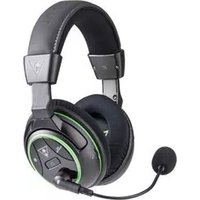
TBS237002 - Headphones TURTLE BEACH - Free user manual and instructions
Find the device manual for free TBS237002 TURTLE BEACH in PDF.


| Product Type | Wireless Gaming Headset |
| Model | Ear Force Stealth 500X (TBS237002) |
| Compatibility | Xbox One, mobile devices (via cable) |
| Speaker Drivers | 50 mm with Neodymium Magnets |
| Frequency Response | 20 Hz – 20 kHz |
| Surround Sound | DTS Headphone:X 7.1 Channel Surround Sound |
| Wireless Connection | RF with Intelligent Channel Hopping |
| Wireless Range | Up to 30 ft (9 m) |
| Battery Type | Rechargeable Lithium Polymer |
| Battery Life | Up to 15 hours |
| Charging Method | USB (Mini USB port on headset) |
| Charging Time | Approximately 4 hours for full charge |
| Microphone | Removable Omni-Directional Boom Mic |
| Mic Monitor | Adjustable (Off, Low, High) to hear own voice |
| Weight | 11.3 oz (320 g) |
| Earpad Material | Fabric with Foam Cushion (Around-Ear, Closed) |
| Controls on Headset | Game Volume, Chat Volume, Mic Mute, Mic Monitor, Surround Modes, Presets, Power |
| Transmitter Inputs | Digital Optical (Toslink) with Pass-through, USB |
| Transmitter Outputs | Wireless to headset, Digital Optical Pass-through |
| Preset Sound Modes | 16 presets across Game, Movie, Music, and Surround Off modes |
| Included Accessories | Transmitter, Mobile Cable, Removable Mic, USB Charging Cable, Digital Optical Cable, Sticker |
| Regulatory Certifications | FCC, ICES, CE, VCCI, KC, RoHS, WEEE |
Frequently Asked Questions - TBS237002 TURTLE BEACH
User questions about TBS237002 TURTLE BEACH
0 question about this device. Answer the ones you know or ask your own.
Ask a new question about this device
Download the instructions for your Headphones in PDF format for free! Find your manual TBS237002 - TURTLE BEACH and take your electronic device back in hand. On this page are published all the documents necessary for the use of your device. TBS237002 by TURTLE BEACH.
USER MANUAL TBS237002 TURTLE BEACH
EAR FORCE'S STEALTH 500X
TURTLE BEACH
natural_image
Black and white photo of a T3 video head with green accent, illuminated by laser beams against a dark background (no text or symbols visible)Congratulations on your purchase of the Ear Force STEALTH 500X headset from Turtle Beach. Designed for Xbox One and mobile gaming, the STEALTH 500X also supports music, movies, and chat. Turtle Beach brings over 35 years of expertise to transforming your listening experience.
In the Box
For our Knowledgebase and Technical Support please visit turtlebeach.com/support
A

natural_image
Line drawing of a pair of hardcover headphones with earbuds and headband (no text or symbols)Stealth 500X Headset Stealth 500X Transmitter
B
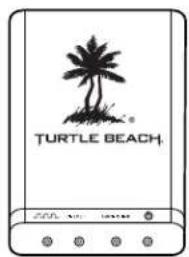
C

Mobile Cable
D

natural_image
Line drawing of a standard screwdriver with a pointed tip and handle (no text or symbols)Removable Mic Boom
EF

USB Charging Cable
●
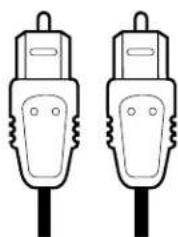
natural_image
Two identical line drawings of a mobile phone plug (no text or symbols)Digital Optical Cable
●

Turtle Beach Sticker

natural_image
Close-up of a black and yellow electronic device with glowing components, showing internal structure and no visible text or symbols.Table of Contents
About the STEALTH 500X P5
Overview P6
Parts and Controls P7
Headset Charging P10
Xbox One™ Setup P11
Mobile Setup P13
Pairing the Headset and Transmitter P14
Adjusting Sound (Xbox One™) P15
Specifications P18
Troubleshooting Tips P19
Important Safety Information P21
About the STEALTH 500X
The STEALTH 500X is an advanced gaming headset optimized for Xbox One consoles. It also unlocks the audio potential of music, movies and more. To get the most from your STEALTH 500X, please take a few moments to review this introduction.
Overview
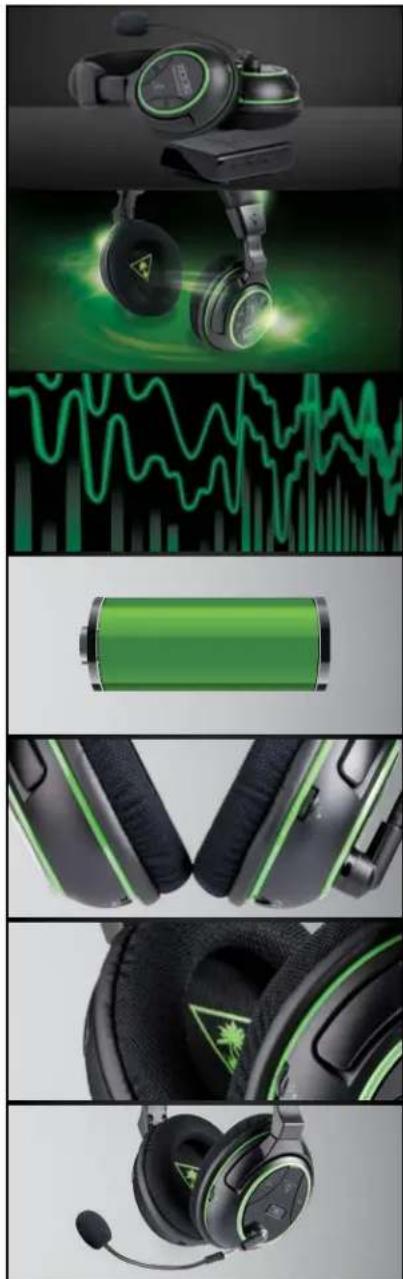
No controller adapters, no cables, just completely wireless DTS Headphone:X 7.1 Channel Surround Sound that puts you in the center of the action. Designed for Xbox One, the powerful Ear Force® Stealth 500X delivers incredible, interference-free wireless audio and chat. The supplied cable supports mobile gaming or connecting a phone to get text or call notifications while gaming.
natural_image
Product collage of a black and green H2O headset with charging cable, battery, and earpieces (no visible text or symbols)Crystal Clear Wireless.
Intelligent channel-hopping for an interference-free wireless experience.
DTS Headphone:X 7.1 Surround Sound.
Amazing, 3D 360-degree sound stage with unmatched spatial accuracy.
DTS Surround Sound Modes.
With the flick of a switch, get enhanced DTS surround sound experiences designed for games, movies or music.
Long-Life Rechargeable Battery.
Ditch the batteries with a built-in rechargeable battery that delivers up to 15 hours of wireless gaming.
Separate Volume Controls.
Set your mix of Game and Chat volume levels right on the headset.
Comfortable & Quiet.
Breathable, around-the-ear mesh cushions for hours of comfort and noise isolation.
High-Quality Chat.
Be heard clearly through a high-sensitivity, omni-directional mic, which is mounted on an adjustable, removable boom.
Overview

natural_image
Product collage showing various headsets, a smartphone, and gaming interface icons (no text or symbols)Stop Shouting!
Adjustable Mic Monitoring lets you hear your own voice in the headset to avoid shouting.
Never Miss a Text or Call.
Hook up your mobile phone to hear text notifications or take calls while gaming.
Mobile Gaming Versatility.
Connect the included Mobile Cable for wired gaming on any mobile device.
For All Your Audio Needs.
Use the STEALTH 500X for movies and TV from Netflix™ or Hulu Plus™. Crank up your tunes on music services like Pandora™ and then chat with friends or make mobile calls!
Awesome Turtle Beach Audio.
Sixteen audio presets and large 50 mm speakers combine to deliver butt-kicking audio.
Step up to STEALTH.
Ear Force® STEALTH headsets connect cutting edge wireless tech with advanced audio features so you win more, jump up the leaderboards and flat out hear your favorite games like never before.
Parts and Controls
Headset Controls: Left Earcup
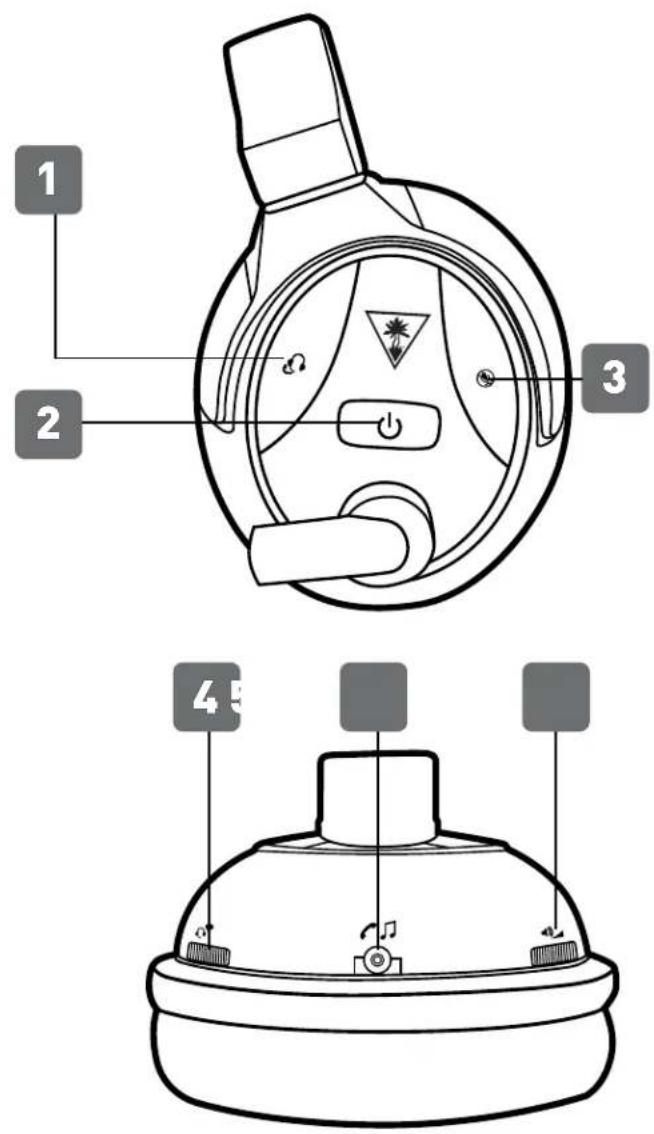
1. Mic Monitor.
Press to adjust the mic monitor level. Your selection will be confirmed by one or more audible tones in the Headset.
1 Tone = Off
2 Tones = Low
3 Tones = High
- Power LED (Battery Status)
Red = Low Battery
Green = Charged
Power LED (Pairing Status)
Single Blink = Transmitter Connected Double Blink = Transmitter not Connected
3. Mic Mute.
Press to turn the mic on and off. Your selection will be confirmed by an audible tone in the Headset.
- Chat Volume
- Wired Audio Connection
- Game Volume
Parts and Controls
Headset Controls: Right Earcup

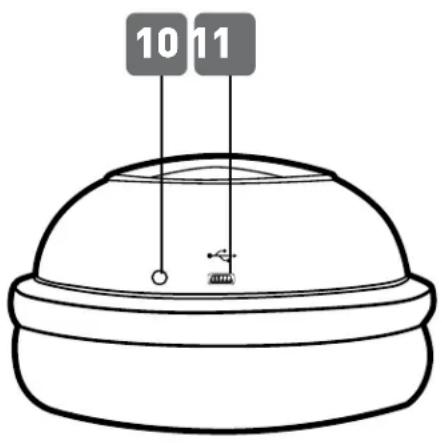
7. Preset + / -
Press to cycle through four presets, customized according to your choice of surround mode. Your selection will be confirmed by one or more audible tones in the Headset and one or more blinks of the Preset LED.
High Tone (HT) Indicates Surround Mode
Low Tone (LT) Indicates Signature Audio Presets


8. Preset LED
Confirms your choice of Preset by blinking one or more times, in tandem with the audible confirmation tones.
9. Surround + / -
Press to cycle through the four customized Surround Modes. Your selection will be confirmed by one or more audible tones in the Headset.
1 Tone: Game Mode
2 Tones: Movie Mode
3 Tones: Music Mode
4 Tones: Surround Off (Stereo Mode)
10. Charging LED
Red = Charging
Off = Charge Complete
11. USB Charging Port
Parts and Controls
Transmitter
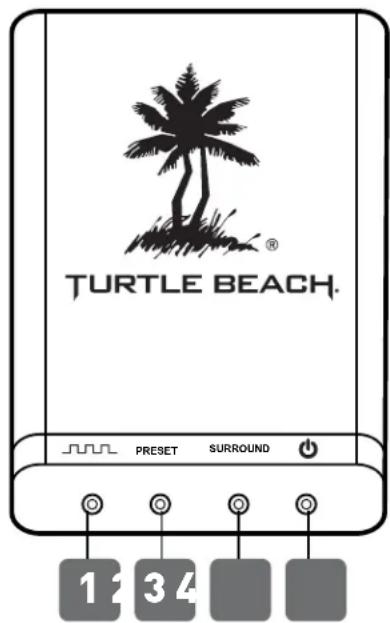
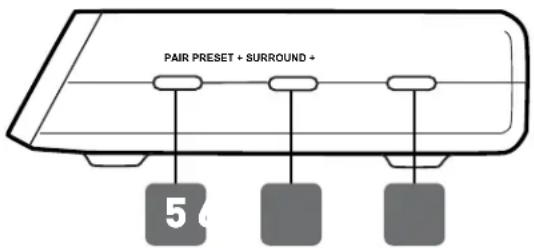
1. Digital Input LED
On = Digital audio signal detected Off = No signal detected
2. Preset LED
3. Surround Mode LED
4. Pairing LED
On (Continuously) = Headset connected Double Blinking = Headset not connecting Rapid Flashing = Pairing in progress
5. Pairing Button.
See "Pairing the Headset and Transmitter," page 14.
6. Preset Button
Press to cycle through four presets, customized according to your choice of surround mode. Your selection will be confirmed by one or more audible tones in the Headset and one or more blinks of the Preset LED on the right earcup of the Headset.
High Tone (HT) Indicates Surround Mode
Low Tone (LT) Indicates Signature Audio Presets
![dtsi SUPPORT X GAME MODE [1 HT] • Signature Sound [1LT] • Shooter [2LT] • Racing [3LT] • Sports [4LT]](/content/2026/06/1186158/images/4b3e0293e130687e41ed38b27dbfb9f4dd0163a241f61b2abdcaf422f4023cea.jpg)
![dts ECONOM MOVIE MODE (2 HT) • Signature Sound [1LT] • Action [2LT] • Horror [3LT] • Drama [4LT]](/content/2026/06/1186158/images/b47d4f564eb981b5785e6c0f00ba749de8d5f2102e40ea50a05b30072ca8cbc7.jpg)
![MUSIC MODE (3 HT) • Signature Sound [1LT] • Stadium [2LT] • Acoustic [3LT] • Dance [4LT]](/content/2026/06/1186158/images/a3f9a7435fd32ea674958cfc99197af675d220ca12cabed6a5128e29e382c273.jpg)

7. Surround Button
Press to cycle through the four customized DTS Headphone:X 7.1 Surround Sound Modes. Your selection will be confirmed by one or more audible tones in the Headset.
1 Tone: Game Mode
2 Tones: Movie Mode
3 Tones: Music Mode
4 Tones: Surround Off (Stereo Mode)
Headset Charging
Even though the STEALTH 500X supports wired connection to mobile devices, it uses an internal amplifier and so requires power from its rechargeable battery.
NOTE: Make sure to charge your Headset regularly.
NOTE: In order to achieve and maintain optimal battery performance for your Turtle Beach wireless headset, proper care is required when charging and storing. Never store the unit in temperatures above 113°F/45°C. When storing the unit for more than 3 months, charge the battery for at least 4 hours. Store the headset at room temperature (72°F/22.5°C) and at humidity below 75%.
WARNING: Never fully deplete the battery then put the unit in storage, as this may cause irreversible damage to the battery.
Following these simple guidelines will ensure that your Turtle Beach wireless headset will provide many hours of enjoyment.

- Connect the USB-A end of the USB Charging Cable to a USB port.
- Connect the mini USB end of the USB Charging Cable to the USB Charging Port on the right earcup of the Headset.
- Charging is complete when the Charge Status LED on the right earcup of the Headset turns off.
Xbox One™ setup
The Ear Force STEALTH 500X Headset is designed for use with the Xbox One console.

flowchart
graph TD
    A["Headphones"] --> B["Analog In"]
    B --> C["Digital In"]
    C --> D["PC"]
    D --> E["S/PDIF"]
    E --> F["USB"]
    style A fill:#f9f,stroke:#333
    style B fill:#ccf,stroke:#333
    style C fill:#cfc,stroke:#333
    style D fill:#fcc,stroke:#333
    style E fill:#cff,stroke:#333
    style F fill:#ffc,stroke:#333
- Insert the Removable Mic Boom into the elbow on the left earcup of the Headset. To ensure that the mic is aligned properly, confirm that the triangle on the Removable Mic Boom points toward your face.
- Connect the Digital Optical Cable to the Digital Out (Optical) S/PDIF port of the Xbox One console and the Digital In port on the back of the Wireless Transmitter.
- Insert the USB plug of the Wireless Transmitter into a USB port on the Xbox One console.
Xbox One™ setup
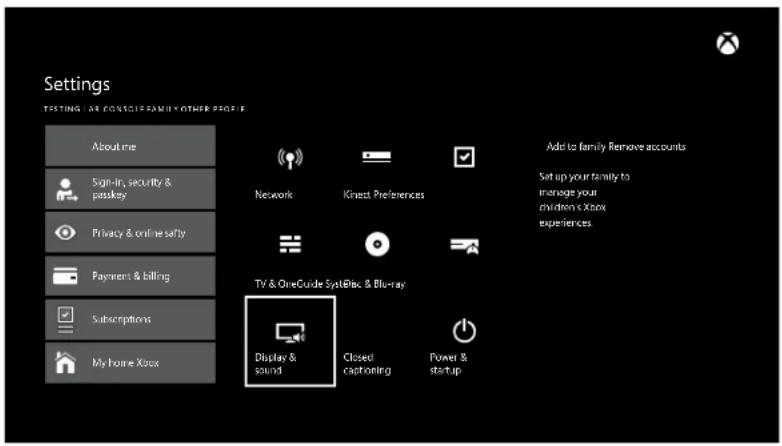
- Go to the Xbox One Home Screen and Press the Ⓐ button on the Xbox One Controller.
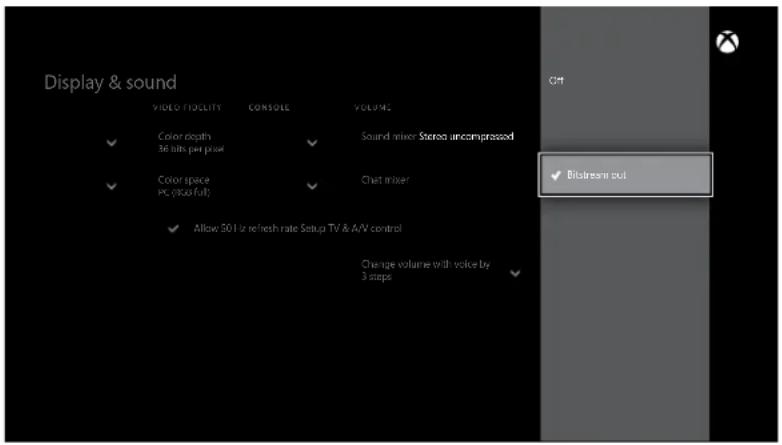
- Go to Settings > Display & Sound > Optical Audio.
- Select Bitstream Out.

- Go to Settings > Display & Sound > Bitstream
Format.
- Select Dolby Digital.
Note: Do NOT select DTS Digital Sound.
Mobile Setup
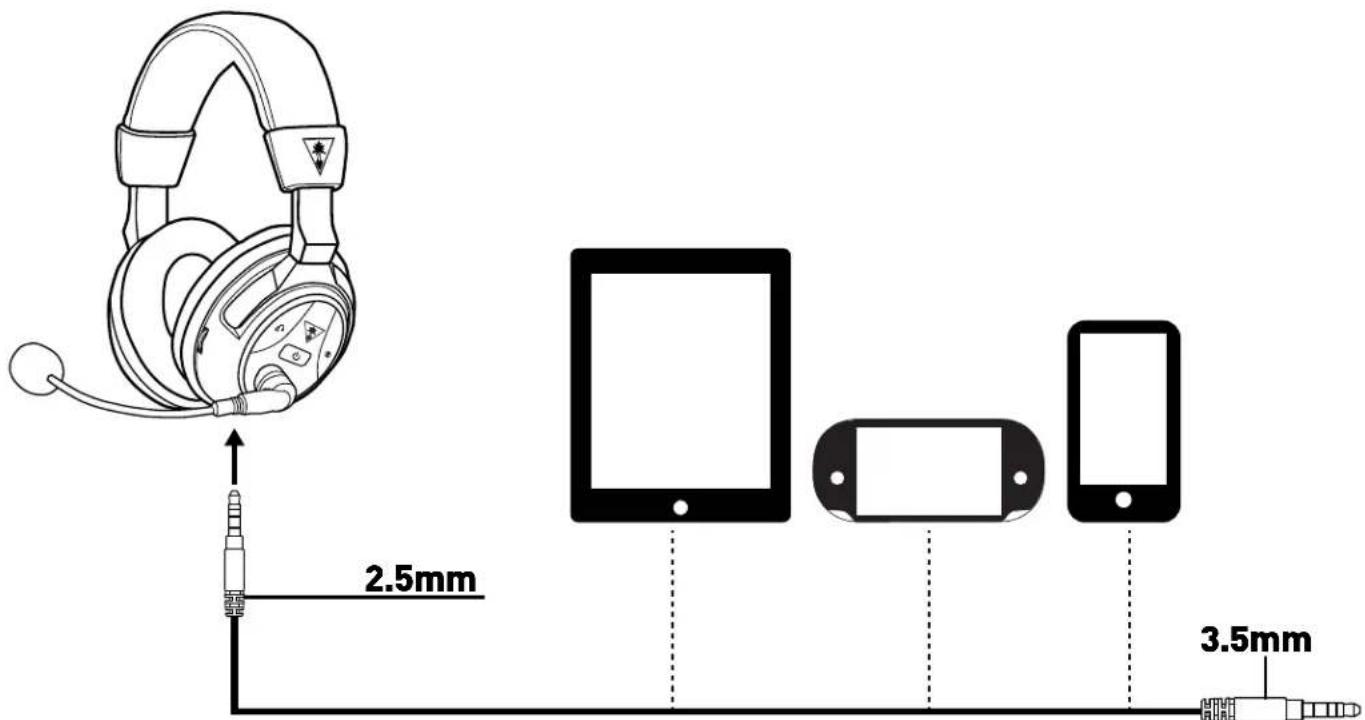
- If you want mobile calls and chat, insert the Removable Mic Boom into the elbow on the left earcup of the Headset. To ensure that the mic is aligned properly, confirm that the triangle on the Removable Mic Boom points toward your face.
- Insert the smaller (2.5 mm) end of the Mobile Cable into the Wired Audio Connection on the left earcup of the Headset.
- Insert the larger (3.5 mm) end of the Mobile Cable into the headphone output jack of your mobile phone, mobile game console, tablet or computer.
NOTE: The Headset must be powered on for use, even when you're connected via the Mobile Cable.
NOTE: Headset sound adjustments - including Game Volume Control, Chat Volume Control, Surround Buttons and Preset Buttons - are inactive when using the Mobile Cable. These controls will have no effect on the sound.
Pairing the Headset and Transmitter
The STEALTH 500X Wireless Transmitter sends audio and chat between your game console and your Headset via interference-free wireless. When the Headset and transmitter are communicating, the Pairing LED on the Wireless Transmitter will stay lit.
NOTE: Your STEALTH 500X Headset ships from the factory already paired with your Wireless Transmitter. In normal operation, it should not be necessary for you to pair the two again. You should only need to perform pairing yourself in the event that wireless communication fails. First check that the Headset is powered on and is within range. If the Pairing LED on the Wireless Transmitter is still pulsing, the Wireless Transmitter can't communicate with the Headset. Perform the following pairing procedure.
- The Headset should be powered OFF. If it's on, press and hold the Power Button on the right earcup for five seconds.
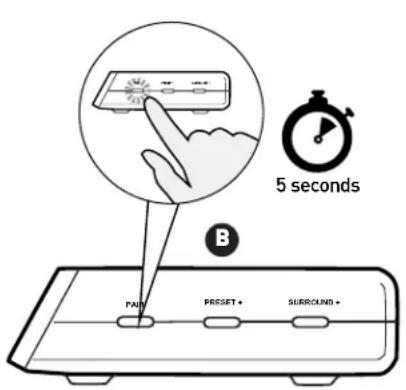

- Press and hold the Pair Button on the Wireless Transmitter until the transmitter's Pairing LED flashes rapidly.
- Press and hold the Power Button on the Headset until the Headset Battery/Pairing Status LED in the Power Button flashes.
- Within 30 seconds, the Connection Status LED on the Transmitter will remain lit, while the Battery/Pairing Status LED on the Headset will flash once per second to confirm that pairing was successful.
Adjusting Sound (Xbox One™)
NOTE: The following control functions are inactive when the Headset is connected to the Mobile Cable.
| If you want to... Then... | |
| Adjust game/media volume. Use | the Game Volume Control on the Headset. |
| Adjust chat volume. Use the Chat | Volume Control on the Headset. |
| Turn the microphone on or off. | Press the Mic Mute Button on the Headset. Ascending Tones indicate you've turn the mic on. Descending Tones indicate that you've turned the mic off. |
| Adjust the Mic Monitor feature. | The Headset features Mic Monitor so you don't need to shout to hear yourself during game play. The Mic Monitor Button on the Headset cycles this function through the following conditions. When you press the button, your selection will be confirmed by one or more audible tones in the Headset:1 Tone: Mic Monitor Off2 Tones: Low Volume3 Tones: High Volume |
| Adjust surround sound. | The STEALTH 500X takes advantage of DTS® Headphone:X Surround Sound, which uses sophisticated processing to create surround sound using just two speakers. The system detects Dolby Digital® sound tracks from the Xbox One console and processes them for headset playback. The system reproduces the sonic characteristics of rooms optimized for specific types of content. The Surround +/- Buttons on the Headset cycle through four surround modes. (You can also use the Surround Button on the Wireless Transmitter to cycle through these modes.) As you use the buttons, your selection will be confirmed by one or more audible tones in the Headset.1 Tone: Game Mode2 Tones: Movie Mode3 Tones: Music Mode4 Tones: Surround Off (Stereo Mode) |
Adjusting Sound (Xbox One™)
If you want to... Then...
Select presets.
For each of the DTS® Headphone:X Surround Sound modes, Turtle Beach has designed four sonic presets that optimize the sound for specific types of games, music and movies. The Preset +/- Buttons on the Headset cycle through these presets. (You can also use the Preset Button on the Wireless Transmitter to cycle through the presets.) As you use the buttons, your selection will be confirmed by one or more audible tones in the Headset and one or more flashes of the Preset LED on the Headset.
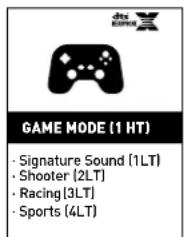
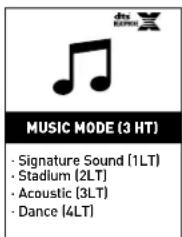
DTS Headphone: X Surround Modes
High Tone (HT) Indicates Surround Mode Low Tone (LT) Indicates Signature Audio Presets







GAME MODE (1 HT)
• Signature Sound (1LT)
- Shooter (2LT)
· Racing (3LT)
· Sports (4LT)
MOVIE MODE (2 HT)
• Signature Sound (1LT)
· Action (2LT)
· Horror (3LT)
· Drama (4LT)
MUSIC MODE (3 HT)
• Signature Sound (1LT)
· Stadium (2LT)
· Acoustic (3LT)
· Dance (4LT)
SURROUND OFF (4 HT)
• Natural Sound (1LT)
· Bass Booster (2LT)
• Bass & Treble Booster(3LT)
· Vocal Booster (4LT)

dts
HEADPHONE

GAME MODE

| Signature Sound | Turtle Beach's signature sound, place yourself in the middle of the action and hear your games just as the developers intended. |
| Shooter | Enter the warzone fully armed, feel your gun's recoil hit your chest, experience the full force of explosions as you lead your squad to victory. |
| Racing | Feel the engine underneath you and hear your opponents cars at your back as you battle for the race win. |
| Sports | Put yourself in the middle of a packed stadium with fans cheering you on from every angle. |
Adjusting Sound (Xbox One™)
| dts HEADPHONE | MOVIE MODE |
| Signature Sound | Turtle Beach's Signature Sound, get the best seat in the house and experience your movies like never before. |
| Action | Be the hero, face the explosions, duck the gunfire and hear the evac chopper circling overhead as you save the world again. |
| Horror | Build the suspense, hear every creaking footstep and bone-rattling scream... just try to get out alive. |
| Drama | Intensify the story and bring characters to life with pinpoint vocals and enhanced dialog. |
| dts HEADPHONE | MUSIC MODE |
| Signature Sound | Turtle Beach's Signature Sound, bring your music onto a personal stage and scan your ticket to your own private concert experience. |
| Stadium | Experience live concert music as it was meant to be heard, feel the crowd around you as the band on stage turns it up to 11. |
| Acoustic | Step into an acoustic open mic night and experience a personal concert for one, just you and your favorite artist. |
| Dance | Put your hands in the air and place yourself in the middle of a nightclub as the DJ drops your favourite dance track. |
| SURROUND OFF | |
| Natural Sound | Turtle Beach tuned Natural Sound, hear your media just as the creators intended. |
| Bass Booster | Turn up the Bass, feel the deep sound effects in your games and the punch of bass heavy music tracks. |
| Bass & Treble Booster | Turn everything up, increased lows and highs give you more of everything for a more powerful audio experience. |
| Vocal Booster | Tune in to the vocals on music tracks and dialog in games and movies, make your characters and stories come alive. |
Specifications
Headset
Speakers 50 mm with Neodymium Magnets
· Frequency Response 20 Hz – 20 kHz
· Earpad Material Fabric (Black) with Foam Cushion
· Earcup Design Around-Ear (Closed)
- Microphone Design Removable Omni-Directional
· Battery Rechargeable Lithium Polymer
· Weight 11.3 oz. (320 g)
Transmitter
• Game Input Digital Optical (Toslink) with Digital Optical Pass-through)
- Chat/Mic Input/Output USB
· Surround Sound Processing DTS Headphone:X 7.1
· Wireless Connection RF with Intelligent Channel Hopping
· Wireless Range Up to 30ft (9 m)
· Power USB
natural_image
Line drawing of a multi-band headphones with brand logo and warning symbol (no text or labels)
Troubleshooting Tips
No sound
| Possible cause Solution | |
| Power is off | Confirm that the Headset is on. The Battery/Pairing Status LED should be illuminated green.NOTE: The Headset must be powered on for use, even when you're connected via the Mobile Cable . |
| Dead/low battery | Confirm that the Headset battery is charged. If the Battery/ Pairing Status LED is glowing red, the Headset needs recharging. See Headset Charging (page 10). |
| Game Volume Control turned down | Check that the Game Volume Control on the Headset is turned up. |
| Loose connection | In game console use, confirm that Wireless Transmitter is firmly connected to the USB port and that the Digital Optical Cable is firmly connected at both ends.In mobile use, confirm that the Mobile Cable plugs are firmly seated in the Headset and the mobile device. |
| Lost pairing | Confirm that the Pairing LED on the Wireless Transmitter stays on. If the LED is slowly pulsing, it indicates that the Wireless Transmitter isn't communicating with the Headset. See Pairing the Headset and Transmitter (page 14). |
Audio Drops, Popping or Clicking Sounds
| Possible cause Solution | |
| Poor Wi-Fi transmission | For best performance, stand within 30 feet from the Wireless Transmitter.Confirm that there is no wall or other large object between the Headset and Wireless Transmitter.Confirm that the location of the Wireless Transmitter is clear of obstructions and isolated from Wi-Fi base stations or other potential sources of interference. |
Troubleshooting Tips
Voice Chat Drops
Most in-game voice chat drops are caused by network congestion or "lag." They usually subside after a few moments so please be patient. In extreme cases, you may need to leave the game and return to reset the chat function.
If you use a wireless internet connection, low signal strength from your modem/router can make the voice chat malfunction. For best results, we recommend a wired connection from your modem/router to your game console.
Microphone not working
| Possible cause Solution | |
| Incorrect console setup | Confirm that the game console is properly configured for the STEALTH 500X. See Xbox One Setup (page 11). |
| Mic muted | Press the Mic Mute Button on the Headset to toggle the microphone between on and off (muted). |
| Mic disconnected | Confirm that the Removable Mic Boom is firmly inserted into the Headset. |
If your issue is not resolved by these steps, please visit turtlebeach.com/support
Important Safety Information
To avoid potential damage to the device, always disconnect all cables before transporting it.
WARNING: Permanent hearing damage can occur if a headset is used at high volumes for extended periods of time, so it is important to keep the volume at a safe level. Over time, your ears adapt to loud volume levels, so a level that may not cause initial discomfort can still damage your hearing. If you experience ringing in your ears after listening with the headset, it means the volume is set too loud. The louder the volume is set, the less time it takes to affect your hearing. So, please take care to listen at moderate levels.
- Before placing a headset on your ears, turn the volume down completely, then slowly increase it to a comfortable level.
- Turn down the volume if you can't hear people speaking near you.
- Avoid turning up the volume to block out noisy surroundings.
Federal Communications Commission (FCC) Compliance Notices
This section includes the following FCC statements for the EAR FORCE Stealth 500X RX & TX Models:
• Class B Interference Statement
• RF Radiation Exposure & Hazard Warning
• Non-Modification Statement
- Deployment Statement
• FCC ID: Headset = XGB-TB2370 & Transmitter XGB-TB2371
RF Radiation Exposure & Hazard Statement
To ensure compliance with FCC RF exposure requirements, this device must be installed in a location such that the antenna of the device will be greater than 2 cm (0.8 in.) from all persons. Using higher gain antennas and types of antennas not covered under the FCC certification of this product is not allowed. Installers of the radio and end users of the product must adhere to the installation instructions provided in this manual. This transmitter must not be co-located or operated in conjunction with any other antenna or transmitter.
Non-Modification Statement
Use only the supplied internal antenna. Unauthorized antennas, modifications, or attachments could damage the EAR FORCE Stealth 500X RX & TX Models and violate FCC regulations. Any changes or modifications not expressly approved by the party responsible for compliance could void the user's authority to operate this equipment. Please contact Turtle Beach for a list of approved 5.0 GHz antennas.
Deployment Statement
This product is certified for indoor deployment only in the 5150–5250 MHz band. Do not install or use this product outdoors in that frequency band in the United States.
Canadian ICES Statements
IC: Headset = 3879A- TB2370 & Transmitter = 3879A- XGB-TB2371
This device complies with ICES-003 and RSS-210 of Industry Canada.
Operation is subject to the following two conditions:
-
This device may not cause interference, and
-
This device must accept any interference, including interference that may cause undesired operation of the device.
To prevent radio interference to the licensed service (i.e. co-channel Mobile Satellite systems) this device is intended to be operated indoors and away from windows to provide maximum shielding. Equipment (or its transmit antenna) that is installed outdoors is subject to licensing and not supported by EAR FORCE Stealth 500X RX & TX Models.
RF Radiation Exposure & Hazard Statement
To ensure compliance with RSS-102 RF exposure requirements, this device must be installed in a location such that the antenna of the device will be greater than 2 cm (0.8 in.) away from all persons. Using higher gain antennas and types of antennas not covered under the IC certification of this product is not allowed. Installers of the radio and end users of the product must adhere to the installation instructions provided in this manual. This transmitter must not be co-located or operated in conjunction with any other antenna or transmitter.
Exposition aux radiations RF & Mention de danger
Deployment Statement
This product is certified for indoor deployment only in the 5150 – 5250 MHz band. Do not install or use this product outdoors in that frequency band in Canada.
European Union and European Fair Trade Association (EFTA) Regulatory Compliance
This equipment may be operated in the countries that comprise the member countries of the European Union and the European Fair Trade Association. These countries, listed below, are referred to as The European Community throughout this document:
AUSTRIA, BELGIUM, BULGARIA, CYPRUS, CZECH REPUBLIC, DENMARK, ESTONIA, FINLAND, FRANCE, GERMANY, GREECE, HUNGARY, IRELAND, ITALY, LATVIA, LITHUANIA, LUXEMBOURG, MALTA, NETHERLANDS, POLAND, PORTUGAL, ROMANIA, SLOVAKIA, SLOVENIA, SPAIN, SWEDEN, UNITED KINGDOM, ICELAND, LICHTENSTEIN, NORWAY, SWITZERLAND
Declaration of Conformity
Marking by this symbol: C ∈ ⚠
indicates compliance with the Essential Requirements of the EMC Directive of the European Union (2004/108/EC). This equipment meets the following conformance standards:
Safety: EN 60950-1: 2006 + A11: 2009 + A1: 2010 + A12: 2011 (T-Mark License)
Also Licensed for Standards:
IEC 60950-1: 2005 (2nd Edition) + Am 1: 2009 (CB Scheme Report/Certificate),
UL 60950-1: 2007 R12.11 (NRTL License),
CAN/CSA-C22.2 No. 60950-1-07 + A1: 2011 (SCC License)
EN 50332-1: 2000, EN 50332-2: 2003
Additional licenses issued for specific countries available on request
Emissions: EN 55022: 2010, CISPR: 2008
Immunity: EN 55024: 2010, EN 55024: 2010,
EN61000-4-2: (2008-12), EN61000-4-3: (2010-04), EN61000-4-4: (2011-03),
EN 61000-4-6: (2005), EN 61000-4-8: (2009-09)
These products are licensed, as required, for additional country specific standards
for the International Marketplace. Additional issued licenses available upon request.
The products are licensed, as required, for additional country specific standards for the International Marketplace.
Additional issued licenses available upon request.
Environmental: Low Voltage Directive 2006/95/EC, RoHS 2011/65/EU,
REACH 2006/1907/EC, WEEE 2012/19/EU, Packaging 94/62/EC
Warning!
This is a Class B product. In a domestic environment, this product may cause radio interference, in which case, the user may be required to take appropriate measures.
Achtung!
This symbol on the product or its packaging indicates that this product must not be disposed of with your other household waste. Instead, it is your responsibility to dispose of your waste equipment by handing it over to a designated collection point for the recycling of waste electrical and electronic equipment. The separate collection and recycling of your waste equipment at the time of disposal will help conserve natural resources and ensure that it is recycled in a manner that protects human health and the environment. For more information about where you can drop off your waste for recycling, please contact your local authority, or where you purchased your product.
Japan Compliance Statement
This is a Class B product based on the standard of the VCCI Council. If this is used near a radio or television receiver in a domestic environment, it may cause radio interference. Install and use the equipment according to the instruction manual.
Korea Compliance Statement
B급 기기 (가정용 방송통신기자재)
(Broadcasting Communication Equipment for Home Use)
As an electromagnetic wave equipment for home use (Class B), this equipment is intended to use mainly for home use and may be used in all regions.
LIMITED ONE YEAR WARRANTY FOR TURTLE BEACH PRODUCTS:
Voyetra Turtle Beach, Inc. ("VTB") warrants to the original end-user purchaser ("Purchaser") that the retail Turtle Beach hardware product herein ("Product") will be free of defects in materials and workmanship for a period of one year from the date of purchase by the Purchaser ("Warranty Period"). Any Extended Warranty or Service Plans purchased through a Retail store are not honored by VTB. The Warranty refers to the repair/replacement of a defective product during this period and not a refund.
This limited warranty is extended only to the original Purchaser of a new product, which was not sold "AS IS". It is not transferable or assignable to any subsequent purchaser. This limited warranty is applicable only in the country or territory where the Product was purchased from an authorized VTB retailer and does not apply to a Product that has been purchased as used or refurbished or was included as part of a non-VTB product.
WARRANTY SERVICE:
In the USA and CANADA Warranty Service is provided by our Turtle Beach USA offices and in all other Countries it is provided by our local International Distributors when available. Refurbished/Recertified products are sold on an AS IS basis with a 90-day Warranty or less in accordance with each vendor's policy.
VTB does not warrant uninterrupted or error-free operation of the Product and is under no obligation to support the Product for all computer operating systems or future versions of such operating systems.
If a defect should occur during the Warranty Period, Purchaser must contact VTB to obtain a Return Merchandise Authorization ("RMA") number on the basis of the dated purchase receipt. Purchaser will be responsible for shipping costs incurred in returning the defective Product to an authorized VTB service center, or to the repair facility located at VTB's corporate headquarters. VTB will not be responsible for other products or accessories included with the defective Product sent to VTB. The RMA number must be clearly indicated on the outside of the package. Packages without an RMA number will be refused by VTB or its representatives and returned to sender at the sender's expense.
In the event of a defect, Purchaser's sole and exclusive remedy, and VTB's sole liability, is expressly limited to the correction of the defect by adjustment, repair, or replacement of the Product at VTB's sole option and expense. VTB owns all Products it has replaced and all parts removed from repaired Products. VTB uses new and reconditioned parts made by various manufacturers in performing warranty repairs and building replacement products. If VTB repairs or replaces a product, the original Warranty Period is not extended, however, VTB warrants that repaired or replacement parts will be free from defects in material and workmanship for a period of thirty (30) days from the date of repair or replacement, or for the remainder of the Warranty Period, whichever is greater.
This warranty does not apply to any Product that has had its serial number altered, removed or defaced, or any Product damage caused by shipping, improper storage, accident, problems with electrical power, abuse, misuse, neglect, ordinary wear, acts of God (e.g. flood), failure to follow directions, improper maintenance, use not in accordance with product instructions, unauthorized modification or service of the Product or damage resulting from the use of the Product with hardware, software or other products not provided by or specifically recommended by VTB.
NOTES:
- Replacement Parts and accessories that are subject to "wear and tear" such as earpads, mic foam covers, talkback cables, etc. have a three (3) month Warranty.
- Replacement Parts for Discontinued Products are sold on an AS IS basis, they are not supported and come with a 30 day Warranty.
THIS LIMITED WARRANTY IS PURCHASER'S SOLE AND EXCLUSIVE REMEDY AND IS IN LIEU OF ALL OTHER WARRANTIES, EXPRESS OR IMPLIED. TO THE EXTENT PERMITTED BY APPLICABLE LAW, VTB HEREBY DISCLAIMS THE APPLICABILITY OF ANY IMPLIED WARRANTY OF MERCHANTABILITY, FITNESS FOR A PARTICULAR PURPOSE OR USE FOR THE PRODUCT. IF SUCH A DISCLAIMER IS PROHIBITED BY APPLICABLE LAW, THE IMPLIED WARRANTY IS LIMITED TO THE DURATION OF THE FOREGOING LIMITED WRITTEN WARRANTY.
IN NO EVENT SHALL VTB BE LIABLE FOR ANY INDIRECT, INCIDENTAL, SPECIAL, PUNITIVE OR CONSEQUENTIAL DAMAGES, OR DAMAGES, INCLUDING BUT NOT LIMITED TO ANY LOST PROFITS, DATA, OR LOSS OF USE, ANY THIRD PARTY CLAIMS, AND ANY INJURY TO PROPERTY OR BODILY INJURY (INCLUDING DEATH) TO ANY PERSON, ARISING FROM OR RELATING TO THE USE OF THIS PRODUCT OR ARISING FROM BREACH OF THE WARRANTY, BREACH OF CONTRACT, NEGLIGENCE, TORT, OR STRICT LIABILITY, EVEN IF VTB HAS BEEN ADVISED OF THE POSSIBILITY OF SUCH DAMAGES.
This warranty supersedes all prior agreements or understandings, oral or written, relating to the Product, and no representation, promise or condition not contained herein will modify these terms. Some states do not allow the exclusion or limitation of incidental or consequential damages, so the above exclusion or limitation may not apply to you. This warranty gives you specific legal rights. You may also have other rights, which vary from state to state. Any action or lawsuit for breach of warranty must be commenced within eighteen (18) months following the purchase of the Product.
EXCLUSIONS FROM LIMITED WARRANTY:
This Limited Warranty shall not apply and VTB has no liability under this Limited Warranty if the Turtle Beach Product:
- is used for commercial purposes such as "LAN, Call Centers" (including rental or lease);
- is modified or tampered with;
- is damaged by Acts of God, power surge, misuse, abuse, negligence, accident, wear and tear, mishandling, misapplication, or other causes unrelated to defective materials or workmanship;
- serial number is defaced, altered or removed;
- is not used in accordance with the documentation and use instructions; or
- is repaired, modified or altered by other than authorized repair centers.
- is no longer available because it was discarded.
For: Xbox One I Mobile
TURTLE BEACH

Watch Turtle Beach product training videos at:
youtube.com/TurtleBeachVideos

Product support and warranty information:
TurtleBeach.com/support
© 2014 Voyetra Turtle Beach, Inc. (VTB, Inc) All rights reserved. TURTLE BEACH, The Palm Tree, Voyetra and Ear Force are either trademarks or registered trademarks of VTB, Inc. Skype is a trademark owned by its respective company. This service may not be available in some countries where this product is sold. All other trademarks are the property of their respective owners. Actual product appearance may differ from imagery.
This product is compliant with the Consumer Product Safety Improvement Act of 2008, Public Law 110-314 (CPSIA)
- EAR FORCE'S STEALTH 500X
- TURTLE BEACH
- In the Box
- Table of Contents
- About the STEALTH 500X
- Overview
- Crystal Clear Wireless.
- DTS Headphone:X 7.1 Surround Sound.
- DTS Surround Sound Modes.
- Long-Life Rechargeable Battery.
- Separate Volume Controls.
- Comfortable & Quiet.
- High-Quality Chat.
- Stop Shouting!
- Never Miss a Text or Call.
- Mobile Gaming Versatility.
- For All Your Audio Needs.
- Awesome Turtle Beach Audio.
- Step up to STEALTH.
- Parts and Controls
- Headset Controls: Left Earcup
- Mic Monitor.
- Mic Mute.
- Preset + / -
- Preset LED
- Surround + / -
- Charging LED
- USB Charging Port
- Transmitter
- Digital Input LED
- Preset LED
- Surround Mode LED
- Pairing LED
- Pairing Button.
- Preset Button
- Surround Button
- Headset Charging
- Xbox One™ setup
- Mobile Setup
- Pairing the Headset and Transmitter
- Adjusting Sound (Xbox One™)
- If you want to... Then...
- DTS Headphone: X Surround Modes
- GAME MODE (1 HT)
- MOVIE MODE (2 HT)
- MUSIC MODE (3 HT)
- SURROUND OFF (4 HT)
- GAME MODE
- Specifications
- Headset
- Troubleshooting Tips
- Voice Chat Drops
- Important Safety Information
- Federal Communications Commission (FCC) Compliance Notices
- This section includes the following FCC statements for the EAR FORCE Stealth 500X RX & TX Models:
- RF Radiation Exposure & Hazard Statement
- Non-Modification Statement
- Deployment Statement
- Canadian ICES Statements
- Exposition aux radiations RF & Mention de danger
- European Union and European Fair Trade Association (EFTA) Regulatory Compliance
- Declaration of Conformity
- Achtung!
- Japan Compliance Statement
- Korea Compliance Statement
- LIMITED ONE YEAR WARRANTY FOR TURTLE BEACH PRODUCTS:
- WARRANTY SERVICE:
- NOTES:
- EXCLUSIONS FROM LIMITED WARRANTY:
Brand : TURTLE BEACH
Model : TBS237002
Category : Headphones