Tytan GXT 629 - Loudspeaker TRUST - Free user manual and instructions
Find the device manual for free Tytan GXT 629 TRUST in PDF.


Pick your language and provide your email: we'll send you a specifically translated version.
| Brand | Trust |
| Model | Tytan GXT 629 |
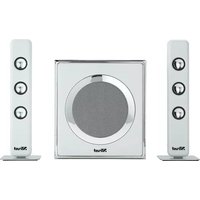
| Product Type | 2.1 multimedia speaker system |
| Subwoofer Output Power | 20 W RMS |
| Satellite Output Power | 2 x 5 W RMS |
| Frequency Response | 35 Hz - 20 kHz |
| Driver Units | 1 x 4" subwoofer, 2 x 2" full-range drivers |
| Connectivity | 3.5 mm stereo jack input, headphone output |
| Controls | Volume control, bass control, power switch |
| Power Source | 100-240 V AC via DC adapter (included) |
| Compatibility | PC, Mac, gaming consoles, smartphones |
| Dimensions (Subwoofer) | 198 x 230 x 250 mm |
| Dimensions (Satellite) | 88 x 150 x 90 mm each |
| Weight | Approximately 2.4 kg |
| Cable Length | 1.5 m (subwoofer to satellites), 1.8 m (input cable) |
| Cleaning | Wipe with a dry, soft cloth; do not use solvents |
| Safety | Keep away from moisture, direct heat, and magnetic fields |
| Spare Parts | Replacement power adapter and audio cables available via authorized resellers |
| Warranty | 2-year warranty |
| General Information | Ideal for gaming and desktop multimedia use |
Frequently Asked Questions - Tytan GXT 629 TRUST
How do I connect the Trust Tytan GXT 629 to my computer?
Connect the 3.5 mm audio cable from the subwoofer to the headphone or speaker output on your computer. Plug the DC adapter into a power outlet. Then turn on the speakers using the power switch.
Why is there no sound coming from the speakers?
Check that the speakers are powered on and the volume is turned up. Verify the audio cable is securely connected to both the speakers and your device. Also ensure your computer's audio output is set to 3.5 mm jack.
Can I use this speaker system with my PlayStation or Xbox?
Yes, you can connect the GXT 629 to consoles via the 3.5 mm audio output on your controller or console. Some consoles may require a 3.5 mm-to-RCA adapter if they lack a headphone jack.
How do I adjust the bass or volume?
Turn the volume control knob on the right satellite (or subwoofer) to adjust the overall level. Use the bass control knob to increase or decrease low-frequency sound to your preference.
How should I clean the speaker system?
Disconnect the speakers from the power source. Wipe all surfaces with a dry, soft cloth. Avoid using water, cleaning solutions, or abrasive materials, as they can damage the finish.
What is the power consumption of the speakers?
The GXT 629 has a maximum power output of 30 W RMS (20 W subwoofer + 2 x 5 W satellites). In standby, consumption is below 0.5 W. Always unplug the adapter during thunderstorms or if unused for a long period.
Are the speakers magnetically shielded?
Yes, the satellite speakers are magnetically shielded to prevent interference with nearby monitors or CRT screens. However, we recommend keeping them at least 20 cm away from sensitive electronics.
What should I do if the speakers produce a humming noise?
Humming is often caused by ground loops or a faulty cable. Try plugging the speakers and your computer into the same power strip. Replace the audio cable if necessary, and keep the speakers away from mobile phones or Wi-Fi routers.
Can I mount the satellites on the wall?
The satellites do not have wall-mounting holes, but you can place them on shelves or use adhesive brackets. Ensure the mounting surface can support the weight to prevent damage.
Where can I find spare parts or accessories?
For replacement power adapters or audio cables, contact Trust customer support or visit the official Trust website. A complete range of accessories is also available through authorized resellers.
User questions about Tytan GXT 629 TRUST
0 question about this device. Answer the ones you know or ask your own.
Ask a new question about this device
No questions yet. Be the first to ask one.
Download the instructions for your Loudspeaker in PDF format for free! Find your manual Tytan GXT 629 - TRUST and take your electronic device back in hand. On this page are published all the documents necessary for the use of your device. Tytan GXT 629 by TRUST.
USER MANUAL Tytan GXT 629 TRUST


Manual assistant
Powered by Anthropic
Waiting for your message
Product information
Brand : TRUST
Model : Tytan GXT 629
Category : Loudspeaker