PEEKTON PEEKBOX 3 MKII - Media player

PEEKBOX 3 MKII - Media player PEEKTON - Free user manual and instructions

Find the device manual for free PEEKBOX 3 MKII PEEKTON in PDF.

📄 45 pages English EN Download 💬 AI Question 10 questions ⚙️ Specs
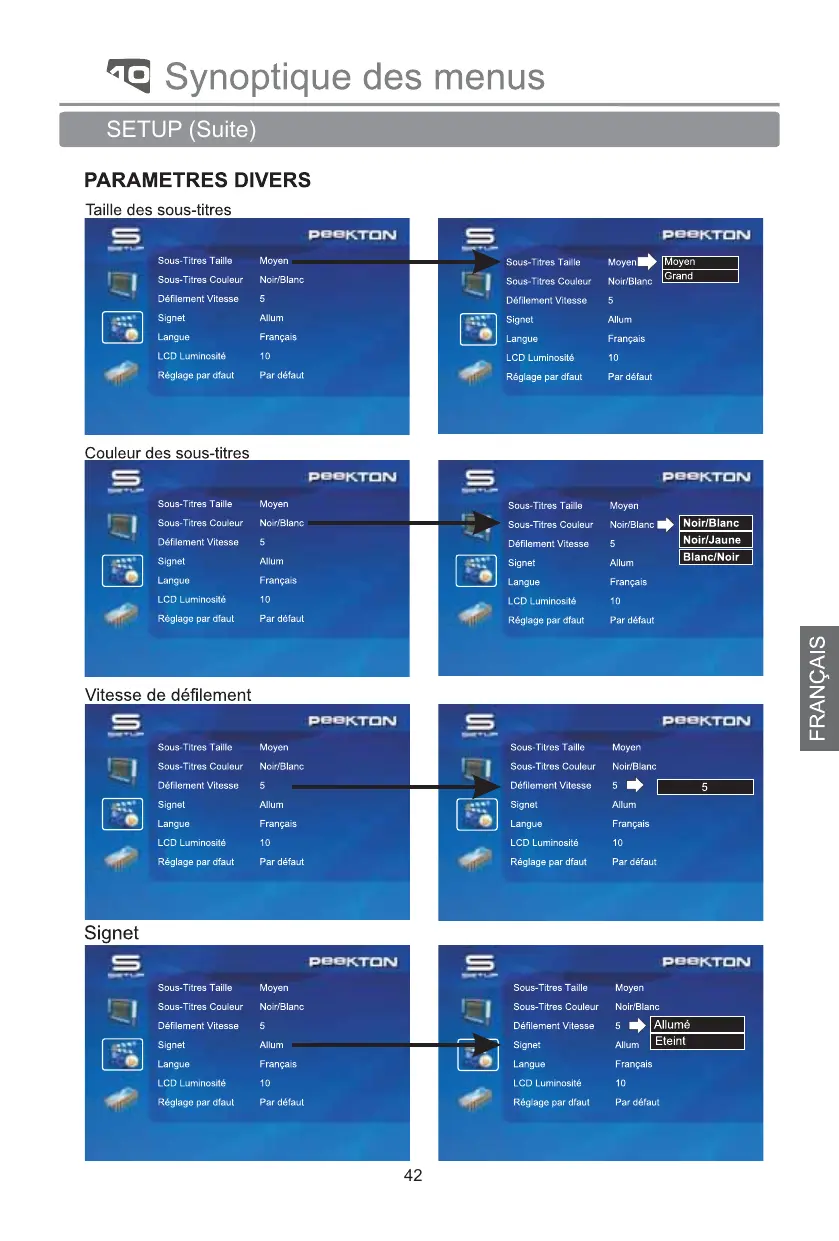
Notice PEEKTON PEEKBOX 3 MKII - page 42
View the manual : Français FR English EN
Pick your language and provide your email: we'll send you a specifically translated version.
Product Type Media Player
Brand PEEKTON
Model PEEKBOX 3 MKII
Supported Video Formats MPEG1/2, DivX 3.11, 4, 5, 6, XviD, DVD (IFO, VOB), VCD (DAT), M2V
Supported Audio Formats AC3, MP2, MP3, WMA, OGG, MPG, MPA
Supported Photo Formats JPEG
Video Inputs/Outputs Composite RCA, S-Video, Component YPbPr
Audio Inputs/Outputs RCA L/R, Coaxial, Optical
USB Interface USB 2.0 (480 Mbps), for PC connection
Compatible Hard Drive 3.5-inch hard drive, IDE interface, jumper set to Master
Power Supply External 12V power adapter
Supported Operating Systems Windows 98SE, ME, 2000, XP, VISTA
Partition Types FAT32, NTFS
Subtitle Formats smi, sub, srt
Included Accessories Power adapter, A/V cables, USB cable, carrying case, manual, driver CD, remote control, stand, batteries
Remote Control Full functions: POWER, SETUP, navigation, playback, volume, subtitles, etc.
Warranty 1 year parts and labor
Operating Temperature 5°C to 35°C
Safety Instructions Unplug before cleaning, do not open, avoid humidity and heat sources

Frequently Asked Questions - PEEKBOX 3 MKII PEEKTON

How to format the hard drive for the PEEKBOX 3 MKII?
On Windows, use the Disk Management utility. Create a primary partition and format it as FAT32 or NTFS. For Windows 98SE/ME, use FDISK. Make sure the hard drive is set to Master.
What to do if the remote control does not work?
Point the remote at the front panel receiver, reduce the distance, replace the batteries respecting polarity, or reinsert them.
What video formats are supported by the PEEKBOX 3 MKII?
It supports MPEG1/2, DivX 3.11, 4, 5, 6, XviD, DVD (IFO, VOB), VCD (DAT) and M2V.
How to install a hard drive in the PEEKBOX?
Unscrew the cover, lift it, spread the retaining clip, place the hard drive (jumper set to Master), connect the IDE ribbon cable and the 4-pin power connector, then close.
How to update the firmware?
Connect the PEEKBOX to the PC via USB, create a folder named UPGRADE at the root of the hard drive, copy the new firmware into this folder, then from the menu SETUP > Update, hold down OK for more than 3 seconds.
What types of cables to use for video connection?
You can use a composite RCA cable (yellow), an S-Video cable (not included) or a component YPbPr cable (not included) for better quality.
What to do if the image does not display?
Check the video output settings in the SETUP menu (TV OUT), make sure the TV is on and set to the correct input, and that the cables are properly connected.
How to transfer files to the PEEKBOX?
Connect the PEEKBOX to the computer via the included USB cable, turn it on, and it will be recognized as an external hard drive. Simply copy your video, audio, or photo files to the desired folders.
What audio formats are supported?
Supported audio formats include AC3, MP2, MP3, WMA, OGG, MPG and MPA.
How to create a playlist?
From the left menu, select Playlist using the navigation keys, then add files by pressing OK. When finished, choose Close. The playlist will play in Auto Play mode.

User questions about PEEKBOX 3 MKII PEEKTON

0 question about this device. Answer the ones you know or ask your own.

Ask a new question about this device

The email remains private: it is only used to notify you if someone responds to your question.

No questions yet. Be the first to ask one.

Download the instructions for your Media player in PDF format for free! Find your manual PEEKBOX 3 MKII - PEEKTON and take your electronic device back in hand. On this page are published all the documents necessary for the use of your device. PEEKBOX 3 MKII by PEEKTON.

USER MANUAL PEEKBOX 3 MKII PEEKTON

Branchement audio video (Suite)

Branchement audio video (Suite)

Supporte: NTSC/S-Video, YPbPr/480i, YPbPr/480p,

YPbPr/720p, PAL/S-Video, YPbPr/PAL.

2) Format TV

Table of contents Click a title to access it
Manual assistant
Powered by Anthropic
Waiting for your message
Product information

Brand : PEEKTON

Model : PEEKBOX 3 MKII

Category : Media player