20251 - Mouse TRUST - Free user manual and instructions
Find the device manual for free 20251 TRUST in PDF.


Pick your language and provide your email: we'll send you a specifically translated version.
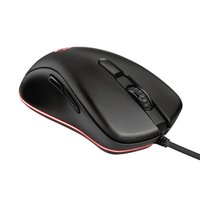
| Product Type | Wireless Optical Mouse |
| Model | Trust 20251 |
| Connection Type | 2.4 GHz Wireless |
| Dimensions (L x W x H) | 10.5 x 6.5 x 3.5 cm |
| Weight | 85 g (including battery) |
| Power Source | 1x AA battery (not included) |
| Battery Life | Up to 12 months |
| Sensor Technology | Optical, 1000 DPI |
| Number of Buttons | 3 (left, right, scroll wheel) |
| Scroll Wheel | Yes, with click |
| Operating Range | Up to 10 meters |
| Compatibility | Windows, macOS, Linux |
| Plug and Play | Yes, no driver needed |
| Color | Black |
| Maintenance | Clean with dry cloth; avoid liquids |
| Safety Warnings | Keep away from water; do not disassemble |
| Spare Parts | Battery, USB receiver (if lost) |
| Repairability | Not user-serviceable; contact support |
| Package Contents | Mouse, USB receiver, user manual |
Frequently Asked Questions - 20251 TRUST
How do I connect the Trust 20251 mouse to my computer?
Insert the USB receiver into an available USB port on your computer. The mouse will automatically connect. If it doesn't work, try a different USB port or replace the battery.
Why is my mouse not moving the cursor?
First, check that the battery is installed correctly and has power. Ensure the USB receiver is firmly plugged in. Try moving the receiver to a different USB port or closer to the mouse.
How do I replace the battery?
Open the battery compartment on the bottom of the mouse. Remove the old AA battery and insert a new one, observing the correct polarity (+/-). Close the compartment securely.
What type of battery does the mouse use?
The mouse requires one AA alkaline or rechargeable battery. Rechargeable batteries may have slightly shorter life per charge.
How long does the battery last?
Under normal usage, the battery can last up to 12 months. Battery life depends on usage frequency and type of battery.
Can I use this mouse with a Mac?
Yes, the mouse is compatible with macOS as well as Windows and Linux. It works plug-and-play without additional drivers.
How do I clean my mouse?
Turn off the mouse and remove the battery. Wipe the exterior with a soft, dry cloth. Do not use water or cleaning agents. For the sensor, use a cotton swab lightly.
What is the range of the wireless connection?
The 2.4 GHz signal has an operating range of up to 10 meters in open space. Walls and obstacles may reduce the range.
My mouse cursor is erratic or jumps. What should I do?
Check the optical sensor for dirt or debris. Clean it gently with a cotton swab. Also ensure the surface is suitable (non-reflective, smooth). Replace the battery if low.
Is the USB receiver stored inside the mouse?
Some models have a storage slot inside the battery compartment. Check there if you need to transport the receiver. If not, store it safely when not in use.
User questions about 20251 TRUST
0 question about this device. Answer the ones you know or ask your own.
Ask a new question about this device
No questions yet. Be the first to ask one.
Download the instructions for your Mouse in PDF format for free! Find your manual 20251 - TRUST and take your electronic device back in hand. On this page are published all the documents necessary for the use of your device. 20251 by TRUST.
USER MANUAL 20251 TRUST

Manual assistant
Powered by Anthropic
Waiting for your message
Product information
Brand : TRUST
Model : 20251
Category : Mouse