Themo - Mouse TRUST - Free user manual and instructions
Find the device manual for free Themo TRUST in PDF.


Pick your language and provide your email: we'll send you a specifically translated version.
| Product Type | Wireless Mouse |
| Brand | Trust |
| Model | Themo |
| Connectivity | 2.4 GHz Wireless (USB Nano Receiver) |
| Dimensions (L x W x H) | 105 x 65 x 38 mm |
| Weight | 75 g (including battery) |
| Power Source | 1 x AA battery (not included) |
| Battery Life | Up to 12 months (depending on usage) |
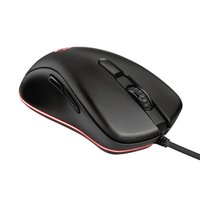
| Buttons | 3 (Left, Right, Scroll wheel with middle click) |
| Scroll Wheel | Yes, with tilt function |
| DPI Resolution | 1000 dpi (fixed) |
| Sensor Type | Optical |
| Compatible Operating Systems | Windows 7/8/10/11, macOS 10.10 or later |
| Wireless Range | Up to 10 m |
| Color | Black (or as available) |
| Care & Cleaning | Wipe with a soft, dry cloth. Do not use liquids or abrasive cleaners. |
| Safety Warnings | Keep away from liquids and excessive heat. Do not open the device. |
| Spare Parts / Repairability | No user-serviceable parts. Contact Trust support for issues. |
| General Information | Plug and play installation. Receiver stored inside mouse for portability. |
Frequently Asked Questions - Themo TRUST
How do I connect the Trust Themo mouse?
Insert the USB nano receiver into a free USB port on your computer. Turn on the mouse using the power switch (usually at the bottom). The mouse should connect automatically.Plug and play installation, no drivers needed.
What battery does the mouse require?
The Trust Themo mouse uses one AA battery (not included). Insert it into the battery compartment with the correct polarity.
How long does the battery last?
Battery life can reach up to 12 months depending on usage patterns. For best performance, use a fresh alkaline battery.
Is the mouse compatible with my operating system?
Yes, it works with Windows 7/8/10/11 and macOS 10.10 or later. No additional software is required.
My mouse is not working. What should I check?
First, ensure the mouse is turned on and the battery is inserted correctly. Try the receiver in a different USB port. Reset the connection by turning the mouse off and on again. If using a USB hub, try connecting directly to the computer.
Can I use the mouse on a glass surface?
The optical sensor works best on opaque surfaces like a mouse pad or desk. Transparent or reflective surfaces (glass, mirrors) may cause erratic cursor movement. Use a mouse pad for optimal performance.
How do I clean the mouse?
Wipe the exterior with a soft, dry cloth. Do not use water, cleaning solvents, or abrasive materials. Avoid getting moisture into the openings.
Is the mouse suitable for gaming?
The Trust Themo is a standard office mouse with a fixed 1000 dpi optical sensor. It is not designed for gaming but works fine for casual use and everyday tasks.
How can I store the USB receiver?
The receiver can be stored inside the mouse battery compartment. Open the battery cover, and you will find a slot to place the receiver. This prevents loss during transport.
The scroll wheel is not working properly. What can I do?
Check for debris between the wheel and the housing. Gently blow compressed air to remove dust. Ensure the mouse has a good connection. If the problem persists, contact Trust customer support.
User questions about Themo TRUST
0 question about this device. Answer the ones you know or ask your own.
Ask a new question about this device
No questions yet. Be the first to ask one.
Download the instructions for your Mouse in PDF format for free! Find your manual Themo - TRUST and take your electronic device back in hand. On this page are published all the documents necessary for the use of your device. Themo by TRUST.
USER MANUAL Themo TRUST

Manual assistant
Powered by Anthropic
Waiting for your message
Product information
Brand : TRUST
Model : Themo
Category : Mouse