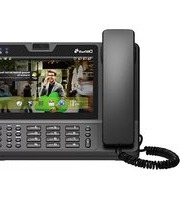
DW-710 IP phone - Telephone Denwa - Free user manual and instructions
Find the device manual for free DW-710 IP phone Denwa in PDF.


Pick your language and provide your email: we'll send you a specifically translated version.
| Product Type | IP Phone |
| Brand | Denwa |
| Model | DW-710 |
| Display | 2.8-inch color LCD |
| Number of Lines | 2 SIP accounts |
| Network Interface | 10/100 Mbps Ethernet |
| Power Supply | PoE (802.3af) or 5V DC adapter |
| Dimensions (W x D x H) | 200 x 180 x 80 mm |
| Weight | 0.85 kg |
| Audio Features | Speakerphone, HD audio, echo cancellation |
| Phonebook Capacity | Up to 500 contacts |
| Call Features | Call hold, transfer, conference, DND |
| Mounting | Desktop or wall-mountable |
| Cleaning Instructions | Wipe with a soft dry cloth; avoid liquids |
| Safety Compliance | CE, FCC, RoHS |
| Spare Parts Availability | Replacement handset, power adapter, and stand |
| Warranty | 1 year limited |
Frequently Asked Questions - DW-710 IP phone Denwa
How do I set up the Denwa DW-710 IP phone?
Connect the phone to your network using an Ethernet cable. Power it via PoE or the included adapter. Wait for boot-up, then configure SIP account settings through the phone menu or web interface.
How many SIP accounts can I register on the DW-710?
The DW-710 supports up to 2 SIP accounts, allowing you to manage two separate lines or providers.
Can I use the DW-710 without a power adapter?
Yes, if your network switch supports Power over Ethernet (PoE 802.3af), the phone can be powered solely through the Ethernet cable.
How do I access the web interface for configuration?
Find the phone's IP address from the phone menu (Settings > Status). Enter that IP into a web browser. Default username and password are usually 'admin' and 'admin'.
What should I do if the phone doesn't power on?
Check the Ethernet cable connection and ensure PoE is active or the power adapter is plugged in securely. Try a different port or adapter if possible.
How do I adjust the volume during a call?
Use the Volume +/- buttons on the right side of the handset or the base during an active call. You can also adjust ringer volume from the menu.
Can I block anonymous calls on the DW-710?
Yes, go to Settings > Call Features > Anonymous Call Rejection and enable it. This will reject calls with blocked caller IDs.
What is the best way to clean the phone?
Use a soft, dry cloth to wipe the surfaces. Do not use liquid cleaners or sprays, as they may damage the electronics.
How do I reset the phone to factory defaults?
Go to Settings > Advanced > Factory Reset. Confirm the reset. The phone will reboot with default settings; all custom configurations will be lost.
Where can I find spare parts for the DW-710?
Contact Denwa support or authorized resellers. Common spare parts include handset, power adapter, and wall-mount bracket.
User questions about DW-710 IP phone Denwa
0 question about this device. Answer the ones you know or ask your own.
Ask a new question about this device
No questions yet. Be the first to ask one.
Download the instructions for your Telephone in PDF format for free! Find your manual DW-710 IP phone - Denwa and take your electronic device back in hand. On this page are published all the documents necessary for the use of your device. DW-710 IP phone by Denwa.
USER MANUAL DW-710 IP phone Denwa


Manual assistant
Powered by Anthropic
Waiting for your message
Product information
Brand : Denwa
Model : DW-710 IP phone
Category : Telephone