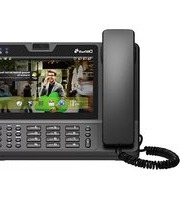
DW-810 - Telephone Denwa - Free user manual and instructions
Find the device manual for free DW-810 Denwa in PDF.


Pick your language and provide your email: we'll send you a specifically translated version.
| Product Type | Corded Telephone |
| Brand | Denwa |
| Model | DW-810 |
| Display | LCD with caller ID support |
| Dimensions (HxWxD) | Approx. 22 x 18 x 12 cm |
| Weight | Approx. 0.6 kg |
| Power Supply | Telephone line powered (no external adapter needed) |
| Keypad | 12 buttons (0-9, *, #) with redial |
| Speakerphone | Yes, hands-free mode |
| Caller ID | Supports FSK and DTMF |
| Ringer Volume | Adjustable (high/low/off) |
| Handset Volume | Adjustable via sliding switch |
| Memory Storage | Up to 10 speed dial numbers |
| Last Number Redial | Yes, memory for last dialed number |
| Wall Mountable | Yes, with included bracket |
| Connection Type | RJ11 standard telephone jack |
| Maintenance | Wipe with dry cloth; avoid liquids |
| Security | Designed for indoor use; keep away from moisture |
| Spare Parts | Handset cord and telephone line cord replaceable |
| General Information | Intended for analog PSTN lines; compatible with VoIP adapters |
Frequently Asked Questions - DW-810 Denwa
How do I set up the Denwa DW-810 telephone?
Connect the handset cord to the base and the telephone line cord to a wall jack. Insert the battery (if required) or simply connect to an active phone line.
Does the DW-810 require batteries?
The Denwa DW-810 is typically line-powered and does not require batteries for basic operation. However, some models may use a 9V battery for memory backup.
How do I adjust the ringer volume?
Locate the ringer volume switch on the side of the phone. Slide it to high, low, or off position.
How can I use the speakerphone feature?
Press the Speaker button on the base to activate hands-free mode. Press again to hang up.
Why is my caller ID not showing?
Ensure your telephone service includes caller ID. The phone supports both FSK and DTMF formats. If still not working, check the line cord connection or contact your provider.
How do I store a number in speed dial?
Press and hold the desired memory button (M1-M10), then enter the phone number. Release the button to save.
Can I mount the DW-810 on a wall?
Yes, the phone includes a wall mount bracket. Remove the base stand, attach the bracket to the wall, and slide the phone onto it.
What should I do if the phone is not ringing?
Check the ringer volume switch; ensure it is not set to off. Also verify the telephone line is active and the handset is properly connected.
How do I clean the telephone?
Unplug the phone from the line. Use a soft, dry cloth to wipe the surfaces. Do not use water or cleaning agents as they may damage the electronics.
Is the Denwa DW-810 compatible with VoIP?
Yes, the phone works with standard RJ11 connections. It can be used with a VoIP adapter or directly with an analog phone line.
User questions about DW-810 Denwa
0 question about this device. Answer the ones you know or ask your own.
Ask a new question about this device
No questions yet. Be the first to ask one.
Download the instructions for your Telephone in PDF format for free! Find your manual DW-810 - Denwa and take your electronic device back in hand. On this page are published all the documents necessary for the use of your device. DW-810 by Denwa.
USER MANUAL DW-810 Denwa


Manual assistant
Powered by Anthropic
Waiting for your message
Product information
Brand : Denwa
Model : DW-810
Category : Telephone