
DW-SOHOPAK2 - Telephone Denwa - Free user manual and instructions
Find the device manual for free DW-SOHOPAK2 Denwa in PDF.


| Product Type | Desktop Telephone |
| Brand | Denwa |
| Model | DW-SOHOPAK2 |
| Dimensions (H x W x D) | Approx. 220 x 200 x 100 mm |
| Weight | Approx. 1.0 kg |
| Power Supply | AC Adapter (input 100-240V, output 9V DC) or Power over Ethernet (PoE) |
| Display | Backlit LCD, 2 lines x 16 characters |
| Keypad | 12 dial keys, 4 function keys, 2 line keys |
| Audio | Full-duplex speakerphone, adjustable volume |
| Call Features | Caller ID, call hold, mute, redial, flash, 3-way conferencing |
| Ringer | Polyphonic, 10 selectable tones, adjustable volume |
| Connections | RJ11 for telephone line, RJ45 for network (PoE), headset jack (2.5mm) |
| Mounting | Desktop or wall mountable |
| Maintenance | Wipe with a soft, dry cloth; do not use liquids or abrasive cleaners |
| Safety | For indoor use only; keep away from water and extreme temperatures |
| Spare Parts | Handset cord, coil cord, AC adapter (optional) available separately |
| Repairability | User-replaceable handset and cords; internal parts serviceable by qualified technician |
| Operating Temperature | 0°C to 40°C |
| Warranty | 1 year limited |
Frequently Asked Questions - DW-SOHOPAK2 Denwa
User questions about DW-SOHOPAK2 Denwa
0 question about this device. Answer the ones you know or ask your own.
Ask a new question about this device
Download the instructions for your Telephone in PDF format for free! Find your manual DW-SOHOPAK2 - Denwa and take your electronic device back in hand. On this page are published all the documents necessary for the use of your device. DW-SOHOPAK2 by Denwa.
USER MANUAL DW-SOHOPAK2 Denwa
MANUAL DE USUARIO
DW-210P
1.3 Teclado
Press Menu->Application->Ping->Enter.
Enter the IP Address to be pinged.
Press Start
Display will show "Ping IP Address"
After approximately 5 seconds, the display will show "OK" if the ping is successful or "Failed" is the ping is unsuccessful.
| Start Time | Duration | Dialed Calls |

| Phone Number | |
| Destination(Optional) | |
| Port(Optional) | |
| Alias(Optional) | |
| Call Mode | SIP ▼ |
| Suffix(Optional) | |
| Deleted Length(Optional) |
Dial Peer Option


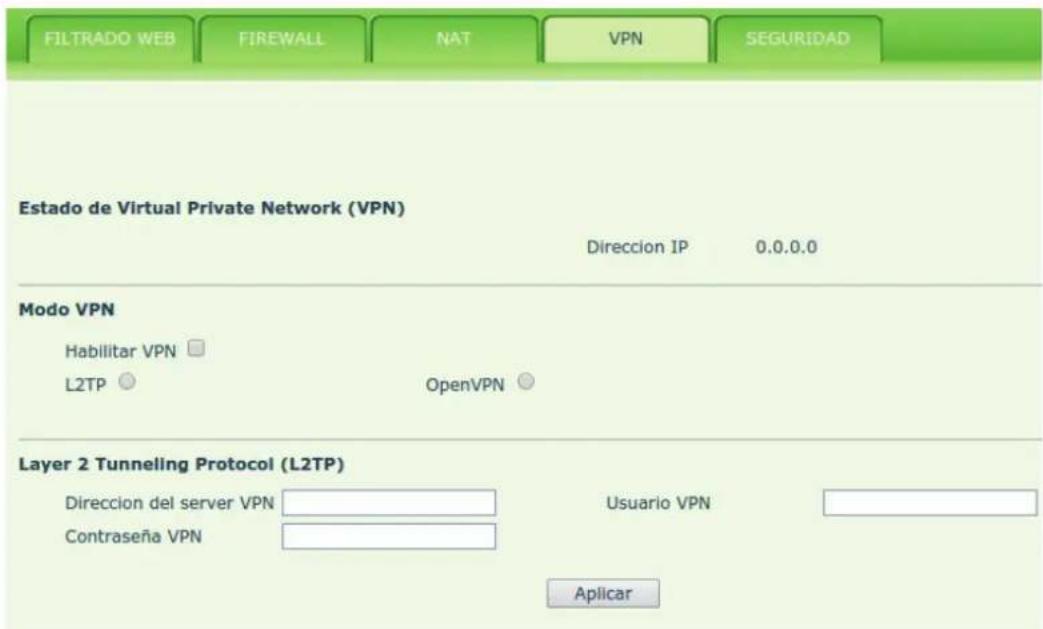
Realizes the logical special line through VPN



Brand : Denwa
Model : DW-SOHOPAK2
Category : Telephone