Pico+ Max - Video projector AAXA Technologies - Free user manual and instructions
Find the device manual for free Pico+ Max AAXA Technologies in PDF.


Pick your language and provide your email: we'll send you a specifically translated version.
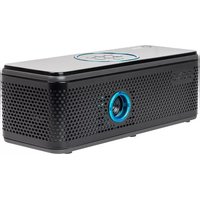
| Product type | Video projector |
| Brand | AAXA Technologies |
| Model | Pico+ Max |
| Display technology | DLP |
| Light source | LED |
| Resolution | 854 × 480 (WVGA) |
| Brightness | 200 lumens |
| Contrast ratio | 1000:1 |
| Projection size | 10 – 60 inches |
| Lamp life | 30,000 hours |
| Connectivity | HDMI, USB, Micro SD |
| Built-in speaker | 1 W mono |
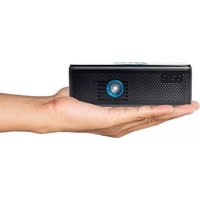
| Dimensions (W × D × H) | 10.0 × 10.0 × 2.5 cm |
| Weight | 150 g |
| Power supply | Built-in rechargeable battery, 5 V DC via USB |
| Battery capacity | 2600 mAh |
| Working time | Up to 2 hours |
| Focus adjustment | Manual |
| Supported media formats | MP4, AVI, MOV, JPEG, BMP |
| Operating temperature | 0 °C – 35 °C |
| Spare parts and reparability | No spare parts available; device not serviceable |
| Maintenance and cleaning | Clean lens with soft dry cloth; avoid liquids |
| Safety | Do not look directly into the lens; keep away from heat sources |
| Warranty | 1 year |
Frequently Asked Questions - Pico+ Max AAXA Technologies
How do I turn on the Pico+ Max projector?
Press and hold the power button on the top of the projector for 2 seconds until the LED lights up.
Can I connect my smartphone to the projector?
Yes, use an HDMI adapter for smartphones with HDMI output, or a USB-C to HDMI cable for compatible devices.
How do I adjust the focus?
Rotate the focus wheel on the side of the projector until the image is clear.
What is the maximum projection size?
The projector can produce an image up to 60 inches diagonal in a dark room.
How do I charge the projector?
Connect the included USB cable to a 5V USB charger and plug it into the projector's micro USB port.
Why is the projector not turning on?
Ensure the battery is charged. If it still doesn't turn on, try a hard reset by pressing and holding the power button for 10 seconds.
Can I play files from a USB drive?
Yes, insert a USB drive into the USB port and use the on-screen menu to navigate and play supported media files.
How do I clean the lens?
Use a soft, microfiber cloth to gently wipe the lens. Do not use any liquids or abrasive materials.
What should I do if the image is distorted?
Check that the projector is placed on a flat surface and adjust the keystone correction if available via the menu.
Is it safe to use the projector on battery power for extended periods?
Yes, the built-in lithium-ion battery is designed for portable use. Avoid extremely high temperatures and do not cover the projector during use.
User questions about Pico+ Max AAXA Technologies
0 question about this device. Answer the ones you know or ask your own.
Ask a new question about this device
No questions yet. Be the first to ask one.
Download the instructions for your Video projector in PDF format for free! Find your manual Pico+ Max - AAXA Technologies and take your electronic device back in hand. On this page are published all the documents necessary for the use of your device. Pico+ Max by AAXA Technologies.
USER MANUAL Pico+ Max AAXA Technologies

Manual assistant
Powered by Anthropic
Waiting for your message
Product information
Brand : AAXA Technologies
Model : Pico+ Max
Category : Video projector