SLC450 - Video projector AAXA Technologies - Free user manual and instructions
Find the device manual for free SLC450 AAXA Technologies in PDF.


Pick your language and provide your email: we'll send you a specifically translated version.
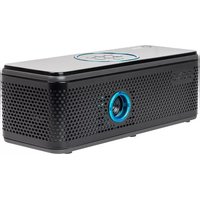
| Product Type | Mini LED Video Projector |
| Display Technology | DLP (Digital Light Processing) |
| Native Resolution | 854 x 480 (WVGA) |
| Maximum Resolution | 1920 x 1080 (Full HD) supported |
| Brightness | 250 LED lumens |
| Contrast Ratio | 2000:1 |
| Light Source | RGB LED |
| Lamp Life | Up to 30,000 hours |
| Input Ports | HDMI, USB 2.0 (for media playback), MicroSD card slot |
| Output Ports | 3.5mm headphone jack |
| Built-in Speaker | 1W monaural |
| Battery | Rechargeable Li-ion, 2500 mAh |
| Battery Life | Up to 2 hours on full charge |
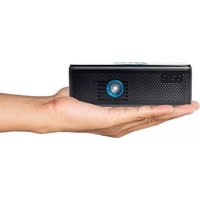
| Dimensions (W x D x H) | 5.5 x 3.5 x 1.5 in (140 x 89 x 38 mm) |
| Weight | 0.6 lb (270 g) |
| Power Supply | DC 5V via USB-C (charger included) |
| Power Consumption | 12W typical |
| Keystone Correction | +/- 15° vertical (manual) |
| Projection Size | 20 - 120 inches diagonal |
| Operating System | None (no smart features; external input required) |
| Mounting | 1/4" tripod screw thread |
| Cleaning | Use a soft, dry cloth; avoid liquids and compressed air |
| Security | Kensington lock slot |
| Spare Parts | Battery and remote control available from AAXA support |
Frequently Asked Questions - SLC450 AAXA Technologies
How do I connect my smartphone to the SLC450?
Use an HDMI adapter (such as MHL or USB-C to HDMI) to connect your phone to the projector's HDMI port. Alternatively, use a Chromecast or wireless display adapter plugged into the HDMI port for screen mirroring.
Can I play media files directly from a USB drive?
Yes, the projector supports playback of video, photo, and audio files from a USB drive or microSD card. Compatible formats include MP4, AVI, JPEG, BMP, and MP3. Use the on-screen media player to browse and play files.
How long does the battery last and how do I charge it?
The built-in battery lasts up to 2 hours on a full charge. Charge it using the included USB-C cable and a 5V/2A power adapter. The LED indicator turns red while charging and green when fully charged.
My projected image is fuzzy. How can I fix the focus?
Turn the focus ring located on the lens barrel until the image appears sharp. Also ensure the projector is placed on a stable surface and the keystone correction is adjusted if the image is trapezoidal.
What is the recommended projection distance for a 100-inch screen?
For a 100-inch diagonal image, place the projector approximately 10-12 feet (3-3.6 meters) away from the screen. Use the built-in zoom (if available) or adjust distance for best fit.
Can I use the projector while it is charging?
Yes, you can use the projector while connected to USB-C power. This will not damage the battery, but the battery may charge slower or remain at the same level during operation.
How do I clean the lens?
Use a soft, lint-free microfiber cloth to gently wipe the lens in a circular motion. Do not use any liquids, abrasive cleaners, or compressed air, as they may damage the lens coating.
Why is there no sound coming from the projector?
Check that the volume is not muted and is turned up. If using an external HDMI source, ensure the device's audio output is set to HDMI. For media playback from USB, verify the audio format is supported. You can also connect external speakers via the 3.5mm jack.
Is the projector compatible with gaming consoles?
Yes, the SLC450 works with gaming consoles like Nintendo Switch, PlayStation, and Xbox via HDMI. Note that due to its native WVGA resolution, text may appear small, and there may be some input lag (typically under 100ms). For fast-paced games, a wired connection is recommended.
What spare parts are available and how do I order them?
Spare parts such as the remote control and battery can be ordered directly from AAXA Technologies support. Contact them via their website or email. The product has a 1-year warranty covering manufacturing defects.
User questions about SLC450 AAXA Technologies
0 question about this device. Answer the ones you know or ask your own.
Ask a new question about this device
No questions yet. Be the first to ask one.
Download the instructions for your Video projector in PDF format for free! Find your manual SLC450 - AAXA Technologies and take your electronic device back in hand. On this page are published all the documents necessary for the use of your device. SLC450 by AAXA Technologies.
USER MANUAL SLC450 AAXA Technologies

Manual assistant
Powered by Anthropic
Waiting for your message
Product information
Brand : AAXA Technologies
Model : SLC450
Category : Video projector