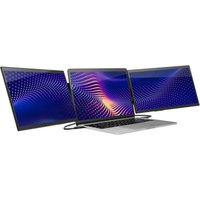
Swivel Pro Touch HD - Monitor SideTrak - Free user manual and instructions
Find the device manual for free Swivel Pro Touch HD SideTrak in PDF.


Pick your language and provide your email: we'll send you a specifically translated version.
| Product Type | Portable Touchscreen Monitor |
| Brand | SideTrak |
| Model | Swivel Pro Touch HD |
| Screen Size | 15.6 inches |
| Resolution | 1920 x 1080 (Full HD) |
| Touch Technology | 10-point capacitive touch |
| Brightness | 250 cd/m² |
| Contrast Ratio | 800:1 |
| Refresh Rate | 60 Hz |
| Connectivity | USB-C (x2), Mini HDMI, 3.5mm headphone jack |
| Power Input | USB-C 5V/3A (supports power delivery up to 15W) |
| Built-in Battery | No (requires external power via USB-C) |
| Speakers | Built-in stereo speakers |
| Stand | Integrated swivel stand (360° rotation) |
| Dimensions (with stand) | 14.2 x 9.3 x 0.6 inches |
| Weight | 1.6 lbs |
| Compatible Systems | Windows, macOS, Android, Chrome OS, Nintendo Switch |
| Accessories Included | USB-C cable (power + data), Mini HDMI to HDMI cable, quick start guide |
| Cleaning Instructions | Wipe with a soft, dry microfiber cloth; do not use liquid cleaners. |
| Safety Warning | Use only the provided cables and power source. Do not disassemble. |
| Warranty | 1-year limited warranty |
Frequently Asked Questions - Swivel Pro Touch HD SideTrak
How do I connect the SideTrak Swivel Pro Touch HD to my laptop?
Use the included USB-C cable for both power and video. If your laptop lacks USB-C video output, use the Mini HDMI port with the included Mini HDMI to HDMI cable, but you will need a separate USB-A to USB-C cable for power.
Does touch functionality work on macOS?
Yes, it is compatible with macOS, but you may need to install a driver. Visit the SideTrak support page for the latest driver for your macOS version.
Can I use this monitor as a second screen for my phone?
Yes, if your phone supports USB-C video output (e.g., Samsung DeX or Huawei EMUI). Connect the phone directly via USB-C to the monitor. The touchscreen will work in DeX mode.
Does the monitor have a built-in battery?
No, the SideTrak Swivel Pro Touch HD does not have an internal battery. It must be powered via the USB-C connection from your host device or a USB power adapter.
What is the resolution of this monitor?
It is a Full HD (1920 x 1080) display with a 60 Hz refresh rate, offering clear and smooth visuals for productivity and media consumption.
How do I clean the touchscreen?
Turn off the monitor and disconnect cables. Gently wipe the screen with a soft, lint-free microfiber cloth. Do not use any liquids, as they may damage the screen.
Is the SideTrak Swivel Pro Touch HD compatible with the Nintendo Switch?
Yes, it works in tabletop mode. Connect the Switch dock via HDMI to the monitor, and power the monitor with a USB-C power source. Touch may not be supported in all games.
What cables come in the box?
The package includes one USB-C to USB-C cable (for power and video) and one Mini HDMI to HDMI cable. A USB power adapter is not included.
How do I adjust the brightness?
Use the physical buttons on the side of the monitor. Press the 'Menu' button, navigate to 'Brightness,' and adjust using the '+' and '-' buttons.
What is the warranty period for this monitor?
The SideTrak Swivel Pro Touch HD comes with a 1-year limited warranty covering manufacturing defects. For more details, refer to the warranty section in the user manual.
User questions about Swivel Pro Touch HD SideTrak
0 question about this device. Answer the ones you know or ask your own.
Ask a new question about this device
No questions yet. Be the first to ask one.
Download the instructions for your Monitor in PDF format for free! Find your manual Swivel Pro Touch HD - SideTrak and take your electronic device back in hand. On this page are published all the documents necessary for the use of your device. Swivel Pro Touch HD by SideTrak.
USER MANUAL Swivel Pro Touch HD SideTrak


Manual assistant
Powered by Anthropic
Waiting for your message
Product information
Brand : SideTrak
Model : Swivel Pro Touch HD
Category : Monitor