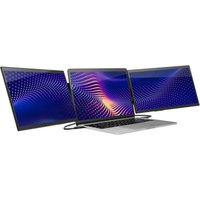
Solo Pro Touch FHD - Screen SideTrak - Free user manual and instructions
Find the device manual for free Solo Pro Touch FHD SideTrak in PDF.


Pick your language and provide your email: we'll send you a specifically translated version.
| Product Type | Portable Touchscreen Monitor |
| Brand | SideTrak |
| Model | Solo Pro Touch FHD |
| Screen Size | 15.6 inches |
| Resolution | 1920 x 1080 (Full HD) |
| Touchscreen | Capacitive Multi-Touch |
| Aspect Ratio | 16:9 |
| Refresh Rate | 60 Hz |
| Brightness | 300 cd/m² |
| Contrast Ratio | 1000:1 |
| Connectivity | USB-C (DisplayPort Alt Mode), Mini HDMI |
| Power | USB-C powered (5V/2A or 15V/2A) |
| Dimensions (WxHxD) | 14.0 x 8.9 x 0.3 inches (355 x 226 x 7.5 mm) |
| Weight | 1.7 lbs (0.77 kg) |
| VESA Mount | 75 x 75 mm compatible |
| Speakers | Built-in stereo speakers |
| OS Compatibility | Windows, macOS, Android (with USB-C DP), Chrome OS |
| Accessories Included | USB-C cable, Mini HDMI to HDMI cable, magnetic stand |
| Usage | Portable productivity, gaming, presentations |
| Cleaning | Wipe with soft dry cloth; avoid harsh chemicals |
Frequently Asked Questions - Solo Pro Touch FHD SideTrak
What cables are needed to connect the Solo Pro Touch FHD to my laptop?
The monitor supports USB-C with DisplayPort Alt Mode and Mini HDMI. Use the included USB-C cable for a single-cable connection (video + power) if your laptop supports USB-C DP. Otherwise, use the Mini HDMI to HDMI cable for video and a separate USB-C power source.
Does the touchscreen work with all devices?
Touch is supported via USB-C connection on Windows, macOS (some limitations), and Android devices with USB-C DP. It may not work over HDMI. Check your device's compatibility.
Can I power the monitor via a USB-A port?
No, USB-A ports typically do not provide enough power. Use a USB-C port that supports Power Delivery (PD) or plug the USB-C power cable into a wall adapter (5V/2A or 15V/2A).
How do I adjust the brightness and volume?
The monitor has on-screen display (OSD) controls via buttons on the side. Press the menu button to access brightness, volume, and other settings.
Is the monitor compatible with gaming consoles like Nintendo Switch?
Yes, the Switch supports USB-C video output. Connect the monitor directly to the Switch using the USB-C cable (the Switch must be in TV mode or use a separate power source).
Does the monitor come with a protective case or stand?
Yes, it includes a magnetic folio stand that can also serve as a cover. The stand supports multiple viewing angles.
What is the warranty period?
SideTrak typically offers a 1-year limited warranty. Check the product packaging or SideTrak website for details.
Can I use the monitor in portrait orientation?
Yes, you can rotate the monitor physically and adjust the display orientation in your computer's settings. The VESA mount allows for flexible mounting.
How to clean the touchscreen without damaging it?
Turn off the monitor and unplug it. Use a soft, lint-free cloth slightly dampened with water or a mild screen cleaner. Wipe gently; do not spray liquid directly on the screen.
What are the dimensions and weight?
It measures 14.0 x 8.9 x 0.3 inches and weighs 1.7 lbs, making it very portable.
User questions about Solo Pro Touch FHD SideTrak
0 question about this device. Answer the ones you know or ask your own.
Ask a new question about this device
No questions yet. Be the first to ask one.
Download the instructions for your Screen in PDF format for free! Find your manual Solo Pro Touch FHD - SideTrak and take your electronic device back in hand. On this page are published all the documents necessary for the use of your device. Solo Pro Touch FHD by SideTrak.
USER MANUAL Solo Pro Touch FHD SideTrak


Manual assistant
Powered by Anthropic
Waiting for your message
Product information
Brand : SideTrak
Model : Solo Pro Touch FHD
Category : Screen