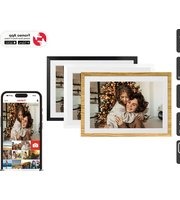
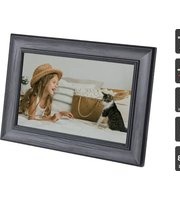
KADPF156DWA - Digital photo frame Kogan - Free user manual and instructions
Find the device manual for free KADPF156DWA Kogan in PDF.


Pick your language and provide your email: we'll send you a specifically translated version.
| Product Type | Digital Photo Frame |
| Model | KADPF156DWA |
| Display Size | 15.6 inches |
| Resolution | 1920 x 1080 (Full HD) |
| Display Type | IPS LCD |
| Aspect Ratio | 16:9 |
| Brightness | 250 cd/m² |
| Contrast Ratio | 1000:1 |
| Supported Photo Formats | JPEG, BMP, PNG |
| Supported Video Formats | MP4, AVI, MOV |
| Supported Audio Formats | MP3, WMA, WAV |
| Memory Card Slots | SD/SDHC/MMC (up to 32GB) |
| USB Ports | 1 x USB 2.0 (for flash drive) |
| Built-in Memory | 8 GB (expandable via card) |
| Remote Control | Yes (IR) |
| Auto Rotation | Yes (based on orientation sensor) |
| Clock and Calendar | Yes, with alarm |
| Slideshow Modes | Fade, slide, random, zoom |
| Power Supply | AC 100-240V, 50/60Hz (adapter included) |
| Power Consumption | 12W (typical) |
| Dimensions (without stand) | 380 x 230 x 30 mm |
| Weight | 1.5 kg |
| Mounting Options | Desktop stand (included) & VESA 75x75 wall mount |
| Warranty | 1 year |
Frequently Asked Questions - KADPF156DWA Kogan
How do I set up the Kogan KADPF156DWA digital photo frame?
Connect the power adapter, insert an SD card or USB drive with photos, and press the power button. The frame will automatically start a slideshow.
What photo formats are supported?
Supports JPEG, BMP, and PNG formats. For best results, use JPEG files with resolution up to 1920x1080.
Can I play videos on this frame?
Yes, it supports MP4, AVI, and MOV video files. Videos are played in full screen with audio through the built-in speaker.
How do I adjust slideshow settings?
Use the remote control or touch buttons to access the menu. You can change transition effects, display time, and shuffle order.
Why is my memory card not recognized?
Ensure the card is formatted as FAT32 and does not exceed 32GB. Try reinserting it or cleaning the contacts.
How do I set the clock and calendar?
Go to Settings > Date/Time and use the remote to set the current date and time. The frame will display it when not showing photos.
Can I mount this frame on a wall?
Yes, it has VESA 75x75 mounting holes. Use appropriate wall anchors and screws (not included). Remove the stand first.
What is the internal memory capacity?
The frame has 8GB of built-in memory. You can also expand storage via SD card or USB flash drive.
How do I reset the frame?
Insert a paperclip into the reset hole on the back or hold the power button for 10 seconds until the screen turns off.
Is there a remote control included?
Yes, an infrared remote control is included. Point it at the sensor on the frame from up to 5 meters away.
User questions about KADPF156DWA Kogan
0 question about this device. Answer the ones you know or ask your own.
Ask a new question about this device
No questions yet. Be the first to ask one.
Download the instructions for your Digital photo frame in PDF format for free! Find your manual KADPF156DWA - Kogan and take your electronic device back in hand. On this page are published all the documents necessary for the use of your device. KADPF156DWA by Kogan.
USER MANUAL KADPF156DWA Kogan



Manual assistant
Powered by Anthropic
Waiting for your message
Product information
Brand : Kogan
Model : KADPF156DWA
Category : Digital photo frame