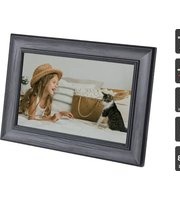
KADPFR10WBA - Digital photo frame Kogan - Free user manual and instructions
Find the device manual for free KADPFR10WBA Kogan in PDF.


| Product Type | Digital Photo Frame |
| Brand | Kogan |
| Model | KADPFR10WBA |
| Dimensions | 287 x 206 x 48 mm |
| Weight | 712.2 g |
| Material | Plastic + Wooden |
| Display Size | 10 inch IPS |
| Resolution | 800 x 1280 |
| Aspect Ratio | 16:10 |
| Processor | Quad Core-A50 1.7GHz |
| RAM | 1 GB |
| Internal Storage | 32 GB |
| Cloud Storage | 10 GB free |
| Battery | 3.7V / 3800mAh |
| Power Adapter | Input: AC100-240V 50/60Hz, Output: 5V/2A DC |
| Connectivity | Wi-Fi 802.11b/g/n |
| Ports | USB-A, USB-C, MicroSD, 3.5mm audio, DC input |
| Supported Photo Formats | JPEG, JPG, PNG, BMP |
| Supported Music Formats | MP3, OGG, AAC, FLAC, WAV |
| Supported Video Formats | MKV (H.264, DIVX, XVID), MOV, MP4 |
| Languages | English, German, French, Spanish, Italian, Portuguese, Japanese, Russian, Chinese, etc. |
| Operating System | Android 8.1 |
| Mounting | Kickstand included; wall-mountable (screws not included) |
| Safety | Indoor use only; keep away from water, heat, and direct sunlight |
| Maintenance | Clean with a soft, dry cloth |
| Repairability | No user-serviceable parts; do not disassemble |
Frequently Asked Questions - KADPFR10WBA Kogan
User questions about KADPFR10WBA Kogan
0 question about this device. Answer the ones you know or ask your own.
Ask a new question about this device
Download the instructions for your Digital photo frame in PDF format for free! Find your manual KADPFR10WBA - Kogan and take your electronic device back in hand. On this page are published all the documents necessary for the use of your device. KADPFR10WBA by Kogan.
USER MANUAL KADPFR10WBA Kogan
natural_image
Black-and-white photo of a girl in straw hat sitting on a bed with a cat nearby, framed in a dark frame (no text or symbols visible)- Read all the instructions in this user guide carefully before using this product. Retain the user guide for future reference. If you pass the unit onto a third party, ensure to include this user guide.
- If this product or its power cord shows any sign of damage, cease use immediately and contact help.Kogan.com for support.
- This product must be placed on a flat stable surface and not subjected to vibrations. Alternatively, the frame can be mounted to a wall using the mounting holes.
- Do not place the product on sloping or unstable surfaces as the unit may fall or tip over.
- Ensure this product is placed near an electrical outlet.
- This product is designed for indoor use only.
- Avoid exposing this product to extreme temperatures.
- Ensure this product is kept away from sources of heat such as radiators or gas/electric fires.
- Avoid exposure to direct sunlight.
- Do not place lit candles or naked flame on the top of or near this product.
- To reduce the risk of fire, electric shock, or product damage, do not expose this product to water or humid environments.
- Do not place objects filled with liquids, such as vases on or near this product.
- Children should be supervised to ensure that they do not play with this product.
- This product does not contain any user-serviceable parts. Do not disassemble or modify this product in any way.
- The supplied power adapter has been specifically designed to charge the photo frame. Refrain from using any third-party adapters to charge the product.
COMPONENTS
- Digital photo frame
- Kickstand
- Power adapter
OVERVIEW

1 Power button
6 USB-A port
2 Speakers
7 MicroSD card slot
3 Mounting hole (x2)
8 Power input
4 Kickstand
9 USB-C port
5 3.5mm audio port
Power Button
Press and hold power button 3 seconds to turn the photo frame on/off
USB-C & USB-A
You can copy photos from the unit to the USB stick.
Ports
Note: The USB port is just for data transfer, not for charging.
MicroSD Slot
Insert a Micro SD (TF) Card to import photos to the photo frame.
DC IN
Connect power adapter to power on the device.
ASSEMBLY
Installing the Kickstand
Lay the frame face down on a flat surface and attach the kickstand to the rear of the photo frame.

natural_image
Top-down view of a computer monitor with ventilation grilles and a mouse (no visible text or symbols)Kickstand
Wall Mounting
The rear of the photo frame has two mounting holes which can be used to mount the frame to a wall using a screw (not supplied).
OPERATION
Connecting to Power
-
Connect the power adapter to the power input on the frame and then plug it into an electrical outlet.
-
Press and hold the power button on the rear of the frame until the frame turns on.
Initial Setup
When using this digital photo frame for the first time, you will need to set up the following:
-
Select your desired language.
-
Select your time zone
-
Connect the frame to your Wi-Fi network.

4. Download the BWJBSW Smart Frame app
To send photos to your frame, you will need to download the "BWJBSW Smart Frame" app on your phone.
- Find the app by searching for "BWJBSW Smart Frame" on the Google Play Store (android) or the App Store (iOS).

natural_image
Stylized icon of a pair of blue circles with a small smiley face above, enclosed in a rounded square frame (no text or symbols)- Launch the mobile APP. You can choose to create a new account and use the account to scan the QR code on the photo frame or input frame device number to pair the digital photo frame.
After the pairing is successful, you can send photos, music and videos from your smart phone to the digital photo frame.
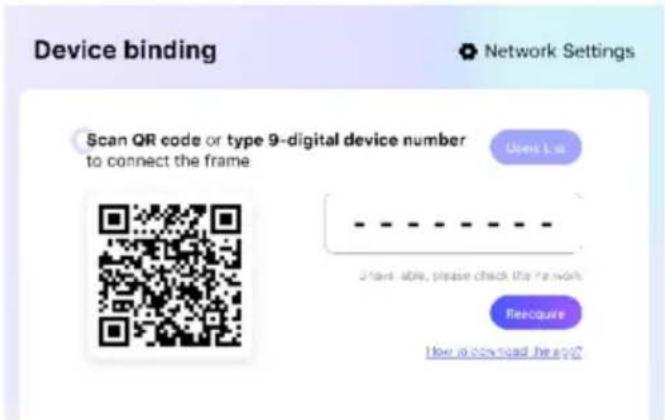
- Click album and choose the photo you'd like to send from local album or click the camera to shoot a fresh photo.
Notes:
- If you'd like to pair another photo frame, please click the return arrow on the top left corner. After the photo is successfully uploaded, the window will pop up prompt on updated content.
• It allows sending up to 9 photos at a time - If one smart phone is bound to many photo frames, you can also send photos to multiple photo frames bound at the same time
• In system setting, you can see multiple options and adjust them.
Main Menu
The main menu provides access to various functions, including albums, music, videos, calendars, weather, and settings. Navigate through these options by tapping the corresponding icons.

Album
In the Albums section, you can view photos that have been uploaded by users or imported locally. If an SD card is inserted, it will also be displayed. This makes it easy to find specific photos.
Options after selecting a photo:
- Play All: Loops the playback of photos in the local album.
- Crop: Allows you to select and adjust the area of the photo you want to keep by pinching and zooming.
- Rotate: Adjusts the angle of the photo.
- Delete: Removes the current photo.
- Info: Displays information about the current photo.
- Edit: Provides options to copy, move, or delete photos.


natural_image
Two people relaxing on a checkered blanket with grass, wearing sunglasses and a red top (no visible text or symbols)Music
Tap the music icon on the main interface to access the music player. This supports music from SD cards, USB drives, or cloud storage.
Controls:
- Play Modes: Switch between different play modes, including play, pause, next, and previous tracks.
• Volume: Adjust the sound volume and set to full-screen mode if desired.

Videos
Tap the Video icon from the main menu to open the video player. This section contains videos sent from mobile devices or imported locally.
During video playback:
- Pause/Play: Pause or play the video.
- Previous/Next: Navigate to the previous or next video.
• Cycle: Repeat the current video.
• In the Edit menu, you can copy, move, or delete videos.


natural_image
Video frame showing two characters with a rifle, captured in a close-up (no visible text or symbols)Calendar
Access the calendar by clicking the calendar icon on the main interface. Navigate between months using the left and right arrows.


Weather
Once connected to the internet, the photo frame will automatically display a three-day weather forecast for your city.

Settings
Customize your digital photo frame using the settings interface.
User Account
Add a new user by scanning and downloading the “BWJBSW Smart Frame” app. Use the app to pair the photo frame to your account, allowing for easy photo, video, and music uploads.
WI-FI Setting
Turn the WI-FI function on or off. When on, the frame will scan and display available nearby WI-FI networks. Select your network and enter the password to connect.
Customization Options:
• Language: Choose from 10 languages.
- Screen Saver: Set screen saver time and type (e.g., fluorescent or album).
- Display Mode: Select full screen, normal, or stretch for images.
- Play Interval: Adjust the time each image is displayed.
- Play Effect: Choose transition effects between images.
• Human Sleep Mode: Toggle sleep mode.
- Brightness: Adjust device brightness.
• Volume: Adjust sound volume.

Alarm
Set and manage alarms through the alarm settings. Add new alarm times using the + symbol.

Time Zone
• Automatic Date and Time: Toggle automatic settings.
- Set Date/Time: Manually set the date and time.
- Select Time Zone: Choose the appropriate time zone.
• 24-Hour System: Toggle between 12-hour and 24-hour formats.

Mailbox
Send photos to the email displayed on the page for easy uploads.

Storage
View local and cloud storage space information.

gauge
| Storage Type | Value | | ---------------- | ----------- | | Local storage | 952.05M /32G | | Cloud storage | 0.00B /10G |About
- Device Information: View or revise the device name, number, software version, MAC address.
- System Update: Check for updates or restore factory settings. Note that restoring will clear all data and settings.
Ensure your digital photo frame is set up and customized to your preferences by navigating through these options and utilizing the available features for an optimal experience.

SPECIFICATIONS
| Size | 287 x 206 x 48mm |
| Weight 712.2g | |
| Material Plastic + wooden | |
| CPU Quad Core-A50 1.7GHz | |
| DDR 1GB | |
| Memory 32GB | |
| Touch screen Glass and plastic | |
| Resolution 800x1280 | |
| Aspect ratio 16:10 | |
| Display 10inch IPS | |
| Speaker 8Ω2W x2 | |
| Input/Output | DC-4.0/USB-A/MINI USB/SDCard/3.5mm earphone |
| Extended type | SD/SDHC/MMC Up64GB U-disk up to 64GB |
| Battery 3.7V/3800mAh | |
| WI-FI | Support Wi-Fi (802.11b/g/n) |
| Power adapter | Input: AC100-240V.50-60HZOutput: 5V/2A DC-4.0 |
| Stand Adjustable | |
| Operating system | Android 8.1 system |
| Photo format | JPEG, JPG, PNG, BMP |
| Music format | MP3, OGG, AAC, FLAC, WAV |
| Video format | MKV (H.264, DIVX, DIVX, XVID), MOV, MP4 |
| Language | Simplified Chinese、English, German, French, Spanish, Italian, Portuguese, Japanese, Russian |
| Cloud Free for 10GB cloud data |
Need more information?
We hope that this user guide has given you the assistance needed for a simple set-up.
For the most up-to-date guide for your product, as well as any additional assistance you may require, head online to help.kogan.com
kogan.com


- COMPONENTS
- OVERVIEW
- Power Button
- ASSEMBLY
- Installing the Kickstand
- Wall Mounting
- OPERATION
- Connecting to Power
- Initial Setup
- Download the BWJBSW Smart Frame app
- Notes:
- Main Menu
- Album
- Options after selecting a photo:
- Music
- Videos
- Calendar
- Weather
- Settings
- User Account
- WI-FI Setting
- Customization Options:
- Alarm
- Time Zone
- Mailbox
- Storage
- About
- SPECIFICATIONS
- Need more information?
Brand : Kogan
Model : KADPFR10WBA
Category : Digital photo frame