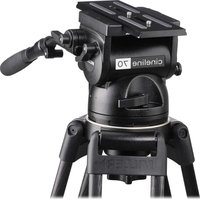
Air - Tripod Miller - Free user manual and instructions
Find the device manual for free Air Miller in PDF.


Pick your language and provide your email: we'll send you a specifically translated version.
| Product Type | Tripod |
| Brand | Miller |
| Model | Air |
| Material | Carbon fiber |
| Weight | 4.2 kg |
| Maximum Load Capacity | 20 kg |
| Minimum Height | 30 cm |
| Maximum Height | 180 cm |
| Leg Sections | 3 |
| Head Type | Fluid head |
| Quick Release Plate | Included |
| Spreader | Mid-level spreader |
| Foot Type | Rubber with spikes |
| Maintenance | Clean with dry cloth; lubricate moving parts with silicone spray |
| Storage | Keep in a dry, cool place inside provided bag |
| Safety | Secure all locks before use; do not exceed maximum load |
| Spare Parts Availability | Contact Miller authorized dealers |
| Repairability | Modular design; replaceable parts |
| Warranty | 2 years |
Frequently Asked Questions - Air Miller
How do I set up the Miller Air tripod?
Extend the legs, unlock the leg locks, adjust height, and lock securely. Mount the head if separate. Attach quick release plate to camera, slide into head, and lock.
How do I level the tripod?
Use the built-in bubble level on the head. Adjust leg lengths individually to achieve level. Some models have a leveling base.
What is the maximum load capacity?
The Miller Air tripod supports a maximum load of 20 kg, suitable for professional video cameras.
How do I clean and maintain the tripod?
Wipe legs and head with a dry, soft cloth. For sticky locks, apply silicone spray sparingly. Do not use oil-based lubricants.
Can I use the tripod on uneven terrain?
Yes, the tripod has adjustable leg angles and spiked feet for stability on soft ground. Use the mid-level spreader for extra rigidity.
How do I attach a camera to the tripod?
Attach the quick release plate to your camera's tripod socket. Slide the plate into the head's clamp and tighten the locking knob until secure.
Is the tripod compatible with other brands' heads?
The Miller Air tripod uses a standard 75mm bowl, so it is compatible with most fluid heads that have a 75mm base.
What should I do if a leg lock becomes loose?
Tighten the lock with a suitable tool. If it persists, contact Miller support for replacement parts. Do not use the tripod if locks are faulty.
How do I transport the tripod?
Fold legs, secure with a strap, and place in the provided carrying bag. Avoid hitting the head against hard surfaces.
Where can I find spare parts?
Contact Miller authorized dealers or visit the official Miller website. Spare parts include leg sections, locks, feet, and head components.
User questions about Air Miller
0 question about this device. Answer the ones you know or ask your own.
Ask a new question about this device
No questions yet. Be the first to ask one.
Download the instructions for your Tripod in PDF format for free! Find your manual Air - Miller and take your electronic device back in hand. On this page are published all the documents necessary for the use of your device. Air by Miller.
USER MANUAL Air Miller


Manual assistant
Powered by Anthropic
Waiting for your message
Product information
Brand : Miller
Model : Air
Category : Tripod