Pegasus 8 - Lighting Altman - Free user manual and instructions
Find the device manual for free Pegasus 8 Altman in PDF.


Pick your language and provide your email: we'll send you a specifically translated version.
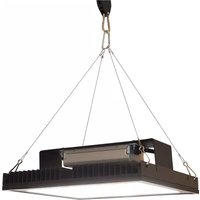
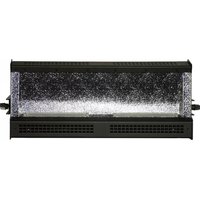
| Product Type | Professional LED Lighting Fixture |
| Model | Pegasus 8 |
| Brand | Altman |
| Light Source | 8 x 10W RGBWA LEDs |
| Beam Angle | 25° (standard), optional 45° lens |
| Power Consumption | 100W max |
| Input Voltage | AC 100-240V, 50/60Hz |
| DMX Control | 3-pin XLR in/out, DMX512 (5/9 channel modes) |
| Standalone Modes | Auto, Sound Active, Master/Slave |
| Display | Digital LCD with 4 buttons |
| Dimensions (L x W x H) | 12.2 x 8.7 x 6.3 inches (310 x 220 x 160 mm) |
| Weight | 5.5 lbs (2.5 kg) |
| Housing Material | Aluminum alloy, tempered glass lens |
| Cooling | Passive convection (no fan) |
| Mounting | Omega bracket for truss or floor stand |
| Protection Rating | IP20 (indoor use only) |
| Accessories Included | Power cord, user manual, mounting bracket |
| Cleaning Instructions | Wipe with dry cloth, avoid solvents |
| Safety | Disconnect power before servicing; ensure proper ventilation |
| Spare Parts | LED modules, power supply, control board available |
| Repairability | Modular design; user-replaceable LEDs and driver |
Frequently Asked Questions - Pegasus 8 Altman
How do I mount the Pegasus 8 safely?
Use the included omega bracket to attach the fixture to a truss or stand. Ensure the mounting surface can support at least 10 lbs. Always use a safety cable as a secondary attachment.
What DMX channel modes are available?
The fixture offers 5-channel (RGBWA) and 9-channel (RGBWA + dimmer, strobe, macro, color temperature) modes. Set via the LCD menu.
Can I use the Pegasus 8 outdoors?
No, the fixture is rated IP20 for indoor use only. Protect from moisture and dust.
How do I clean the lens?
Wipe the lens gently with a soft, dry cloth. For stubborn dirt, use a mild glass cleaner on the cloth, not directly on the lens. Avoid abrasive materials.
What is the recommended standoff distance for safety?
Keep flammable materials at least 20 inches away. Ensure adequate ventilation around the fixture; do not cover the housing.
How do I replace an LED module?
Disconnect power. Remove the front bezel screws. Slide out the defective LED module and disconnect the wire. Insert new module and reassemble. Torque screws to 0.5 Nm.
The fixture won't respond to DMX. What should I check?
Verify DMX cable is connected correctly. Ensure fixture is set to DMX mode and the correct address. Check terminator on last fixture. Test with known working cable.
Can I run the fixture in sound-active mode?
Yes, select Sound Active on the LCD menu. The built-in microphone will trigger color changes and strobe effects. Adjust sensitivity via the menu.
What is the maximum ambient temperature for operation?
Operate between 14°F and 104°F (-10°C to 40°C). Do not exceed these limits to avoid damage.
Where can I purchase spare parts?
Spare parts are available through authorized Altman dealers or by contacting support. Provide model and serial number.
User questions about Pegasus 8 Altman
0 question about this device. Answer the ones you know or ask your own.
Ask a new question about this device
No questions yet. Be the first to ask one.
Download the instructions for your Lighting in PDF format for free! Find your manual Pegasus 8 - Altman and take your electronic device back in hand. On this page are published all the documents necessary for the use of your device. Pegasus 8 by Altman.
USER MANUAL Pegasus 8 Altman
Manual assistant
Powered by Anthropic
Waiting for your message
Product information
Brand : Altman
Model : Pegasus 8
Category : Lighting