Spectra Par 100 - Lighting Altman - Free user manual and instructions
Find the device manual for free Spectra Par 100 Altman in PDF.


Pick your language and provide your email: we'll send you a specifically translated version.
| Product Type | LED PAR can |
| Model | Spectra Par 100 |
| Brand | Altman |
| Light Source | 100W RGBW LED |
| Beam Angle | 25° |
| Color Mixing | RGBW (Red, Green, Blue, White) |
| Control Protocol | DMX512 |
| DMX Channels | 4/8 selectable |
| Operating Modes | DMX, Master/Slave, Sound-Active, Standalone |
| Strobe Rate | 0-20 Hz |
| Dimmer | 0-100% smooth linear dimming |
| Power Consumption | 130W max |
| Input Voltage | AC 100-240V, 50/60Hz |
| Power Connector | IEC power cord with locking plug |
| Dimensions (L x W x H) | 11.5 x 9.5 x 9.5 in (292 x 241 x 241 mm) |
| Weight | 5.5 lbs (2.5 kg) |
| Housing Material | Aluminum die-cast, black finish |
| IP Rating | IP20 (indoor use only) |
| Cooling | Fanless, passive heat sink |
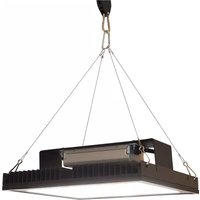
| Mounting Options | Yoke bracket for hanging or floor mounting |
| Accessories Included | Power cord, gel frame, user manual |
| Safety Features | Overheat protection, safety cable attachment point |
| Maintenance | Clean lenses with dry cloth; no user-serviceable parts |
| Repairability | LED module replaceable by qualified technician; fuse replaceable |
Frequently Asked Questions - Spectra Par 100 Altman
How do I set the DMX address on the Altman Spectra Par 100?
Press and hold the MENU button until the display shows DMX addressing mode. Use the UP/DOWN buttons to set the desired address (1-512). Press ENTER to confirm.
Can I use the Spectra Par 100 outdoors?
No, the fixture has an IP20 rating and is designed for indoor use only. Exposure to moisture or dust can cause damage.
What is the maximum power cable length for daisy chaining?
You can connect up to 10 units at 120V (5 units at 230V) in a chain. Ensure the total current draw does not exceed the circuit breaker rating.
How do I clean the lens of the fixture?
Use a soft, dry cloth to gently wipe the lens. Do not use any liquids, as they may damage the optical components.
Why is my fixture not responding to DMX?
Check that the DMX cable is properly connected and the DMX address matches the controller. Ensure the fixture is set to DMX mode (not Master/Slave or Sound-Active). Try replacing the DMX cable.
Can I replace the LED module myself?
The LED module is not user-serviceable. Replacement should be performed by a qualified technician to avoid injury and maintain warranty.
What is the beam angle of the Spectra Par 100?
The fixture has a fixed beam angle of 25 degrees, which provides a medium throw suitable for stage or architectural lighting.
How do I reset the fixture to factory defaults?
Press the MENU button to enter the settings menu. Scroll to RESET using UP/DOWN, then press ENTER. Confirm by selecting YES.
What mounting accessories are compatible?
The fixture comes with a yoke bracket that fits standard clamps (e.g., C-clamp) and truss systems. Always use a safety cable for overhead mounting.
Does the Spectra Par 100 support wireless DMX?
No, the fixture only supports wired DMX512 communication. An external wireless DMX receiver can be used if desired.
User questions about Spectra Par 100 Altman
0 question about this device. Answer the ones you know or ask your own.
Ask a new question about this device
No questions yet. Be the first to ask one.
Download the instructions for your Lighting in PDF format for free! Find your manual Spectra Par 100 - Altman and take your electronic device back in hand. On this page are published all the documents necessary for the use of your device. Spectra Par 100 by Altman.
USER MANUAL Spectra Par 100 Altman
Manual assistant
Powered by Anthropic
Waiting for your message
Product information
Brand : Altman
Model : Spectra Par 100
Category : Lighting