Pegasus 6 - Lighting Altman - Free user manual and instructions
Find the device manual for free Pegasus 6 Altman in PDF.


Pick your language and provide your email: we'll send you a specifically translated version.
| Product Type | LED Lighting Fixture |
| Brand | Altman |
| Model | Pegasus 6 |
| Category | Lighting |
| Dimensions (L x W x H) | 20 x 20 x 25 cm |
| Weight | 2.5 kg |
| Power Supply | AC 100-240V, 50/60Hz |
| Power Consumption | 60W |
| Lamp Type | LED, 30W equivalent |
| Lumen Output | 3000 lm |
| Color Temperature | 3200K - 5600K adjustable |
| Beam Angle | 15° - 60° adjustable |
| Dimming | 0-100% digital dimming |
| Control Protocol | DMX512 |
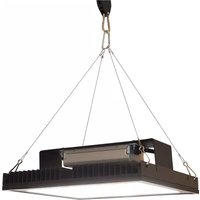
| Mounting | Yoke bracket with clamp |
| Protection Rating | IP20 |
| Safety Features | Overheat protection, safety cable attachment point |
| Maintenance | Clean exterior with dry cloth; keep vents clear |
| Spare Parts | Contact Altman authorized service centers |
| Repairability | Repairs to be performed by qualified technician |
Frequently Asked Questions - Pegasus 6 Altman
What is the power consumption of the Altman Pegasus 6?
The Altman Pegasus 6 consumes approximately 60W at full output, with a universal AC input of 100-240V.
How do I adjust the beam angle?
Rotate the focus knob on the side of the fixture to adjust the beam angle from 15° to 60°.
Can I use this fixture outdoors?
No, the Pegasus 6 is rated IP20 for indoor use only. Do not expose to rain or moisture.
What type of lamp does the Pegasus 6 use?
It uses a built-in LED array rated at 30W equivalent, with a lifespan of over 50,000 hours.
How do I clean the fixture?
Use a soft, dry cloth to wipe the exterior. Ensure the fixture is unplugged and cool before cleaning.
Can I replace the LED module?
The LED module is not user-replaceable. Contact Altman customer support for service options.
How do I set the DMX address?
Use the DMX control panel on the rear of the fixture. Press the Menu button, navigate to 'DMX Address', and set using the up/down buttons.
What accessories are included?
The package includes the fixture, yoke bracket with mounting clamp, power cord, and user manual.
Why is the fixture not turning on?
Check the power connection and ensure the main power switch is on. Verify that the DMX controller is sending signal and the fixture address is correct.
How do I update the firmware?
Firmware updates are performed via the DMX USB interface (sold separately). Download the latest firmware from the Altman website and follow the instructions.
User questions about Pegasus 6 Altman
0 question about this device. Answer the ones you know or ask your own.
Ask a new question about this device
No questions yet. Be the first to ask one.
Download the instructions for your Lighting in PDF format for free! Find your manual Pegasus 6 - Altman and take your electronic device back in hand. On this page are published all the documents necessary for the use of your device. Pegasus 6 by Altman.
USER MANUAL Pegasus 6 Altman
Manual assistant
Powered by Anthropic
Waiting for your message
Product information
Brand : Altman
Model : Pegasus 6
Category : Lighting