SP1000LCDRTXL2U - Inverter Bxterra - Free user manual and instructions
Find the device manual for free SP1000LCDRTXL2U Bxterra in PDF.


Pick your language and provide your email: we'll send you a specifically translated version.
| Product Type | Uninterruptible Power Supply (UPS) |
| Model | SP1000LCDRTXL2U |
| Brand | Bxterra |
| Power Capacity | 1000 VA / 900 W |
| Input Voltage | 120 V AC (typical) |
| Output Voltage | 120 V AC ± 5% (sine wave simulated) |
| Outlets | 6 to 8 outlets (battery backup + surge protection) |
| Battery Type | Sealed lead-acid (replaceable) |
| Typical Runtime | 10 to 15 minutes at half load |
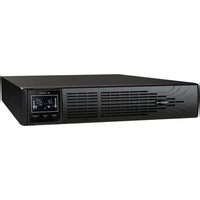
| Form Factor | Rackmount / Tower convertible (2U) |
| Display | LCD screen with status information |
| Communication Ports | USB port for monitoring |
| Dimensions (WxHxD) | Approx. 17.2 x 3.5 x 15.5 inches (rack ears excluded) |
| Weight | Approx. 30 to 40 lbs (13.6 to 18 kg) |
| Protection Features | Surge protection, overvoltage protection, overload protection |
| Audible Alarms | Low battery, overload, fault |
| Operating Temperature | 32°F to 104°F (0°C to 40°C) |
| Certifications | UL, FCC Class B (typical) |
| Cleaning Instructions | Unplug unit and wipe with dry cloth; do not use liquids |
| Battery Replacement | User-replaceable; contact support for compatible model |
Frequently Asked Questions - SP1000LCDRTXL2U Bxterra
What does the LCD display show during normal operation?
The LCD displays input/output voltage, battery charge level, load percentage, and status indicators. Refer to the user manual for detailed icon descriptions.
How do I replace the battery in the Bxterra SP1000LCDRTXL2U?
Turn off the UPS and unplug it. Remove the front bezel, disconnect the battery terminals, and slide out the old battery. Insert a new battery of the same type (sealed lead-acid), reconnect terminals, and replace the bezel. Safety note: Dispose of old battery properly.
What does a continuous alarm mean?
A continuous alarm typically indicates an overload condition. Reduce the load by unplugging non-essential devices. If the alarm persists, the UPS may have a fault.
Can I use the UPS for sensitive electronics like a computer?
Yes, the UPS provides simulated sine wave output suitable for most computer equipment. For servers or sensitive equipment, check compatibility with your device's power supply.
How do I connect the UPS to my computer for monitoring?
Use the USB cable (not included) to connect the UPS to a computer. Install the software from the Bxterra website or included CD. The software provides status monitoring and automatic shutdown.
What is the runtime at full load?
At 100% load (900W), the runtime is approximately 2 to 5 minutes. For half load (450W), runtime extends to 10-15 minutes. Actual runtime depends on battery age and health.
How often should I test the UPS?
Perform a self-test monthly using the front panel button. This simulates a power outage and verifies battery condition. Replace battery if test fails.
What do the side selector switches do?
The switches may configure input voltage range (e.g., 120V vs 100V) and output frequency (50/60Hz). Set them according to your local utility before first use.
Is the UPS rackmountable?
Yes, it is convertible between tower and rackmount (2U). Rackmount ears are included for installation in a standard 19-inch rack.
What warranty does Bxterra provide?
Bxterra typically offers a 2-year limited warranty for the UPS and a longer warranty for the battery (varies by region). Register your product online for coverage details.
User questions about SP1000LCDRTXL2U Bxterra
0 question about this device. Answer the ones you know or ask your own.
Ask a new question about this device
No questions yet. Be the first to ask one.
Download the instructions for your Inverter in PDF format for free! Find your manual SP1000LCDRTXL2U - Bxterra and take your electronic device back in hand. On this page are published all the documents necessary for the use of your device. SP1000LCDRTXL2U by Bxterra.
USER MANUAL SP1000LCDRTXL2U Bxterra
Manual assistant
Powered by Anthropic
Waiting for your message
Product information
Brand : Bxterra
Model : SP1000LCDRTXL2U
Category : Inverter