SP2200LCDRT2U - Inverter Bxterra - Free user manual and instructions
Find the device manual for free SP2200LCDRT2U Bxterra in PDF.


Pick your language and provide your email: we'll send you a specifically translated version.
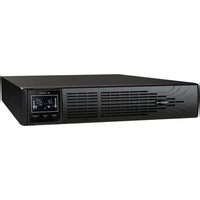
| Product Type | Uninterruptible Power Supply (UPS) |
| Model | SP2200LCDRT2U |
| Brand | Bxterra |
| VA Rating | 2200 VA |
| Watt Rating | 1980 W |
| Form Factor | 2U Rackmount / Tower Convertible |
| Topology | Line-Interactive with AVR |
| Waveform | Pure Sine Wave |
| Input Voltage | 120 VAC (typical US model) |
| Output Voltage | 120 VAC ± 2% |
| Number of Outlets | 8 (NEMA 5-15R) |
| Battery Type | Sealed Lead-Acid, maintenance-free |
| Battery Quantity | 2 x 12V / 9Ah |
| Typical Backup Time (Half Load) | 12-15 minutes |
| Recharge Time | 4-6 hours to 90% |
| Dimensions (W x D x H) | 17.3 x 19.0 x 3.5 inches |
| Weight | 38.5 lbs |
| Display | LCD (voltage, load, runtime) |
| Communication | USB, RS-232, SNMP slot |
| Cooling Fan | Variable speed, temperature controlled |
| Operating Temperature | 32°F to 104°F (0°C to 40°C) |
| Surge Protection | RJ11/45, coaxial (optional) |
| Hot-Swappable Battery | Yes |
| Warranty | 2 years (UPS), 2 years (battery) |
Frequently Asked Questions - SP2200LCDRT2U Bxterra
What is the VA rating of the Bxterra SP2200LCDRT2U?
The SP2200LCDRT2U is rated for 2200 VA (volt-amps), with a typical output of 1980 watts.
How long does the battery last on a full load?
At full load (1980W), runtime is approximately 4-6 minutes. At half load (990W), runtime extends to 12-15 minutes.
Can this UPS be mounted in a rack?
Yes, the SP2200LCDRT2U is a 2U rackmount unit and also supports tower conversion with included stand.
What type of battery does it use?
It uses two 12V / 9Ah sealed lead-acid batteries that are hot-swappable and maintenance-free.
Does this UPS provide pure sine wave output?
Yes, it produces a pure sine wave output, suitable for sensitive electronics like servers and networking gear.
How do I connect the UPS to my computer for monitoring?
Use the included USB cable or RS-232 serial cable. You can also install an optional SNMP card for network management.
What is the recharge time after a power outage?
The batteries recharge to 90% capacity within 4-6 hours under normal conditions.
How do I replace the battery?
Open the front bezel, slide out the battery compartment, disconnect the wires, and insert the new battery. It is hot-swappable, but caution is advised.
What surge protection features are included?
The unit includes surge protection for AC power and optional protection for RJ11/RJ45 phone/network lines.
Is the Bxterra SP2200LCDRT2U compatible with 220V input?
No, this model is designed for 120V input (typical US standard). For 220V regions, look for a different model.
User questions about SP2200LCDRT2U Bxterra
0 question about this device. Answer the ones you know or ask your own.
Ask a new question about this device
No questions yet. Be the first to ask one.
Download the instructions for your Inverter in PDF format for free! Find your manual SP2200LCDRT2U - Bxterra and take your electronic device back in hand. On this page are published all the documents necessary for the use of your device. SP2200LCDRT2U by Bxterra.
USER MANUAL SP2200LCDRT2U Bxterra
Manual assistant
Powered by Anthropic
Waiting for your message
Product information
Brand : Bxterra
Model : SP2200LCDRT2U
Category : Inverter