PowerTel 760 Assure - Telephone Amplicom - Free user manual and instructions
Find the device manual for free PowerTel 760 Assure Amplicom in PDF.


Pick your language and provide your email: we'll send you a specifically translated version.
| Product Type | Corded Amplified Telephone |
| Brand | Amplicom |
| Model | PowerTel 760 Assure |
| Dimensions (approx.) | 220 x 180 x 100 mm |
| Weight (approx.) | 600 g |
| Power Supply | AC adapter (mains powered) |
| Amplification Level | Up to 40 dB |
| Tone Control | Adjustable (bass/treble) |
| Visual Ringer Indicator | Yes, flashing light |
| Hearing Aid Compatible | Yes (Magnetic coupling) |
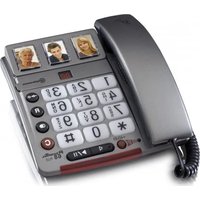
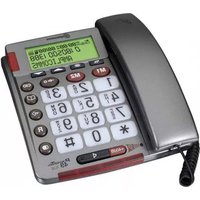
| Keypad | Large, backlit buttons |
| Display | LCD with caller ID |
| Memory | 20 speed dial entries |
| Ringer Volume Levels | 5 levels + off |
| Number of Handsets | 1 (corded base) |
| Wall Mountable | Yes |
| Cleaning Instructions | Wipe with a soft, dry cloth. Do not use liquids. |
| Safety Features | Overvoltage protection, non-slip feet |
| Spare Parts Availability | Replacement handset cord, AC adapter available from Amplicom |
| Warranty | 2 years |
Frequently Asked Questions - PowerTel 760 Assure Amplicom
How do I adjust the volume amplification?
Press the volume up/down buttons on the side of the base. The amplification can be increased up to 40 dB for clearer hearing. Note: Avoid setting too high to prevent feedback.
Can I use this phone with a hearing aid?
Yes, the PowerTel 760 Assure is compatible with hearing aids set to the 'T' position. It uses magnetic coupling for clear sound.
How do I store a number in speed dial?
Press and hold a memory button (M1-M5) until the display shows 'Store'. Enter the number, then press the memory button again to save. Up to 20 entries can be stored.
What does the visual ringer do?
When a call comes in, the base flashes a bright light to alert you visually. This is useful for the hearing impaired or in noisy environments.
How do I change the ringer volume?
Press the ringer button repeatedly to cycle through 5 volume levels or to turn it off. The display will show the current setting.
Can I mount this phone on the wall?
Yes, the base has slots for wall mounting. Use the included wall bracket or screws (not supplied) to mount securely. Ensure the power cord is routed safely.
How do I clean the phone?
Unplug the phone from power. Wipe the surface with a soft, dry cloth. Do not use water, solvents, or abrasive cleaners. Warning: Avoid getting moisture into openings.
What is the warranty period?
The Amplicom PowerTel 760 Assure comes with a 2-year warranty against manufacturing defects. Keep your receipt as proof of purchase.
How do I reset the phone to factory settings?
To reset, unplug the power adapter and remove the handset cord. Wait 10 seconds, then reconnect and plug back in. The phone will restart with default settings.
Where can I buy spare parts?
Replacement handset cords and power adapters are available from the Amplicom website or authorized retailers. Tip: Check the manual for part numbers.
User questions about PowerTel 760 Assure Amplicom
0 question about this device. Answer the ones you know or ask your own.
Ask a new question about this device
No questions yet. Be the first to ask one.
Download the instructions for your Telephone in PDF format for free! Find your manual PowerTel 760 Assure - Amplicom and take your electronic device back in hand. On this page are published all the documents necessary for the use of your device. PowerTel 760 Assure by Amplicom.
USER MANUAL PowerTel 760 Assure Amplicom
Manual assistant
Powered by Anthropic
Waiting for your message
Product information
Brand : Amplicom
Model : PowerTel 760 Assure
Category : Telephone