MX2010 - Router Juniper - Free user manual and instructions
Find the device manual for free MX2010 Juniper in PDF.


Pick your language and provide your email: we'll send you a specifically translated version.
| Product Type | Router |
| Brand | Juniper Networks |
| Model | MX2010 |
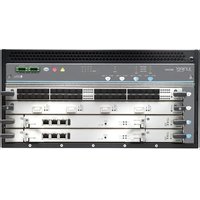
| Form Factor | Modular chassis, 10-slot |
| Dimensions (H x W x D) | 17.5 x 24.5 x 16.5 in (44.5 x 62.2 x 41.9 cm) |
| Weight | 195 lb (88.5 kg) fully loaded |
| Power Supply | Dual redundant AC or DC, 2000 W each |
| Throughput | Up to 1.6 Tbps |
| Capacity | Up to 2.4 Tbps (with DPC cards) |
| Cooling | Front-to-back airflow, redundant fans |
| Operating Temperature | 32°F to 104°F (0°C to 40°C) |
| Humidity | 5% to 90% non-condensing |
| Primary Functions | Core routing, MPLS, VPN, QoS, firewall, NAT, IPv6 |
| Management Interfaces | RJ45 console, USB, Ethernet (MGMT) |
| Maintenance and Cleaning | Clean with dry cloth; keep vents clear; replace air filters annually |
| Safety | Operate only in rack; ensure proper grounding; use ESD wrist strap |
| Spare Parts and Repairability | Field-replaceable modules; support via Juniper JTAC; parts available for 10+ years |
| Package Contents | Chassis, power supplies, optional line cards, documentation |
| Warranty | 1 year hardware, optional extended |
Frequently Asked Questions - MX2010 Juniper
How do I power on the Juniper MX2010?
Ensure all power supplies are installed and connected to a suitable source. Flip the power switch on each supply to the 'ON' position. The router will boot automatically. Monitor the RE and FPC LEDs for normal operation.
What is the maximum throughput of the MX2010?
The MX2010 supports up to 1.6 Tbps of full-duplex throughput when fully loaded with appropriate line cards.
How do I install line cards in the MX2010?
Slide the line card into an empty slot ensuring alignment with the backplane. Push firmly until the handle clicks. Tighten the captive screws. The card should power on automatically; verify using show chassis fpc.
Can I use AC and DC power supplies in the same chassis?
No, mixing AC and DC power supplies is not supported. Use either all AC or all DC for safety and proper load sharing.
How do I reset the MX2010 to factory defaults?
Connect to the console port at 9600 baud. Reboot and interrupt the boot process. At the loader prompt, type boot -s to enter single-user mode. Then issue request system zero media to clear the configuration.
What is the default username and password for the MX2010?
The default credentials are root with no password. It is strongly recommended to set a password upon initial login using set system root-authentication plain-text-password.
How often should I replace the air filters?
Air filters should be inspected every 3 months and replaced annually, or more frequently in dusty environments, to ensure proper cooling.
Can I stack multiple MX2010 routers?
The MX2010 does not support physical stacking. However, you can interconnect them via Ethernet or MPLS to form a logical cluster using MC-LAG or VRRP.
What should I do if the router does not boot?
Check power connections and LEDs. Ensure the routing engine (RE) is seated properly. Try reseating the RE and clearing NVRAM by pressing the CF button on the RE faceplate. If still failing, contact Juniper JTAC.
Where can I download the latest Junos OS for MX2010?
Visit the Juniper Support Portal (support.juniper.net). Navigate to 'Downloads' and select your platform. A valid support contract is required.
User questions about MX2010 Juniper
0 question about this device. Answer the ones you know or ask your own.
Ask a new question about this device
No questions yet. Be the first to ask one.
Download the instructions for your Router in PDF format for free! Find your manual MX2010 - Juniper and take your electronic device back in hand. On this page are published all the documents necessary for the use of your device. MX2010 by Juniper.
USER MANUAL MX2010 Juniper
Manual assistant
Powered by Anthropic
Waiting for your message
Product information
Brand : Juniper
Model : MX2010
Category : Router