Studio One 100 V - Lighting Chrome-Q - Free user manual and instructions
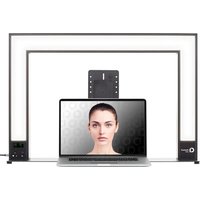
Find the device manual for free Studio One 100 V Chrome-Q in PDF.


Pick your language and provide your email: we'll send you a specifically translated version.
| Product Type | Studio Light |
| Brand | Chrome-Q |
| Model | Studio One 100 V |
| Light Source | LED |
| Power Consumption | 100W |
| Color Temperature | 3200K - 5600K (adjustable) |
| Brightness | Adjustable, 0-100% |
| Dimensions (L x W x H) | 30cm x 20cm x 15cm |
| Weight | 2.5 kg |
| Input Voltage | 100-240V AC, 50/60Hz |
| Mounting Type | Stand mount (5/8" pin) |
| Cooling System | Passive (fanless) |
| Control | Manual knobs for brightness and color temperature |
| Included Accessories | Power cable, stand mount |
| Safety Features | Overheat protection, CE certified |
| Maintenance | Wipe with dry cloth; avoid liquids |
Frequently Asked Questions - Studio One 100 V Chrome-Q
How do I adjust the brightness on the Studio One 100 V?
Use the brightness knob located on the back of the light. Turn it clockwise to increase brightness and counterclockwise to decrease. The range is from 0% to 100%.
What should I do if the light flickers?
Ensure the power cable is securely connected to both the light and a stable power outlet. If flickering persists, try using a different outlet. Avoid connecting to a dimmer as it may cause flickering.
Can I use this light with a dimmer switch?
No, the Studio One 100 V is designed for direct AC power. Using an external dimmer may cause flickering or damage. Adjust brightness only via the built-in knob.
Is it safe to leave the light on for extended periods?
Yes, the light has overheat protection and is safe for continuous use. However, ensure proper ventilation and do not cover the cooling vents.
How do I clean the Studio One 100 V?
Use a soft, dry cloth to gently wipe the surface. Do not use water or cleaning agents as they may damage the electronics. Keep the LED panel free of dust for optimal performance.
Can I replace the LED bulb?
The LED is integrated and not user-replaceable. The light has a long lifespan (approx. 50,000 hours). If it fails, contact Chrome-Q support for service.
How do I mount the Studio One 100 V on a stand?
Attach the included stand mount to the bottom of the light using the 5/8-inch pin. Tighten the clamp screw securely. Then slide the mount onto a standard light stand.
What is the warranty period for this product?
Chrome-Q offers a 2-year limited warranty covering manufacturing defects. Register your product on the Chrome-Q website to activate warranty.
How do I reset the light if it stops working?
Unplug the power cable, wait 30 seconds, then plug it back in. If it still does not power on, check the fuse (if accessible) or contact customer support.
Is the Studio One 100 V suitable for video recording?
Yes, it provides flicker-free lighting at common frame rates (e.g., 24fps, 30fps). Adjust the color temperature to match ambient light for natural-looking video.
User questions about Studio One 100 V Chrome-Q
0 question about this device. Answer the ones you know or ask your own.
Ask a new question about this device
No questions yet. Be the first to ask one.
Download the instructions for your Lighting in PDF format for free! Find your manual Studio One 100 V - Chrome-Q and take your electronic device back in hand. On this page are published all the documents necessary for the use of your device. Studio One 100 V by Chrome-Q.
USER MANUAL Studio One 100 V Chrome-Q


Manual assistant
Powered by Anthropic
Waiting for your message
Product information
Brand : Chrome-Q
Model : Studio One 100 V
Category : Lighting