M7 - Video projector AAXA Technologies - Free user manual and instructions
Find the device manual for free M7 AAXA Technologies in PDF.


Pick your language and provide your email: we'll send you a specifically translated version.
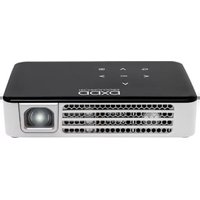
| Product type | Portable LED video projector |
| Model | M7 |
| Brand | AAXA Technologies |
| Display technology | DLP |
| Native resolution | 1280 x 720 (HD) |
| Brightness | 200 lumens |
| Contrast ratio | 2000:1 |
| Light source | LED |
| Light source life | Up to 30,000 hours |
| Projection size | 20 to 100 inches |
| Throw ratio | 1.2:1 |
| Keystone correction | Vertical ±40° |
| Focus | Manual |
| Inputs | HDMI (with MHL), USB 2.0, 3.5mm audio out |
| Built-in speaker | 1 watt |
| Battery | Built-in rechargeable battery, up to 2 hours |
| Power supply | DC 12V 2A |
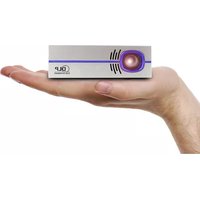
| Dimensions (W x D x H) | 4.7 x 4.7 x 1.6 inches (120 x 120 x 40 mm) |
| Weight | 0.77 lbs (350 g) |
| Operating temperature | 32°F to 95°F (0°C to 35°C) |
| Included accessories | Remote control, power adapter, HDMI cable, user manual |
Frequently Asked Questions - M7 AAXA Technologies
How do I connect my smartphone to the AAXA M7 projector?
Use an MHL-enabled HDMI cable or a wireless HDMI adapter. For Android, connect via USB-C to HDMI adapter if supported.
What is the battery life of the M7 projector?
The built-in battery lasts up to 2 hours on a full charge, depending on brightness settings.
Can I use the projector while charging?
Yes, you can use the projector while plugged into the power adapter without draining the battery.
How do I clean the lens?
Use a soft, dry microfiber cloth gently on the lens. Do not use any liquids or abrasive materials.
What file formats are supported via USB?
The USB port supports media playback of video, photo, and audio files. Common formats like MP4, AVI, JPEG, MP3 are supported.
Why is the projector overheating?
Ensure the ventilation openings are not blocked. Keep the projector on a hard, flat surface. If overheating persists, reduce brightness or use in a cooler environment.
How do I adjust the picture size?
Move the projector closer or farther from the screen. Use the manual focus ring to adjust sharpness.
Does the M7 support 4K input?
No, the native resolution is 720p. It can accept 1080p signals but will downscale to 720p.
What is the warranty period?
AAXA offers a 1-year limited warranty for the M7 projector. Check the manual for details on warranty registration.
How to reset the projector?
Press and hold the power button for 10 seconds until the unit powers off. Remove battery and wait 1 minute before powering on again.
User questions about M7 AAXA Technologies
0 question about this device. Answer the ones you know or ask your own.
Ask a new question about this device
No questions yet. Be the first to ask one.
Download the instructions for your Video projector in PDF format for free! Find your manual M7 - AAXA Technologies and take your electronic device back in hand. On this page are published all the documents necessary for the use of your device. M7 by AAXA Technologies.
USER MANUAL M7 AAXA Technologies

Manual assistant
Powered by Anthropic
Waiting for your message
Product information
Brand : AAXA Technologies
Model : M7
Category : Video projector