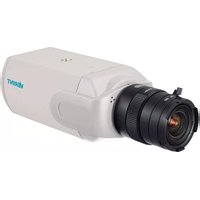
Nextiva S5250BX-DN-L1 - Security Camera Verint - Free user manual and instructions
Find the device manual for free Nextiva S5250BX-DN-L1 Verint in PDF.


Pick your language and provide your email: we'll send you a specifically translated version.
| Product Type | Outdoor Security Camera |
| Model | Nextiva S5250BX-DN-L1 |
| Brand | Verint |
| Dimensions (H x W x D) | 10.5 x 8.0 x 8.0 cm |
| Weight | 500 g |
| Power Supply | PoE (Power over Ethernet) 802.3af |
| Power Consumption | 5.5 W maximum |
| Resolution | 5 Megapixels (2592 x 1944) |
| Lens Type | Fixed focal length, 4.0 mm |
| Field of View | Horizontal: 80°, Vertical: 60° |
| Night Vision | IR LEDs up to 30 meters |
| Day/Night Function | Mechanical IR cut filter |
| Weatherproof Rating | IP66 |
| Operating Temperature | -30°C to 55°C |
| Video Compression | H.265, H.264, MJPEG |
| Network Interface | RJ45 10/100/1000 Mbps |
| Supported Protocols | IPv4, IPv6, HTTP, HTTPS, ONVIF |
| Audio | Built-in microphone and speaker |
| Motion Detection | Yes, with configurable zones |
| Local Storage | MicroSD card slot (max 128 GB) |
| Maintenance | Clean lens with soft cloth. Avoid solvents. |
| Safety | Disconnect power before cleaning. Use only PoE injector. |
| Spare Parts | Mounting bracket, screws, power adapter (optional) |
| Repairability | No user-serviceable parts. Contact Verint support. |
| General Info | Supports ONVIF Profile G for integration. |
Frequently Asked Questions - Nextiva S5250BX-DN-L1 Verint
How do I reset the camera to factory defaults?
Press and hold the reset button on the camera for 10 seconds using a paperclip. The camera will reboot with default settings.
What is the default IP address?
The default IP address is 192.168.1.108. You can also find it using the Verint IP Utility tool.
Can I use this camera outdoors?
Yes, the camera has an IP66 weatherproof rating, suitable for outdoor use.
How far can the IR night vision see?
The IR LEDs provide night vision up to 30 meters in complete darkness.
Does the camera support audio?
Yes, it has a built-in microphone and speaker for two-way audio communication.
What is the field of view?
The camera has a horizontal field of view of 80° and vertical 60° with the 4.0 mm lens.
How do I mount the camera?
Use the included mounting bracket. Drill holes for screws, attach the bracket, then screw the camera onto the bracket.
What memory cards are supported?
It supports MicroSD cards up to 128 GB for local recording.
How do I update the firmware?
Download the latest firmware from Verint's website, then upload it via the camera's web interface under 'Maintenance' > 'Upgrade'.
Is the camera ONVIF compatible?
Yes, it supports ONVIF Profile G for integration with third-party systems.
User questions about Nextiva S5250BX-DN-L1 Verint
0 question about this device. Answer the ones you know or ask your own.
Ask a new question about this device
No questions yet. Be the first to ask one.
Download the instructions for your Security Camera in PDF format for free! Find your manual Nextiva S5250BX-DN-L1 - Verint and take your electronic device back in hand. On this page are published all the documents necessary for the use of your device. Nextiva S5250BX-DN-L1 by Verint.
USER MANUAL Nextiva S5250BX-DN-L1 Verint

Manual assistant
Powered by Anthropic
Waiting for your message
Product information
Brand : Verint
Model : Nextiva S5250BX-DN-L1
Category : Security Camera