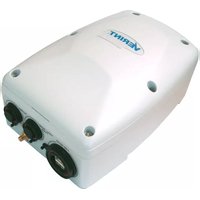
Nextiva S4300-BR - Wi-Fi repeater Verint - Free user manual and instructions
Find the device manual for free Nextiva S4300-BR Verint in PDF.


Pick your language and provide your email: we'll send you a specifically translated version.
| Product Type | Wi-Fi Repeater |
| Model | Nextiva S4300-BR |
| Brand | Verint |
| Dimensions (W x D x H) | 120 mm x 60 mm x 30 mm |
| Weight | 150 g |
| Power Supply | DC 5V/1A via micro USB |
| Wireless Standards | IEEE 802.11 b/g/n |
| Frequency Bands | 2.4 GHz |
| Maximum Data Rate | 300 Mbps |
| Ethernet Ports | 1 x 10/100 Mbps LAN |
| Antenna | Internal |
| Security | WEP, WPA, WPA2 |
| Setup | WPS or web interface |
| Operating Temperature | 0°C to 40°C |
| Storage Temperature | -20°C to 60°C |
| Humidity | 10% to 90% non-condensing |
| LED Indicators | Power, WLAN, LAN, WPS |
| Compliance | CE, FCC |
| Cleaning | Wipe with dry cloth; avoid liquids |
| Spare Parts / Repairability | Contact Verint support; non-user serviceable |
Frequently Asked Questions - Nextiva S4300-BR Verint
How do I set up the Verint Nextiva S4300-BR Wi-Fi repeater?
Plug the repeater into a power outlet, press the WPS button on your router and then the WPS button on the repeater within 2 minutes. Alternatively, connect to the repeater's Wi-Fi network (scan the QR code on the device) and open the setup page in your browser to configure manually.
What is the maximum range of the S4300-BR?
The repeater can extend Wi-Fi coverage up to 30 meters indoors, depending on obstacles and interference. For best performance, place it halfway between your router and the dead zone.
Can I use the S4300-BR with any router?
Yes, it works with any standard Wi-Fi router operating on 2.4 GHz (802.11 b/g/n). Ensure your router's WPS is enabled or configure manually via web interface.
Does the repeater support 5 GHz Wi-Fi?
No, the Nextiva S4300-BR only supports 2.4 GHz band. If you need dual-band, consider a different model.
How do I reset the repeater to factory settings?
Press and hold the WPS/Reset button on the side for 10 seconds until the LEDs flash. Release and wait for the device to reboot. All settings will be cleared.
What does the WPS button do?
The WPS button allows easy connection to a WPS-enabled router. Press it once to start WPS pairing; hold for 10 seconds to reset.
Why is the WLAN LED not lit?
The WLAN LED indicates a successful connection to your router. If off, move the repeater closer to the router and try reconnecting. Also ensure your router is broadcasting.
Can I connect a wired device to the repeater?
Yes, the S4300-BR has one Ethernet port. Connect a device like a TV or game console to the LAN port for a stable wired connection.
Is the repeater compatible with mesh systems?
It can extend the Wi-Fi from any standard router, including mesh nodes, but it will not integrate into a mesh network. It works as a separate access point.
How do I update the firmware?
Download the latest firmware from Verint's support website. Access the repeater's web interface (default IP 192.168.10.1), go to Administration > Firmware Upgrade, and upload the file.
User questions about Nextiva S4300-BR Verint
0 question about this device. Answer the ones you know or ask your own.
Ask a new question about this device
No questions yet. Be the first to ask one.
Download the instructions for your Wi-Fi repeater in PDF format for free! Find your manual Nextiva S4300-BR - Verint and take your electronic device back in hand. On this page are published all the documents necessary for the use of your device. Nextiva S4300-BR by Verint.
USER MANUAL Nextiva S4300-BR Verint

Manual assistant
Powered by Anthropic
Waiting for your message
Product information
Brand : Verint
Model : Nextiva S4300-BR
Category : Wi-Fi repeater