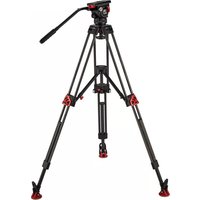
V20P - Tripod Camgear - Free user manual and instructions
Find the device manual for free V20P Camgear in PDF.


Pick your language and provide your email: we'll send you a specifically translated version.
| Product Type | Professional Video Tripod |
| Brand | Camgear |
| Model | V20P |
| Maximum Load Capacity | 20 kg |
| Weight | 5.5 kg |
| Material | Aluminum Alloy |
| Leg Sections | 3 |
| Leg Lock Type | Twist Lock |
| Head Mount | 75mm Bowl |
| Minimum Height | 25 cm |
| Maximum Height | 180 cm |
| Bubble Level | Yes |
| Spreader | Mid-Level Spreader |
| Feet | Rubber with Retractable Spikes |
| Color | Black |
| Warranty | 2 Years |
| Accessories Included | Carry Bag |
| Maintenance | Wipe with dry cloth; avoid solvents |
| Safety | Ensure legs are locked; use on stable ground |
Frequently Asked Questions - V20P Camgear
How to assemble the Camgear V20P tripod?
To assemble, extend the legs by loosening the twist locks, adjust to desired height, and tighten. Attach the fluid head to the 75mm bowl and secure with the locking knob.
What is the maximum payload of the V20P tripod?
The Camgear V20P tripod can support up to 20 kg, making it suitable for heavy professional cameras and accessories.
How to clean and maintain the V20P tripod?
Clean with a soft, dry cloth. Avoid using harsh chemicals. Periodically check and tighten all screws and locks. Store in a dry place.
Is the V20P compatible with any fluid head?
The V20P features a standard 75mm bowl mount, compatible with most 75mm fluid heads. Ensure the head is secured properly.
What is the height range of the V20P tripod?
The tripod adjusts from a minimum height of 25 cm to a maximum of 180 cm (without head).
What material is the tripod made from?
The V20P is constructed from aluminum alloy, offering a balance of strength and light weight.
How to transport the V20P tripod?
Fold the legs, secure with the strap, and place in the included carry bag for convenient transport.
Can the V20P be used for photography?
Yes, the V20P is versatile and can be used for both video and photography with appropriate heads.
How to level the tripod on uneven ground?
Use the bubble level and adjust leg lengths individually. For finer adjustments, use the mid-level spreader.
What is the warranty period for the Camgear V20P?
Camgear offers a 2-year limited warranty against manufacturing defects. Keep your proof of purchase.
User questions about V20P Camgear
0 question about this device. Answer the ones you know or ask your own.
Ask a new question about this device
No questions yet. Be the first to ask one.
Download the instructions for your Tripod in PDF format for free! Find your manual V20P - Camgear and take your electronic device back in hand. On this page are published all the documents necessary for the use of your device. V20P by Camgear.
USER MANUAL V20P Camgear
Manual assistant
Powered by Anthropic
Waiting for your message
Product information
Brand : Camgear
Model : V20P
Category : Tripod