Solidcom C1-3S - Intercom system Hollyland - Free user manual and instructions
Find the device manual for free Solidcom C1-3S Hollyland in PDF.


Pick your language and provide your email: we'll send you a specifically translated version.
| Product Type | Full-Duplex Wireless Intercom System |
| Model | Solidcom C1-3S |
| Brand | Hollyland |
| Number of Users | 3 |
| Technology | DECT 6.0 (1.9 GHz) |
| Range (Line of Sight) | Up to 1100 ft (335 m) |
| Battery Life | Up to 8 hours continuous use |
| Battery Type | Rechargeable Li-Ion (included) |
| Charging Time | Approximately 2.5 hours |
| Frequency Response | 20 Hz – 20 kHz |
| Audio Codec | G.722 wideband |
| Beltpack Dimensions | 2.8 x 2.2 x 1.0 in (71 x 56 x 25 mm) |
| Beltpack Weight | 3.5 oz (100 g) per beltpack |
| Headset Compatibility | 3.5 mm universal jack (stereo/mono) |
| Number of Channels | 1 shared channel |
| Pairing Method | Automatic on power-up within range |
| Controls | Power, volume up/down, mute, pairing button |
| Indicators | LED: Power, battery level, link status |
| Operating Temperature | 14°F to 122°F (-10°C to 50°C) |
| Storage Temperature | -4°F to 140°F (-20°C to 60°C) |
| Security | 128-bit AES encryption |
| Cleaning | Wipe with dry cloth; avoid liquids, solvents |
| Maintenance | Keep charging contacts clean; store in dry place |
| Spare Parts Available | Replacement beltpacks, headsets, charging cables |
| Certifications | FCC, CE, RoHS |
Frequently Asked Questions - Solidcom C1-3S Hollyland
How do I pair the Solidcom C1-3S beltpacks?
Turn on all beltpacks within 10 feet of each other. They will automatically pair. If not, press and hold the pairing button on each beltpack for 2 seconds until the LED flashes green, then release. The LED will turn solid green when paired.
What is the maximum range of the Solidcom C1-3S?
The maximum line-of-sight range is up to 1100 feet (335 meters). In buildings, range may be reduced due to walls and obstacles.
How long does the battery last and how do I charge it?
The battery lasts up to 8 hours on a full charge. Charge using the provided micro USB cable connected to a 5V/1A adapter. Full charge takes approximately 2.5 hours.
Can I use my own headset with the Solidcom C1-3S?
Yes, the beltpack has a standard 3.5mm audio jack compatible with most wired headsets (stereo or mono). Ensure the headset has a compatible microphone connection (TRRS or TRS).
How do I mute my microphone?
Press the mute button on the beltpack. The LED will turn red to indicate mute is active. Press again to unmute.
What should I do if the beltpacks are not connecting?
Ensure all beltpacks are within 10 feet for initial pairing. Turn off and on each unit. If the issue persists, reset by holding all three buttons (power, volume up, volume down) simultaneously for 5 seconds.
Can I add more than 3 users to the system?
The Solidcom C1-3S is designed for exactly 3 users. For larger groups, consider the Solidcom C1-8S (8 users) or C1-Pro series.
Is the system secure from eavesdropping?
Yes, the Solidcom C1-3S uses 128-bit AES encryption, providing secure communication to prevent unauthorized listening.
How do I clean and maintain the beltpacks?
Wipe the beltpack with a soft dry cloth. Do not use liquids or abrasive cleaners. Keep the charging contacts clean. Store in a cool, dry place when not in use.
What accessories are included in the box?
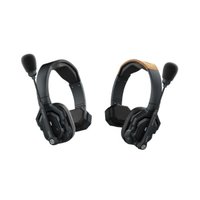
The package includes 3 beltpacks, 3 headsets (with mic), 3 charging cables, a charging splitter (1-to-3), 3 clips, and a user manual. Check with your retailer for variations.
User questions about Solidcom C1-3S Hollyland
0 question about this device. Answer the ones you know or ask your own.
Ask a new question about this device
No questions yet. Be the first to ask one.
Download the instructions for your Intercom system in PDF format for free! Find your manual Solidcom C1-3S - Hollyland and take your electronic device back in hand. On this page are published all the documents necessary for the use of your device. Solidcom C1-3S by Hollyland.
USER MANUAL Solidcom C1-3S Hollyland


Manual assistant
Powered by Anthropic
Waiting for your message
Product information
Brand : Hollyland
Model : Solidcom C1-3S
Category : Intercom system