
HG40AE690DW - Wall mount SAMSUNG - Free user manual and instructions
Find the device manual for free HG40AE690DW SAMSUNG in PDF.


| Product Type | TV Wall Mount |
| Brand | Samsung |
| Model | HG40AE690DW |
| Compatible TV Size | 40 inches |
| VESA Compatibility | 200x200 mm and 400x400 mm |
| Weight Capacity | 35 kg (77 lbs) |
| Material | Steel with Anti-Corrosion Coating |
| Tilt Angle | 0° to -5° |
| Swivel Range | ±90° |
| Wall Distance | 50 mm (close-to-wall) |
| Installation Type | Fixed to Wall Studs |
| Dimensions (WxHxD) | 400 x 270 x 50 mm |
| Net Weight | 2.1 kg |
| Color | Black |
| Certification | UL Listed |
| Warranty | 5 Years |
| Included Hardware | M6 and M8 Screws, Wall Anchors, Washers |
Frequently Asked Questions - HG40AE690DW SAMSUNG
User questions about HG40AE690DW SAMSUNG
0 question about this device. Answer the ones you know or ask your own.
Ask a new question about this device
Download the instructions for your Wall mount in PDF format for free! Find your manual HG40AE690DW - SAMSUNG and take your electronic device back in hand. On this page are published all the documents necessary for the use of your device. HG40AE690DW by SAMSUNG.
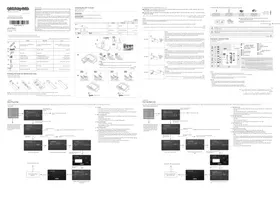
USER MANUAL HG40AE690DW SAMSUNG
To register this product please visit
www.samsung.com/register

List of Parts
| ATTENTION:This product is qualified for the BEE Star rating in the 'Home' Mode. The Objectives of Star Labeling Program is designed to promote energy efficient products and practices.When the television is initially set up, it is designed to meet the BEE Star Labeling requirements while maintaining optimum picture quality.• Changes to certain functionalities of this television ITV Guide |
| • Depending upon such changed setting (eq., Retail model), the power consumption may vary which possibly could exceed the |
| stated energy consumption.To reset the television to Star rating qualified settings, select 'Home' mode from the initial set-up procedure in Factory settings' under the 'Set-up' menu. |
Installing the LED TV Stand
English: The provided accessories may vary depending on the model.
| English | Tiling VR | |
| 1 | Remote Control (LAD-003STAG & Batteries/AAA x 2) | Pre (LAD-003STAG & Silva sknfin 14 vs AA x 2) |
| 2 | Power Cord | Dly Dlm-squhyn |
| 3 | Dark Cable | Cap 45V/8u |
| 4 | • Security Cable• Dark Signal Cable• Regulatory Cable | • Haking the Air Isolation• Haking the Thirl W/Thairsh• Haking the Green Qoq Jpn |
| 5 | Hotel Mount Kit | Bd gal tree tailing klk3a sun |
| 6 | Holder Wind Stand | Df dly gbl |
| 7 | Ball mount Adapter EEA | Bd fly hng gsk tailing ftd 4 sl |
Installing the batteries (Battery size: AAA)
Lip dit pin (Kish cit pin: AAA)
English: After you have installed the batteries, use a screwdriver to screw in the screw that holds the battery cover closed.
- Place a soft cloth over the table to protect the TV, and then place the TV on the cloth screen-side floor.
Tiang Vijt
» fiscal módicón ménu lèn mát tán débáo wǒ TV kāsau dǒ éjícúp männinh TV kào khác.
مُجْعَقَطْعَةِ فُمَّاِشَ لِكَتَمَةً الْمَنْسَّةً لِمُّحَمِيلَةٍ الْتَلَّفَّيُونَ نَعْرِ فَيْرَّهُ الْتَلَّفَّيُونَ عَلَى الْمُطْعَةٍ الْمُمْسِانِ بِحِبْتِ بِكِينَ جَكَبٍ لِكَثَ اشَةٍ
Jikun, 45-90
x3 044 X L121 x4 044 X L121
Assembling the swivel. / Lâp dê xozy / نرکیب محور الدوران
▲WARNING: If you configure the TV to swivel, you must attach it securely to the floor, a desk, a dresser top, etc. as described in the installation instructions.
described in the installation instructions. A GÁNU PÁO Núo has life of TV of the very few, having a fin of TV who is not, his place will remain
The LED TVs have swivel stands. You can configure these stands so that the T's swivel 20 degrees left and right, 60 degrees left and right, or 90
degrees left and right using the BRACKET HOLDER SWIVEL.
▲ Affix the stand to a flat surface such as a dresser top, desk top, or entertainment series as cheap.
Glo chūn fú xiào mǎi bì miàn obāng qù(àr tǔ, miàn hǎn heik kě T)
WARNING: To prevent injury, you must attach this TV securely to the floor, a table, a dresser top, etc. with the Hotel Mount Kit as described in
Viewing the Connection Panel
Viewing the Comel Yam Ring (File Knife Kit, pf)
| A# IN | PC |
| B# IN | VOL CTRL |
| HOD/TAU/CUP/RUN | VARIABLE AUDIO OUT |
| HOM/DAU/DIN HON 2 | CLOCK |
| HOM/IN SARCE | DATA |
| LAN | VOTAL AUDIO OUT (OPTICAL) |
| ANT IN | HOT |
| VE/MPONE JACK | HOT |
| R-UN | LAN OUT |
| PC#D/A#D#IN |
Engi
- When using Widget Solution through Virtual Standby mode gets set to be On.
- If power cable is reconnected after being plugged out, it may take up to 2 minutes for boeting time - LAN/OUT
- Network speed may differ depending on network environment. (Up to 100Mbps)
- You may set LAN OUT Port On/Off in Factory Mode.
Tiếng Việt
∴ m = 3/11

|
↓
↓
If you select Factory Reset, the Ti rests all value to their factory.
defaults and then displays the
Hospital Plug & Play menu. Go to the first Hospital Plug & Play
screen below.
[Non-Text]
![graph TD A["TV Sources"] --> B{If you select TV: Clearing Mode} B -->|Yes| C["Copy the system settings from the USB or server to the TV"] B -->|No| D{If you select Factory Mode} D -->|Yes| E["End setup and go to Factory Mode directly"] D -->|No| F["Add Programs"] A --> G["TV Sources: If you change t…](/content/2026/07/1528228/images/b854dabbb60837faba6f2e3c23ad71006176e32c185388dc7f53d0e94c7ca174.jpg)
Select your language

the channel band to
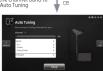
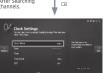
Select Clock Mode, DST, and your
Time Zone
◆ LocalSet
– If you press the Enter key after selecting Change, you can change the country.
– If the country is changed, the TV automatically turns off and on.
- If you select the incorrect country, execute TV reset again after entering the System section of the Hotel Menu.
♦ Meou Language OSD
- If you select TV Basic Setup from the "TV Installation Type" OSD, the "Menu Language"
OSD appears.
- Initially highlighted: English
- If you press the Enter key, the "Picture Mode" OSD appears
- Picture Mode D - initially high
- The TV displays the Picture M
The TV displays the Picture mode where you can enable the HTML or a Standard Picture mode.
♦ Auto Program O
- If you press the Enter key, the TV automatically searches for channels
- Set Clock Mode, DST[Daylight saving time], and Time Zone OSD
- Initially highlighted: Clock Mode: Auto, DSL: Off, Time Zone: Eastern
- If the TV will be tuned to digital broadcast channels, and these channels transmit data and time information, set the Clock Mode to Auto. The TV will set the date and time
and also otherwise, the company has to maintain the 10% ownership of both one line automatically.
- If the TV will not be tuned to digital broadcast channels, set the Clock Mode to Manual
and then set the date and time on the TV manually. Cut DST On 00% to arrive on a daily daylight.
- Set USI On or Off to apply of not apply daylight saving time to one TV. Select your time ago on the day that appears
- Select your time zone on the map that appears.
[TKng]
Cẩm Chay Bệnh viên
Chic ně
Design and specifications are subject to change without pri
This device is a Class B digital apparatus.
For information about power supply and power consumption, refer to the label attached to the product.
WARNING: This product contains chemicals known to the State of California to cause cancer and reproductive toxicity.
WARNING: This pretest confirms clinical known for the state of California to cause cancer and reproductive toxicity.
[English]
Soundbar(AirTrack)
Samsung Soundbar(AirTrack) and Hospitality TVs in 2016
- Samsung Soundbar(AirTrack) and hospitality TVs support the HDMI ARC feature if you connect a compatible Samsung
Samsung hospitality TV using a single HDMI cable, guests can listen to the TVs sound through the Soundbar(AirTrack).
- The I/MI of Soundbar(AirTrack) Out in Hotspot by Upton Meiu Make you control to where the TV sound is surpassed when the If Sound bar Out is On, the TV sound is automatically outtrauded in the Soundbar(AirTrack) device only whenever TV is turned on.
If Sound bar Out is Off, the TV sound is automatically outputted in the TV speaker only whenever TV is turned on.
- Models supporting the ARC function are listed below:
– Sound Bars: HW-H450/H550/H570/H600/H7500
HW-K450/K550
Setting the Soundiber(AirTruck) to Hotel, Made.
- Set the following Hotel menu options:
= Hotel option > System > Sound Bar Out = On.
- Hotel option > Power On > Power On Volume = User Defined
- Hotel option > Power On > Power On Volume Hunt > Set greater than 0. Until setting > Entry On > Max Volumes > Fast arrival than 0.
- Note option > Power Off > Max Insurance > Set greatest than 0 2. Connect in HDMI sub is from the HDMI Off link to the back of
- Connect bar AirTrack from the Radio Out Jack on the audio of the Soundbar/Amika to the Radio in port (supporting ANC) on the hospitality TV.
- After the Soundbar(AirTrack) is connected to the hospitality TV when the TV turns on, the Soundbar(AirTrack) automatically detects the TI and then
automatically switches to Hotel Mode.
Soundbar(AirTrack) Hotel mode functional characteristics
– Power On/Off is synchronized with
- HDMI_CEC defaults set to On
- Functions through the "HDMI OUT" port only
- Disables the "Input mode" key on the VFD to prevent unexpected audio-source changes.
- Acquireds adjustable Power On and Max Volume settings from the TV's Hotel edition menu. Standbar's Power On Volume and Max Volume israel, however, are 10 of Power On Volume and Max Volume settings in the TV's Hotel option menu. Example: If the TV's Power On Volume:20 and Max
However, the Power on Volumes and Max Volume settings in the PV-100 volume=90, then Soundbar's Power On Volume=10 (Up to 20) and Max Volume
Wall Mount Kit Specifications (VESA)
Install your wall request on a solid wall, perpendicular to the floor. When attaching to other building materials, please contact your nearest dealer. If
Installing on a ceiling or slanted wall, TiF may fail and result in severe personal injury
➢ Standard dimensions for wall mount kits are shown in the table below.
- Samsung wall mount kits contain a detailed installation manual. All parts necessary for assembly are provided
Do not use screws that do not congly with VESA standard screw specimen
Do not use screws that are longer than the standard dimension or do not comply with the IESA standard screw specifications. Screws that are too long may cause damage to the inside of the TV.
For wall mounts that do not comply with the V
standard screw specifications, the length of the screws
may differ depending on the wall mount specifications.
Do not listen the screws too firmly. This may damage the product or cause the product to fall, leading to
personal injury. Samsung is not liable for these kinds
of accidents.
Samsung is not liable for product damage or personal injury when a non-VESA or non-specified wall mount.
Is used or the consumer fails to follow the product;
installation instructives.
Do not mount the TV at more than a 15 degree tilt.
- Always have two people mount the TV on a wall.
| TV size in inches | VESA screw hole space (A" x 10) in millimeters | C (mm) | Standard Screw | Quantity |
| 32 | 100 x 100 | 43 ~ 45 | M4 | 4 |
| 40 ~ 49 | 200 x 200 | M8 | ||
| 55 | 400 x 400 |
a
Do not install your Wall Mount Kit while your TV is turned on. It may result in personal injury due to electric shock.
乙
[Tiếng Việt]
Specifications
| Age Group (M) and Working | |||
| Married (M) Women | 5076 ± 3247a(19%, 580–60%) | ||
| Risikovir Women | 10% (8.8%, 14.6%) | ||
| NMIR (M) Women | 49 ± 1070a(29%, 64%) | ||
| Risikovir Women | 10% (8.5%, 14.6%) | ||
| Total sample | HOMA/HEVANIA/HERALDHEVANIA | ||
| Age Group (Years) and Location | |||
| Male (N= 130) | 20/6 ± 100b | ||
| Grade-Bio (Men / High / Low) | 20a± 100c | ||
| Acute Biod (Men) | |||
| Biodiversity (Yes) | |||
| Amom Biod (Low) | 20/6 ± 100b | ||
| Acute Biod (High / Medium) | |||
| Trigary only | 73.04 ± 43.38 ± 5.46 cm | 91.9% ± 53.92 ± 6.50 cm | 97.29 ± 57.81 ± 6.44 cm |
| Trigary only | 73.04 ± 43.38 ± 7.92 cm | 91.9% ± 53.13 ± 6.84 cm | 97.29 ± 62.52 ± 7.05 cm |
| Trigary mixed | |||
| Trigary mixed | 5.5 kg | 4.1 kg | 9.4 kg |
| Trigary mixed | 7.1 kg | 1.6 kg | 12.3 kg |
| Total sample | HOMA/HEVANIA/HERALDHEVANIA | ||
| Age Group (Years) and Location | |||
| Male (N= 130) | 20/6 ± 100b | ||
| Grade-Bio (Men / High / Low) | 20a± 100c | ||
| Acute Biod (Men) | 20b± 100d | ||
| Acute Biod (High / Medium) | |||
| Trigary mixed | |||
| Trigary mixed | 123 ± 158 cm | ||
| Acrom Biod (Low) | |||
| Amom Biod (Medium) | 20/6 ± 100b | ||
| Acrom Biod (High / Medium) | |||
| Trigary mixed | 124.9x ± 72.14x ± 5.41 cm | ||
| Trigary mixed | 110.56 ± 66.65 ± 5.46 cm | 124.9x ± 77.33 ± 6.22 cm | |
| Trigary mixed | 110.56 ± 69.71 ± 5.46 cm | ||
| Trigary mixed | 56.9 kg | ||
| Trigary mixed | 15.1 kg | 56.9 kg | |
| Trigary mixed | 15.1 kg | 56.9 kg | |
- An USA, USA, China, Japan, Vietnam, Australia, Canada, India, Turkey, Indonesia, Philippines, Thailand, Pakistan, Bangladesh, Pakistan, Nigeria, Egypt, Saudi Arabia, Saudi Arabia, Singapore, Singapore, Singapore, Singapore, Singapore, Singapore, Singapore, Singapore, Singapore, Singapore, Singapore, Singapore, Singapore, Singapore, Singapore, Singapore, Singapore, Singapore, Singapore, Singapore, Singapore, Singapore, Singapore, Singapore, Singapore, Singapore, Singapore, Singapore, Singapore, Singapore, Singapore, Singapore, Singapore, Singapore, Singapore, Singapore, Singapore, Singapore, Singapore, Singapore, Singapore, Singapore, Singapore, Singapore, Singapore, Singapore, Singapore, Singapore, Singapore, Singapore,
- Kung to doing thin WT can then hold in the soft strain medium. Long tanh tried strong to try a job. We drill WT strain can VLSK. Drill VT can qualify to the arm hong bên trong più TV.
Open/Source/License Notice Open/Source-used in this proo
Open Source License Notice is written only English.

[Non-Text]

(2) 1.1.3.4.5.6.7.8.9.10.11.12.13.14.15.16.17.18.19.20.21.22.23.24.25.26.27.28.29.30.31.32.33.34.35.36.37.38.39.40.41.42.43.44.45.46.47.48.49.50.51.52.53.54.55.56.57.58.59.60.61.62.63.64.65.66.67.68.69.70.71.72.73.74.75.76.77.78.79.80.81.82.83.84.85.86.87.88.89.90.91.92.93.94.95.96.97.98.99.100
∴ m = 3/11
The Ground Truth image displays a single, solid horizontal line. According to Rule 2 (UNDERSCORE & LINE RULES), this is a stylistic or background line, not a placeholder underscore. Therefore, the OCR result must ignore it. The provided OCR content is "____", which consists of four underscores. This is an incorrect interpretation of the line as a placeholder, violating the rule that stylistic lines must be ignored. The OCR has hallucinated text (underscores) where none should exist. Hence, the result is inconsistent with the Ground Truth.
∴ m = 3/11
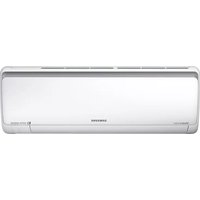
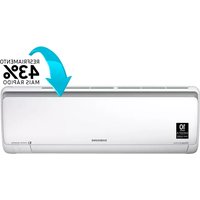
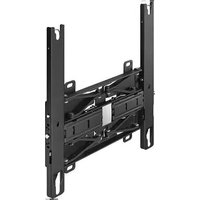
Brand : SAMSUNG
Model : HG40AE690DW
Category : Wall mount