
WMN4277ST - Wall mount SAMSUNG - Free user manual and instructions
Find the device manual for free WMN4277ST SAMSUNG in PDF.
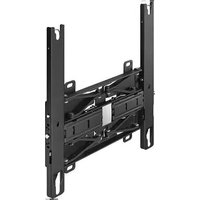


| Product Type | Wall Mount |
| Model Number | WMN4277ST |
| Brand | Samsung |
| Compatible TV Sizes | 32 to 70 inches |
| Maximum Weight Capacity | 50 kg (110 lbs) |
| VESA Compatibility | 200x200, 300x200, 300x300, 400x200, 400x400 |
| Movement Type | Tilt, Swivel, Articulating |
| Tilt Range | -15° to +15° |
| Swivel Range | -60° to +60° |
| Extension Distance from Wall | 6.7 cm (2.6 in) to 48.9 cm (19.2 in) |
| Level Adjustment After Installation | Yes, ±2° |
| Material | Steel, Plastic |
| Product Dimensions (WxHxD) | 86.4 x 49.5 x 15.2 cm (34 x 19.5 x 6 in) |
| Gross Weight | 8.2 kg (18 lbs) |
| Net Weight | 7.1 kg (15.7 lbs) |
| Included Hardware | Mounting bracket, lag bolts, spacers, screws, washers, user manual |
| Cable Management | Yes, integrated cable covers |
| Maximum Stud Spacing | 16 inches (40.6 cm) |
| Wall Type | Wood stud, solid concrete |
| Safety Certification | UL Listed |
| Warranty | 5 years limited |
Frequently Asked Questions - WMN4277ST SAMSUNG
User questions about WMN4277ST SAMSUNG
0 question about this device. Answer the ones you know or ask your own.
Ask a new question about this device
Download the instructions for your Wall mount in PDF format for free! Find your manual WMN4277ST - SAMSUNG and take your electronic device back in hand. On this page are published all the documents necessary for the use of your device. WMN4277ST by SAMSUNG.
USER MANUAL WMN4277ST SAMSUNG
Angle Adjustment and Rotation Type Wall-Mount Bracket Installation Guide WMN4277ST

Product Image


Components
* Only use the supplied components for the bracket installation.


Safety Instructions
Be sure to contact an authorized service center when installing your set.


- Be sure to keep the product away from children. There can be serious damage on the head when hit by the edge of the product.
- Be careful when you adjust the angle or rotate the set. The product can be damaged if it is too close to touch the wall. (Attach some sponges to 4 corners of the product to avoid the product or wall damage.)
- Do not install the product in a place with high temperature and high humidity. Avoid to install the product on the wall which cannot bear the weight.
- Since there is a danger of electric shock, do not insert your fingers into the TV stand installation hole while installing the TV.
- Make sure to cover the TV stand installation hole with the hole cover supplied with the TV before completing the wall installation.

Wall Bracket Assembly
1 Install the angle adjustment bracket on the wall as shown in the figure.

Tighten the angle adjustment bracket by using anchors and screws a orderly from 1 to 7.
If it cannot be installed on the assigned area, install at the nearest place.
How to Tighten Anchors or Screws

Make a hole in the wall with the drill of 6X50.
Clean up the hole.
Insert the supplied anchor into the hole.
Match the angle adjustment bracket to the holes on the wall and tighten the screws.
* Use the drill with the required size when making a hole in the wall. Be sure to follow the directions for the installation to avoid safety problems.
Check the solidity of the wall before the installation. Strengthen the wall and install the bracket if the wall is not firm enough. The supplied screws and anchors are for installing on concrete walls. For walls of plaster, marble, or steel, use the appropriate screws.
2 Securely fix the set to the wall. Pull the bracket forward and unfold it. Insert the bracket into the assigned area of the angle adjustment bracket and tighten the supplied 8 screws. (Same for both left and right side)


3 Remove the screws from the main body of the TV, assemble the 4 enclosed plastic hangers and screws as shown by the figure and firmly fasten them to the back of the main body of the TV.
[Slim, Normal TV] Use M8X35 screws.
![graph LR A["Start"] --> B["Component 1"] B --> C["Component 2"]](/content/2026/06/1375578/images/1cf630f92e4f7505b97aecabaf12ca6670d921ab99af05e710cf32a823af9906.jpg)

Mount the product on the wall bracket. Be sure to check on the left and right side to see if it is properly fixed. Be careful when installing the product or adjusting the angle as fingers can be caught in the holes. Be sure the wall bracket is securely fixed to the wall. Falling down the product may cause physical damage.
4 Pull the wall bracket fixing part forward. Two people are required to install the product on the assigned area of the wall bracket.


Install the TV set to the wall bracket and rotate the 2 safety pins on the upper part to fix.
You can keep the TV level using the height leveler.

![[Slim, Normal TV]](/content/2026/06/1375578/images/36574b1b9bac3b6ae0bce7d0390b23c9da1d9e6af8ebb4508afa127d75803551.jpg)
![[Ultra-Slim Only]](/content/2026/06/1375578/images/4823db80d062371fd236c2d0f591d15b26da713c00a7ac59893d044dfb066c86.jpg)
5 For managing the power cord and other cables for peripheral equipment, bundle the wires by using the supplied wire fixing tool. Be sure the wires are not unbundled or come off when rotating or operating.
* Insert the cables and pull the angle adjustment bracket forward. Arrange the wires by using the hole to avoid interference with the wires when rotating the set. Check the operation 2 to 3 times and fix the wall molding if it works properly.


Wall Bracket Angle Adjustment
* The smooth moving mechanism is applied to this product to move the product smoothly for convenience. * Adjust the installation angle and then stick the TV close to the wall.

Do not adjust the angle with force. The product can be damaged if it is too close to the wall.
Hold the left and right sides of the product when you want to adjust the left and right angle.
Hold the top center to adjust the down angle.
* You can adjust the angle to the left and right side between -20° and 20°, and to the down side to 10° to 15°.
The adjustable angle range may vary depending on the model.

Product Specifications


Product Standards
| Width (mm) | 465 |
| Height (mm) | 442 |
| Dept (mm) | 24.5 |
| Weight (Kg) | 5.5 |
| Bracket VESA Standard | 400 X 300, 400 X 400 |

Information in this document is subject to change without notice.
SAMSUNG WALL MOUNT - WMN4277SH
LIMITED WARRANTY TO ORIGINAL PURCHASER
English
WARRANTY
This SAMSUNG brand product, as supplied and distributed by SAMSUNG and delivered new, in the original carton to the original consumer purchaser, is warranted by SAMSUNG against manufacturing defects in materials and workmanship for a limited warranty period of 1 year. (90 Days Parts and Labor for Commercial Use) This limited warranty begins on the original date of purchase. To receive warranty service, the purchaser must contact SAMSUNG for problem determination and service procedures. Warranty service can only be performed by a SAMSUNG authorized service center. The original dated bill of sale must be presented upon request as proof of purchase to SAMSUNG or SAMSUNG's authorized service center.
Korean
Warranty: 1 year
Contact SAMSUNG WORLD WIDE If you have any questions or comments relating to Samsung products, please contact the SAMSUNG customer care center.
| Region | Contact Center e | Web Site | |
| North America | CANADA | 1-800-SAMSUNG (726-7864) | www.samsung.com/ca/support (English)www.samsung.com/ca_tr/support (French) |
| MEXICO | 01-800-SAMSUNG (726-7864) | www.samsung.com/mx/support | |
| Dirección: General Mariano Escobedo 476 Piso 8 Col.Anzures Delegación Miguel Hidalgo, Distrito Federal CP 11590 | |||
| U.S.A | 1-800-SAMSUNG (726-7864) | www.samsung.com/us/support | |
| Latin America | ARGENTINE | 0800 333 3733 | www.samsung.com/ar/support |
| BRAZIL | 0800-124-421 (Demais cidades e regiões)4004-0000 (Capitais e grandes centros) | www.samsung.com/br/support | |
| CHILE | 800-SAMSUNG(726-7864)[HHF] (02-24826200) | www.samsung.com/cd/support | |
| COLOMBIA | Bogotá 600 12 72Gratis desde cualquier parte del país 01 8000 112 112 ó desde su celular #SAM(726) | www.samsung.com/co/support | |
| COSTA RICA | 0-800-507-726700-800-1-SAMSUNG (726-7864) | www.samsung.com/latin/support (Spanish)www.samsung.com/latin_en/support (English) | |
| DOMINICA | 1-800-751-2676 | ||
| ECUADOR | 1-800-10-726701-800-SAMSUNG (72-6786) | ||
| EL. SALVADOR | 800-6225 | ||
| GUATEMALA | 1-800-299-00131-800-299-0033 | ||
| HONDURAS | 800-27919267800-2791-9111 | ||
| JAMAICA | 1-800-234-72671-800-SAMSUNG (726-7864) | www.samsung.com/latin/support | |
| NICARAGUA | 001-800-5077267 | www.samsung.com/latin/support (Spanish)www.samsung.com/latin_en/support (English) | |
| PERU | 0-800-777-08Desde celulares por favor llamar al número 336 8686 | www.samsung.com/pe/support | |
| PUERTO RICO | 1-800-682-3180 | www.samsung.com/latin/support (Spanish)www.samsung.com/latin_en/support (English) | |
| TRINIDAD & TOBAGO | 1-800-SAMSUNG(726-7864) | ||
| VENEZUELA | 0-800-SAMSUNG (726-7864) | www.samsung.com/ve/support | |
| CIS | RUSSIA | 8-800-555-55-55 | www.samsung.com/ru/support |
| GEORGIA | 8-800-555-555 | www.samsung.com/support | |
| ARMENIA | 0-800-05-555 | ||
| AZERBAIJAN | 088-55-55-555 | ||
| KAZAKHSTAN | 8-10-800-500-55-500(GSM: 7799, VIP care 7700) | ||
| UZBEKISTAN | 8-10-600-500-55-500 | ||
| KYRGYZSTAN | 8-10-800-500-55-500 | www.samsung.com/kz_ru/support | |
| TADUKISTAN | 8-10-800-500-55-500 | www.samsung.com/support | |
| MONGOLIA | 7-800-555-55-55 | www.samsung.com/support | |
| UKRAINE | 0-800-502-000 | www.samsung.com/ua/support (Ukrainian)www.samsung.com/ua_ru/support (Russian) | |
| BELARUS | 810-800-500-55-500 | www.samsung.com/support | |
| MOLDOVA | 0-800-614-40 | www.samsung.com/support | |
| Asia Pacific | AUSTRALIA | 1300 362 603 | www.samsung.com/au/support |
| NEW ZEALAND | 0800 SAMSUNG (0800 726 786) | www.samsung.com/hk/support (Chinese)www.samsung.com/hk_en/support (English) | |
| HONG KONG | (852) 3698 4698 | ||
| INDIA | 1800 3000 8282 - Toll Free1800 266 8282 - Toll Free30308282 - Non Toll Free | www.samsung.com/in/support | |
| INDONESIA | 0800112888021-56997777 | www.samsung.com/id/support | |
| JAPAN | 0120-327-527 | www.samsung.com/jp/support | |
| MALAYSIA | 1800-88-9999 | www.samsung.com/my/support | |
| PHILIPPINES | 1-800-10-7267864 [PLDT]1-800-8-7267864 [Globe landline and Mobile]02-4222111 [Other landline] | www.samsung.com/ph/support | |
| SINGAPORE | 1800-SAMSUNG(726-7864) | www.samsung.com/sg/support | |
| THAILAND | 0-2689-3232,1800-29-3232 | www.samsung.com/th/support | |
| TAIWAN | 0800-32-9999 | www.samsung.com/tw/support | |
| VIETNAM | 1 800 588 889 | www.samsung.com/vn/support | |
| Middle East | U.A.E | 800-SAMSUNG (726-7864) | www.samsung.com/ae/support (English)www.samsung.com/ae_ar/support (Arabic) |
| OMAN | 800-SAMSUNG (726-7864) | ||
| KUWAT | 183-2255 (183-CALL) | ||
| BAHRAIN | 8000-4726 | ||
| EGYPT | 08000-72678616580 | www.samsung.com/eg/support | |
| JORDAN | 0800-2227306 5777444 | www.samsung.com/Levant/support (English) | |
| IRAN | 021-8255 | www.samsung.com/iran/support | |
| MOROCO | 080 100 2255 | www.samsung.com/n_africa/support | |
| SAUDI ARABIA | 920021230 | www.samsung.com/sa/supportwww.samsung.com/aa_en/support (English) | |
| Africa | NIGERIA | 0800-726-7864 | www.samsung.com/afrika_en/support |
| GHANA | 0800-100770902-200077 | ||
| COTE D'MOIRE | 8000 0077 | www.samsung.com/afrika_fr/support | |
| SENEGAL | 800-00-0077 | ||
| CAMEROON | 7095-0077 | ||
| KENYA | 0800 545 545 | www.samsung.com/support | |
| UGANDA | 0800 300 300 | ||
| TANZANIA | 0685 88 99 00 | ||
| SOUTH AFRICA | 0860-SAMSUNG (726-7864) | ||
| Q9FNQ900R | M8 x L47 | → | [IMAGE] | → | [IMAGE] | UpDown |  | |
| M8 x L47 | → | [IMAGE] | → | [IMAGE] | ||||
| Q90R | M8 x L49 | → | [IMAGE] | → | [IMAGE] | UpDown |  | |
| M8 x L49 | → | [IMAGE] | → | [IMAGE] | ||||
| Q9FM | M8 x L40 | → | [IMAGE] | UpDown |  | |||
| M8 x L40 | → | [IMAGE] | ||||||
| Q70R~Q85R | M8 x L64 | → | [IMAGE] | → | 1T Washers | UpDown |  | |
| M8 x L64 | → | [IMAGE] | → | 1T Washers | ||||
| LED KS9500 | M8 x L35 | → | [IMAGE] | → | [IMAGE] | UpDown |  | |
| M8 x L35 | → | [IMAGE] | → | [IMAGE] | ||||
| LED KS9000 | M8 x L35 | → | [IMAGE] | → | [IMAGE] | UpDown |  | |
| M8 x L35 | → | [IMAGE] | → | |||||
| LED KS8000~8500LED KU7000~7600LED K5500~6500LS003Q7FM~Q8CMMU7000~8500Q6FN~Q8CNNU7100~8500Q60R~Q65RRU7000~8500 | M8 x L71 | → | [IMAGE] | → | [IMAGE] | UpDown |  | |
| M8 x L71 | → | [IMAGE] | → | [IMAGE] | ||||
| LED KS9800~9900LED KU6000~6300MU6200~6350 | M8 x L47 | → | [IMAGE] | UpDown |  | |||
| M8 x L47 | → | [IMAGE] | ||||||
| LED KU6500MU6500NU6070~6900 (70")RU7100 (70") | M8 x L49 | → | [IMAGE] | UpDown |  | |||
| M8 x L49 | → | [IMAGE] | ||||||
| Q950TS | 3T Washers | Up |  | |||||
| M8 x L35 | 3T Washers | Down | ||||||
| M8 x L35 | 3T Washers | |||||||
| Q900TSQ800T~Q850T | 1T Washers | Up |  | |||||
| M8 x L40 | 1T Washers | Down | ||||||
| M8 x L40 | 1T Washers | |||||||
| Q95T, Q90T, Q700T | M8 x L40 | Up |  | |||||
| M8 x L40 | Down | |||||||
| Q80T, LS03T 75" | 1T Washers | Up |  | |||||
| M8 x L55 | 1T Washers | Down | ||||||
| M8 x L55 | 1T Washers | |||||||
| LS03T 65" | 3T Washers | Up |  | |||||
| M8 x L55 | 3T Washers | Down | ||||||
| M8 x L55 | 3T Washers | |||||||
| Q70T, Q60T, TU8500 | 3T Washers | Up |  | |||||
| M8 x L71 | 3T Washers | Down | ||||||
| M8 x L71 | 3T Washers | |||||||
| TU8000, TU7000 | M8 x L49 | Up |  | |||||
| M8 x L49 | Down | |||||||
SCREW Size
| M8 x L71 | M8 x L64 | M8 x L55 | M8 x L49 | M8 x L47 | M8 x L40 | M8 x L35 |
 |  |  |  |  |  |  |
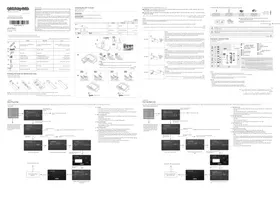
- ANGLE ADJUSTMENT AND ROTATION TYPE WALL-MOUNT BRACKET INSTALLATION GUIDE WMN4277ST
- PRODUCT IMAGE
- COMPONENTS
- SAFETY INSTRUCTIONS
- WALL BRACKET ASSEMBLY
- HOW TO TIGHTEN ANCHORS OR SCREWS
- WALL BRACKET ANGLE ADJUSTMENT
- PRODUCT SPECIFICATIONS
- PRODUCT STANDARDS
- SAMSUNG WALL MOUNT - WMN4277SH
- LIMITED WARRANTY TO ORIGINAL PURCHASER
- ENGLISH
- WARRANTY
- KOREAN
- WARRANTY: 1 YEAR
Brand : SAMSUNG
Model : WMN4277ST
Category : Wall mount