IAHB56 - Headphones iLive - Free user manual and instructions
Find the device manual for free IAHB56 iLive in PDF.


Pick your language and provide your email: we'll send you a specifically translated version.
| Product Type | Wireless Bluetooth Headphones |
| Brand | iLive |
| Model | IAHB56 |
| Driver Size | 40 mm |
| Impedance | 32 Ω |
| Frequency Response | 20 Hz – 20 kHz |
| Bluetooth Version | 5.0 |
| Wireless Range | Up to 10 m (33 ft) |
| Battery Type | Rechargeable Lithium-Ion |
| Battery Life | Up to 12 hours |
| Charging Port | Micro USB |
| Charging Time | Approximately 2 hours |
| Controls | On-ear buttons for volume, play/pause, and calls |
| Microphone | Built-in for hands-free calling |
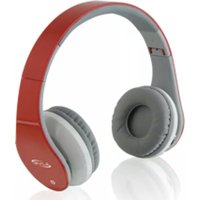
| Foldable Design | Yes, for portability |
| Weight | Approximately 180 g (6.3 oz) |
| Dimensions (Folded) | 6.3 x 5.5 x 2.4 in (16 x 14 x 6 cm) |
| Ear Cushion Material | Leatherette |
| Headband Padding | Yes, cushioned |
| Warranty | 1 year limited |
| Color | Black (typical) |
Frequently Asked Questions - IAHB56 iLive
How do I pair my iLive IAHB56 headphones with a Bluetooth device?
Press and hold the power button until the LED indicator flashes red and blue alternately. Then, enable Bluetooth on your device and select iLive IAHB56 from the list.
What should I do if my headphones won't turn on?
First, charge the headphones using the included Micro USB cable. If still unresponsive, try resetting by pressing and holding the power button for 10 seconds.
Can I use these headphones while charging?
Yes, you can use the headphones in wired mode while charging, but wireless playback is disabled during charging.
How do I clean the ear cushions?
Wipe the ear cushions with a soft, dry cloth. For stubborn dirt, use a slightly damp cloth and avoid harsh chemicals. Never submerge the headphones in water.
What is the battery life of the iLive IAHB56?
The battery lasts up to 12 hours on a full charge, depending on volume level and usage.
How do I reset my iLive IAHB56 headphones?
To reset, press and hold the volume up and volume down buttons simultaneously for about 5 seconds until the LED flashes rapidly. This clears paired devices and restores factory settings.
Why is the sound cutting out or distorted?
Ensure the headphones are within 10 meters of the connected device. Reduce interference from other wireless devices. Also, check battery level; low battery can cause distortion.
Can I connect these headphones to a TV or gaming console?
Yes, if your TV or console supports Bluetooth audio. Alternatively, use a Bluetooth transmitter connected to the audio output.
Are replacement ear cushions available?
Replacement ear cushions can be purchased from third-party sellers online. Ensure compatibility with the iLive IAHB56 model.
How do I store the headphones when not in use?
Fold the headphones and store them in a cool, dry place. Use the included carrying pouch if available. Keep away from extreme temperatures.
User questions about IAHB56 iLive
0 question about this device. Answer the ones you know or ask your own.
Ask a new question about this device
No questions yet. Be the first to ask one.
Download the instructions for your Headphones in PDF format for free! Find your manual IAHB56 - iLive and take your electronic device back in hand. On this page are published all the documents necessary for the use of your device. IAHB56 by iLive.
USER MANUAL IAHB56 iLive
Manual assistant
Powered by Anthropic
Waiting for your message
Product information
Brand : iLive
Model : IAHB56
Category : Headphones