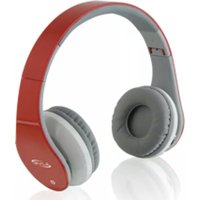
IAHB64 - Headphones iLive - Free user manual and instructions
Find the device manual for free IAHB64 iLive in PDF.


| Product Type | Wireless Over-Ear Headphones |
| Brand | iLive |
| Model | IAHB64 |
| Connectivity | Bluetooth 5.0 |
| Battery Life | Up to 15 hours |
| Battery Type | Rechargeable Lithium-Ion |
| Charging Port | Micro USB |
| Driver Size | 40 mm |
| Impedance | 32 ohms |
| Frequency Response | 20 Hz - 20 kHz |
| Microphone | Built-in for hands-free calls |
| Controls | On-ear for volume, track, and calls |
| Weight | Approximately 200 g |
| Dimensions (Folded) | Compact, foldable design |
| Included Accessories | Charging cable, 3.5mm audio cable, user manual |
| Noise Isolation | Passive |
| Adjustable Headband | Yes |
| Care Instructions | Wipe with dry cloth, store in a cool place |
| Safety Precautions | Avoid high volume for prolonged periods; keep away from moisture |
Frequently Asked Questions - IAHB64 iLive
User questions about IAHB64 iLive
0 question about this device. Answer the ones you know or ask your own.
Ask a new question about this device
Download the instructions for your Headphones in PDF format for free! Find your manual IAHB64 - iLive and take your electronic device back in hand. On this page are published all the documents necessary for the use of your device. IAHB64 by iLive.
USER MANUAL IAHB64 iLive
Warning: Changes or modifications to this unit not expressly approved by the party responsible for compliance could void the user's authority to operate the equipment.
NOTE: This equipment has been tested and found to comply with the limits for a Class B digital device, pursuant to Part 15 of the FCC Rules. These limits are designed to provide reasonable protection against harmful interference in a residential installation. This equipment generates, uses, and can radiate radio frequency energy and, if not installed and used in accordance with the instructions, may cause harmful interference to radio communications. However, there is no guarantee that interference will not occur in a particular installation. If this equipment does cause harmful interference to radio or television reception, which can be determined by turning the equipment off and on, the user is encouraged to try to correct the interference by one or more of the following measures:
- Reorient or relocate the receiving antenna.
- Increase the separation between the equipment and receiver.
- Connect the equipment into an outlet on a circuit different from that to which the receiver is connected.
- Consult the dealer or an experienced radio/TV technician for help.
Additional Warnings and Precautions
- To avoid hearing damage, make sure that the volume on your music player is turned down before connecting your headphones. After placing headphones in/on your ears, gradually turn up the volume until you reach a comfortable listening level.
- Lithium batteries, like all rechargeable batteries, are recyclable and should be recycled or disposed of according to state and local guidelines. They should never be disposed of in normal household waste, and they should never be incinerated, as they might explode. Contact your local government for disposal or recycling practices in your area.
- WARNING: This product may contain chemicals known to the State of California to cause birth defects, or other reproductive harm (California Prop 65). Wash hands after handling.
- This product meets and complies with all Federal regulations.
Features & Controls
Features
• Supports Bluetooth
- Wireless range: 33 feet
• Built-in microphone
- Micro-USB port for battery recharge
• Aux in (3.5mm audio input)
- Adjustable headband
- On-ear controls
• DC battery power: built-in rechargeable lithium ion battery
- Battery life: approx. 8 hours at 100% volume 15 hours at 50% volume
Includes
- Micro-USB to USB cable
- 3.5mm audio cable
- Carry pouch
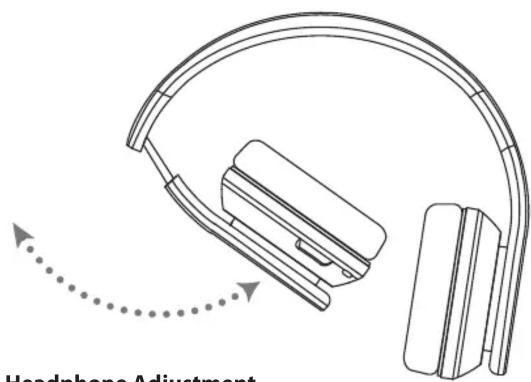
Headphone Adjustment
Microphone
Line In
DC Power Input
Power/Pairing Indicator Light

Play/Pause/Volume
Press to play or pause the current track.
Adjust to turn the volume up or down.
Power/Pair
Press and hold to turn the unit On or Off.
Press and hold for 4 sec. to turn the unit on and begin pairing.
Charging the Battery
Requires a Micro-USB to USB cable (included).
- Using a Micro-USB to USB cable (included), connect to the USB port of a powered on computer or USB power adaptor (not included).

natural_image
Diagram showing a laptop connected to a light bulb via USB and USB cable (no text or symbols)LED Indicators
| STATUS INDICATOR | |
| Power On Flashing blue light | |
| Power Off No light | |
| Charging Solid red light | |
| Charging Complete No light | |
| Pairing Flashing red and blue lights | |
Bluetooth
Pairing a Bluetooth Device for the First Time
- Simultaneously power on the unit and begin the pairing process by pressing and holding the Power/Pair button for approximately 4 seconds. The indicator will flash red and blue. When pairing, remain within 3 feet of the unit.
- Using the native controls on your Bluetooth device, select the IAHB64 in your Bluetooth settings to pair. If your device requests a password, enter the default password 0 0 0 0 . Refer to the user's manual for your specific device for instructions on pairing and connecting Bluetooth devices.
- After initial pairing, the unit will stay paired unless unpaired manually by the user or erased due to a reset of the device.
- If your device should become unpaired or you find it is unable to connect, repeat the above steps.
Playing Audio Wirelessly
- To play or pause the selected track, use the native controls on the connected Bluetooth Device or press the Play/Pause/Volume button.
- Audio played through the connected Bluetooth device will now be heard through the headphones.
Using the Speakerphone
- When a call is received, a ringtone will sound through the headphones.
- Press the Power/Pair button to accept the call or accept the call with the native controls on the connected device.
- The incoming call received through the device will now be heard through the headphones.
- To end the call, press the Power/Pair button or end the call using the controls on the connected device. Note: To re-dial the last dialed number, press the Power/Pair button twice.
Line In
Using the Audio Input
Requires a 3.5mm audio cable (included).
- Connect a 3.5mm audio cable to the Line In Input on the unit and the audio output/headphone jack on an audio device.
- Use the controls on the connected device to select and play your audio through the headphones.

natural_image
Diagram showing a smartphone connected to an earbell device via cable, with no text or symbols present.Customer Support
To download this User's Guide in English, Spanish, or French, or to get answers to frequently asked questions, visit the support section at: www.iLiveElectronics.com
For Warranty Information and the most up-to-date version of this User's Guide, go to www.iLiveElectronics.com
Customer Service: 1-888-999-4215 | Email Support: prodinfo@dpiinc.com | Email Parts: partsinfo@dpiinc.com
Copyright © 2016 Digital Products International (DPI, Inc.) All other trademarks appearing herein are the property of their respective owners. Specifications are subject to change without notice.

Protect for Today Sustain for Tomorrow
Brand : iLive
Model : IAHB64
Category : Headphones